How to Start a Print-on-Demand Business with Shopify in 2026
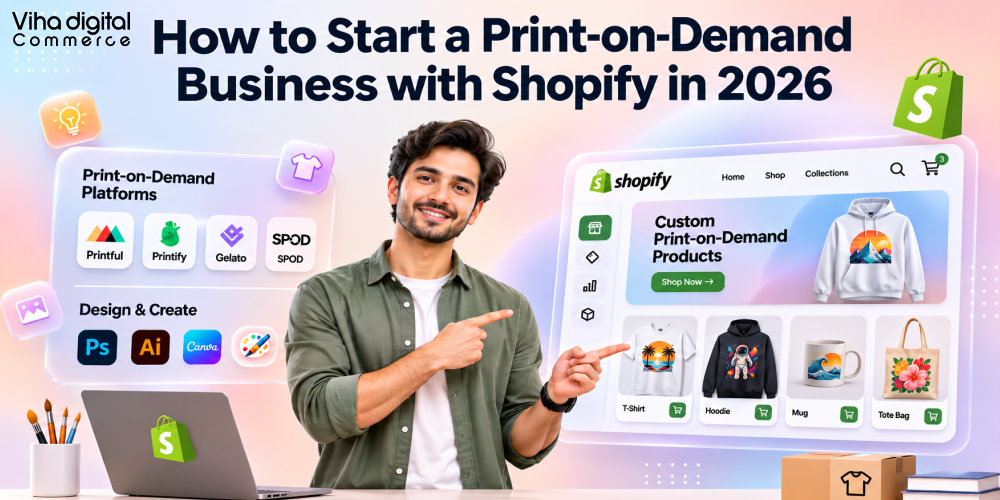
Key Takeaways
- Shopify print on demand lets you sell custom-printed products without holding inventory: a supplier prints, packs and ships each order after the customer pays.
- The real work is not uploading designs. It is choosing a niche, picking a reliable print partner, pricing for margin, and building a store and brand customers trust.
- Print on demand apps connect your Shopify store to a supplier. The app is the software layer, the supplier is the factory. You need to evaluate both.
- A lean launch can cost a few hundred dollars (or the rupee equivalent), but samples, design work and ad testing are where budgets actually go.
- Order fulfilment can be almost fully automated through Shopify’s fulfilment and webhook infrastructure, leaving you to focus on design, marketing and customer experience.
- Margins are thinner than many guides suggest. Build your pricing from real base costs, shipping, fees and ad spend before you list a single product.
Quick Answer: How Do You Start a Print-on-Demand Business with Shopify?
You start by choosing a focused niche, setting up a Shopify store, connecting a print on demand app and supplier, and pricing your products from their real costs. After testing with samples, you launch with organic content and small ad tests, then automate fulfilment. The eight steps are:
- Choose a focused niche and audience
- Set up your Shopify store: payments, taxes, shipping and policies
- Pick a print on demand app and supplier that fit your product, quality and location
- Design products and create accurate mockups
- Price each product from its real cost stack
- Order samples and place test orders
- Launch with organic content and small paid tests
- Automate fulfilment, tracking and support
This guide from Viha Digital Commerce covers the complete picture for 2026, including the technical details behind the integration, print methods and design file specifications, supplier and app comparisons, the real cost of starting, pricing maths, fulfilment automation, branding, marketing, SEO and AI search visibility, compliance and scaling.
What Is Print on Demand, and Why Build It on Shopify?
Print on demand (POD) is a fulfilment model in which a product is manufactured only after a customer orders it. You supply the design, the supplier holds blank products (t-shirts, mugs, posters, phone cases and so on), prints your artwork on request, packs the order and ships it directly to the buyer. You never touch the stock. A Shopify print on demand store combines that production model with Shopify’s storefront, checkout, payments and app ecosystem.
The business model in one paragraph
You earn the spread between your retail price and what the supplier charges for the blank product, printing and shipping, minus payment fees, returns and marketing. Because nothing is produced in advance, you carry no inventory risk and need very little starting capital. The trade-off is lower unit margins than bulk manufacturing and less control over production quality and speed.
Advantages of the print on demand business model
- Low upfront cost: no minimum order quantities, no warehouse, no unsold stock.
- Fast testing: you can publish a new design in minutes and see whether it sells before committing anything.
- Wide product range: apparel, drinkware, wall art, bags, accessories, home goods and more from one supplier.
- Automation-friendly: orders can flow from checkout to production without human involvement.
- Location flexibility: you can run the business from anywhere with an internet connection.
Limitations to plan for
- Thin margins: base costs are higher than bulk production, and shipping is often charged per order.
- Quality variance: print quality, colour accuracy and blank product quality differ between suppliers and even between print facilities of the same supplier.
- Longer fulfilment times: production adds two to five business days before shipping begins, depending on the product and partner.
- Low barriers to entry: many sellers use the same blanks and the same mockups, so differentiation must come from design, niche and brand.
- Dependency risk: your supplier’s stock, pricing and policies affect your business.
Why Shopify is a strong platform for POD
- You own the storefront and customer relationship, including email lists, customer data and brand experience, unlike marketplaces where you are one of thousands of sellers.
- A mature app ecosystem: most major POD suppliers publish Shopify apps that sync products, orders and tracking.
- Flexible checkout and payments: Shopify Payments (where available), PayPal, local gateways and accelerated checkouts such as Shop Pay, Apple Pay and Google Pay.
- Markets and localisation: sell in multiple currencies and languages from one store.
- Strong SEO and marketing foundations: blogs, collections, structured data and integrations with Google, Meta, TikTok and Pinterest.
- Scalability: the same platform supports a first sale and a high-volume brand.
Marketplaces such as Etsy, Amazon Merch and Redbubble can be useful for discovery, but a POD brand built only on a marketplace remains at the mercy of that marketplace’s fees and policies. Many sellers use marketplaces for acquisition and Shopify as the home base.
How Does Print on Demand Work with Shopify?
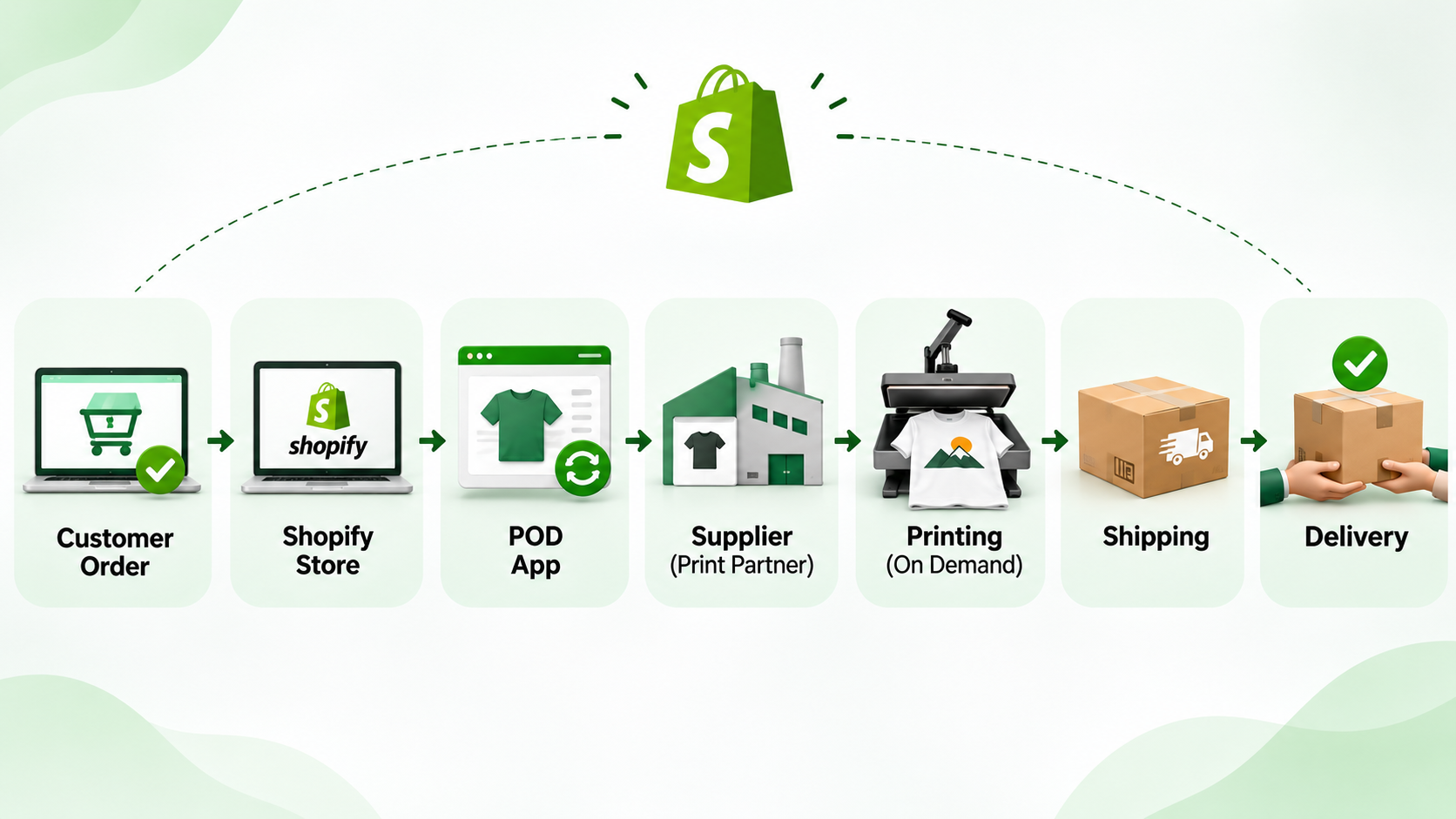
Understanding the order lifecycle helps you troubleshoot problems and design a better customer experience. Here is the flow from product creation to delivery.
The order lifecycle
| Stage | What happens | Who does it |
| 1. Product creation | Your design is applied to a blank product template in the supplier’s app. Mockups, variants (size, colour) and a base cost are generated | You and the app |
| 2. Product sync | The app pushes the product to Shopify as a draft or active product, including title, description, images, variants, SKUs and price | App via Shopify Admin API |
| 3. Customer order | A shopper checks out in your store and pays through Shopify | Customer and Shopify |
| 4. Order transfer | The app receives the paid order (typically through a webhook) and creates a matching order at the supplier | App |
| 5. Payment to supplier | The supplier charges the cost of the product, printing and shipping to your payment method on file, or to your account balance | You (automatic charge) |
| 6. Production | The supplier prints the design on the blank, runs quality checks and packs the order | Supplier |
| 7. Shipping | The supplier hands the parcel to a carrier and generates tracking | Supplier |
| 8. Fulfilment sync | Tracking details are written back to Shopify as a fulfilment, and Shopify emails the customer | App and Shopify |
| 9. After-sale | Reviews, support, reprints for defects, and retention marketing | You |
What happens technically
Under the hood, Shopify print on demand integration relies on a few core mechanisms:
- OAuth app installation. When you install a POD app, you grant it access scopes, for example reading orders, writing products and managing fulfilments. These are the permissions the app uses to create products and update orders.
- Admin API product creation. The app creates products using the Shopify Admin GraphQL API, including options, variants, images (mockups), prices, SKUs and sometimes metafields.
- Webhooks for orders. Shopify sends events such as orders/paid or orders/create to the app’s server, which then submits the order to the supplier’s production system. Reliable apps verify the X-Shopify-Hmac-Sha256 header to confirm authenticity and handle retries idempotently, so a duplicate webhook does not create a duplicate print order.
- Fulfilment orders and fulfilment services. Shopify uses a fulfilment orders model, where an order’s line items are assigned to locations. Many POD apps register as a fulfilment service (a type of location), so Shopify can route items to the supplier and the app can report fulfilment and tracking back through the API.
- Tracking and customer notification. When the supplier ships, the app calls Shopify with the tracking number and carrier, which marks the items fulfilled and triggers the shipping confirmation email.
- Inventory behaviour. POD products usually have inventory tracking turned off or set to continue selling, because stock is not held by you. If the supplier’s blank goes out of stock, a good app marks the variant unavailable or notifies you.
Multiple suppliers and split shipments
If a customer orders a mug from one supplier and a poster from another, the items ship separately from different locations, usually with different delivery times and tracking numbers. Your store should set shipping rates by supplier (using shipping profiles) and communicate that items may arrive separately. This is a common source of confusion and support tickets.
Where responsibilities sit
You are responsible for the customer relationship, product page accuracy, pricing, marketing, customer service and policies. The supplier is responsible for production and shipping. When something goes wrong, customers contact you, not the supplier, so choose partners whose quality and policies you trust.
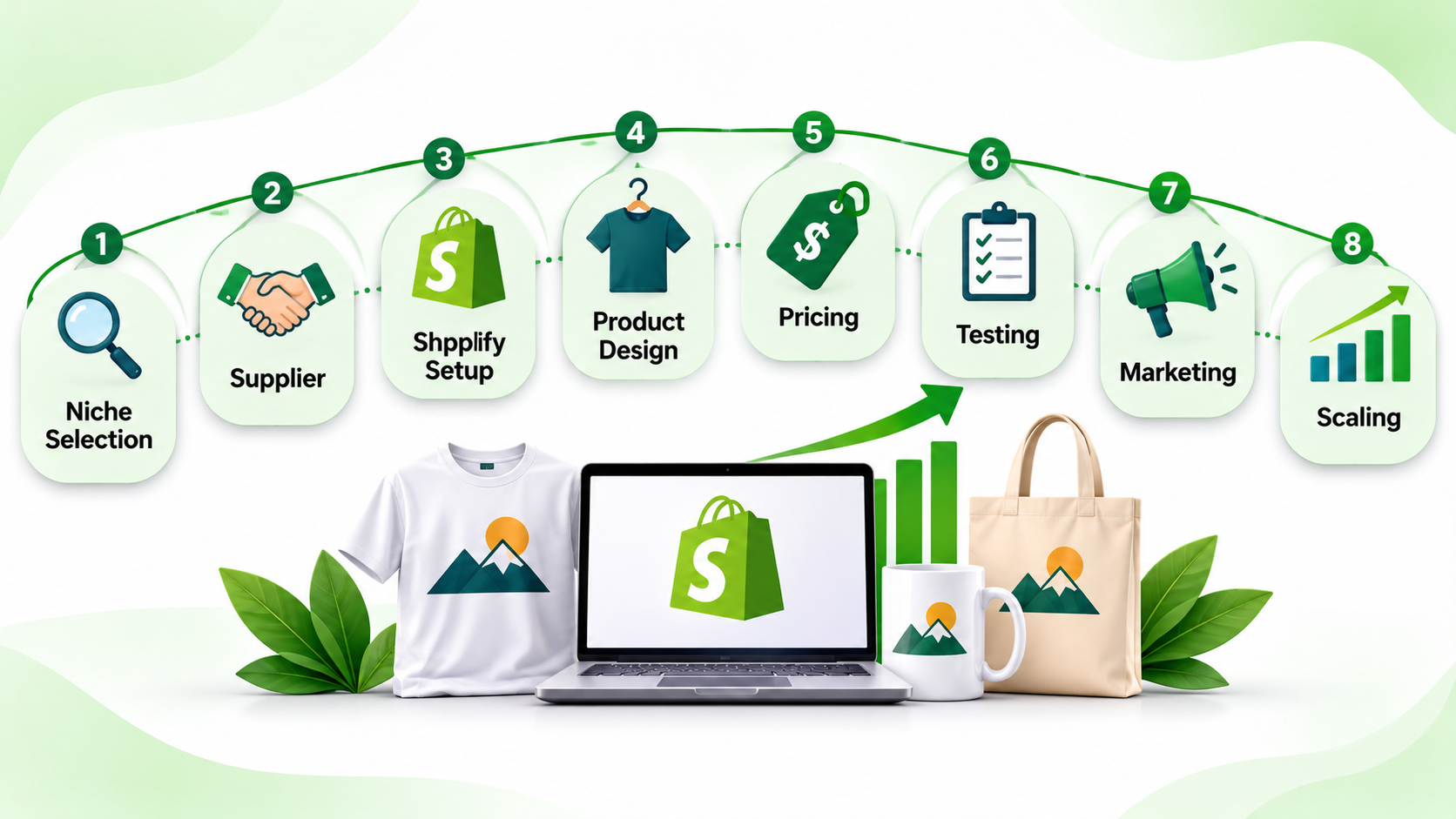
How to Start a Print-on-Demand Business with Shopify: The Roadmap
Here is the sequence we recommend. Each step has a detailed section below.
- Define the business: niche, audience, brand positioning, target markets and budget.
- Validate demand: research keywords, trends, competitors and communities before designing at scale.
- Choose supplier and app: compare quality, base costs, shipping, production time, branding options and integration quality. Order samples.
- Build the Shopify store: theme, policies, payments, shipping profiles, taxes and tracking.
- Create products and designs: a small catalogue of 10 to 30 strong products, with accurate mockups and size information.
- Price for profit: calculate the full cost stack and test price points.
- Test the entire flow: place test orders and review physical samples.
- Launch and market: organic content, creators, email and small paid tests.
- Automate and optimise: fulfilment, support, reviews and reporting.
- Scale: expand winners, add products and markets, negotiate better terms and consider private label.
A realistic first-month goal is not revenue but learning: a working store, a tested supply chain, a handful of designs and early data on what resonates.
Choosing a Niche and Validating Demand
The most common reason POD stores fail is selling generic designs to nobody in particular. A tight niche gives you a clear customer, simpler marketing and a better chance of ranking in search.
What makes a good POD niche
- Passionate identity: audiences who express identity through what they wear or display (hobbies, professions, fandoms, communities, causes, pets, regional pride).
- Gifting potential: products that people buy for others, with natural seasonal peaks.
- Underserved: you can find communities that are active online but poorly served by existing merchandise.
- Reachable: you can find the audience through specific hashtags, subreddits, groups, creators or keywords.
- Safe to sell: no reliance on trademarked characters, brands or celebrities.
A niche scoring model
| Criterion | Weight | What to check |
| Audience passion and identity | 25% | Active communities, merch already worn or shared |
| Reachability | 20% | Specific interests available in ad platforms; creators and communities |
| Competition quality | 15% | Many sellers but weak designs or branding is an opportunity |
| Gifting and seasonality | 10% | Recurring occasions, holidays, events |
| Design differentiation | 15% | Can you create original art, typography or humour others cannot copy easily? |
| Margin potential | 10% | Premium products or bundles you can sell above base cost |
| IP risk | 5% | Absence of trademark, licensing or sensitive-content issues |
Score a handful of niches from 1 to 5, weight them, and pick the top one or two to test.
How to validate
- Search demand: use Google Trends, Google Keyword Planner and autocomplete to see what people look for. Look at long-tail phrases such as funny nurse gifts or retro hiking shirt.
- Competitor research: study other Shopify stores, Etsy listings and Amazon results. Note bestselling designs, price ranges, review volume and recurring complaints.
- Community research: read subreddits, Facebook groups, Discord servers and TikTok comment sections to learn the language and humour of the audience.
- Ad libraries: review Meta Ad Library and TikTok Creative Center to see which creative angles competitors are running.
- Pre-testing designs: post concepts on social media, run small polls or short ad tests, and see which designs get engagement before you build a large catalogue.
- AI-assisted research: large language models can help brainstorm sub-niches, slogans and audience pain points, and AI tools can speed up trend scanning. Verify any claims against real data, and avoid generating designs that copy existing protected work.
Product-market fit signals
Early signs include saves and shares on organic content, unprompted comments asking where to buy, email signups, add-to-carts and repeat visitors. Do not scale until you see real purchase intent.
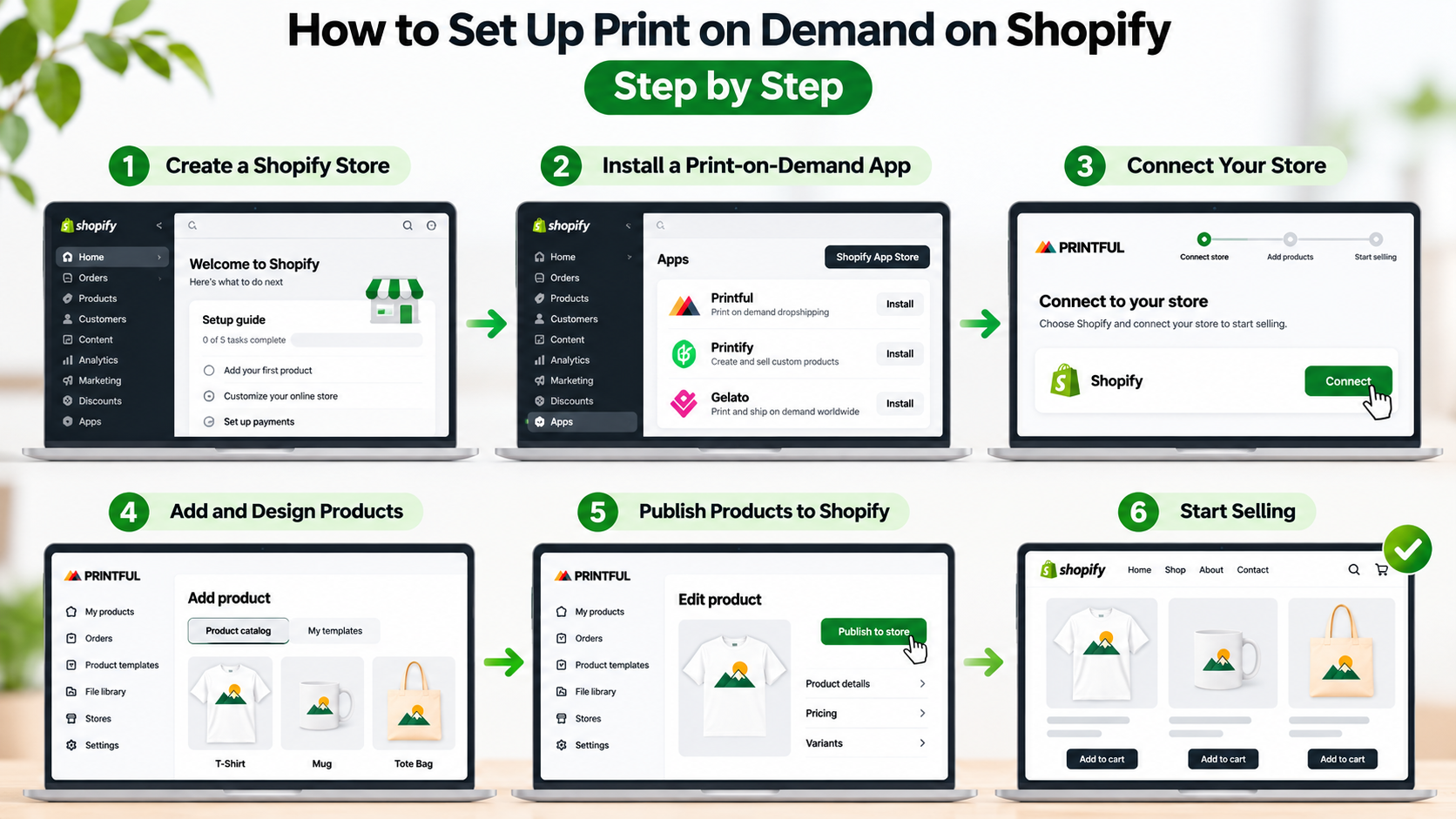
How to Set Up Print on Demand on Shopify, Step by Step
This section answers how to set up print on demand on Shopify in practical terms.
Step 1: Create your Shopify store
- Sign up at Shopify and choose a plan that fits your stage. Check current plans and pricing on Shopify’s website, because they change. Start small and upgrade as needed.
- Choose a store name and domain that match your niche and are easy to spell. Buy the domain through Shopify or connect an existing one, and set it as primary.
- In Settings > Store details, set your business address, currency, time zone and units (imperial or metric).
Step 2: Set up payments, taxes and legal basics
- Enable Shopify Payments where available, or a supported local gateway, plus PayPal. Turn on accelerated checkout options (Shop Pay, Apple Pay, Google Pay).
- Configure taxes in Settings. Understand your obligations for sales tax, VAT or GST in the places you sell. Shopify Tax and Markets can help, but you remain responsible for compliance.
- Draft policies: refund, shipping, privacy and terms of service. Shopify can generate templates, but customise them to your supplier’s real production times and return rules.
Step 3: Choose and customise your theme
Pick a fast, mobile-friendly Online Store 2.0 theme with strong product page layouts, support for size charts, variant swatches and image zoom. POD traffic is heavily mobile, so test on a real phone. Customise brand colours, typography, logo and navigation. Keep the app count low to protect page speed. If you need custom sections such as size guides, design galleries or personalisation fields, our Shopify theme customization services can build them with Liquid.
Step 4: Pick your supplier and install the app
See sections 7 and 8 for a comparison framework. Install the supplier’s app from the Shopify App Store, authorise the requested scopes and connect payment details for supplier charges. Confirm which shipping origins and print facilities serve your target markets.
Step 5: Create your first products
- Choose a product template in the app (for example a unisex tee, a mug or a poster).
- Upload your artwork and place it within the print area, following the supplier’s specifications.
- Select colours, sizes and variants. Start with fewer, best-selling colours rather than every option.
- Generate mockups. Check them carefully. Mockups that do not match reality cause returns.
- Write a product title, description and bullet points. Include material, fit, size chart, care instructions, print method and production and delivery times.
- Set pricing (see section 10).
- Push the product to Shopify as a draft first. Review the page on mobile and desktop.
Step 6: Configure shipping
Shipping is where POD stores often lose margin. Options include:
- Free shipping built into price, often with a price uplift.
- Flat rates by region, matching the supplier’s actual charges.
- Calculated rates that reflect weight and destination, where your supplier or app supports them.
- Free shipping thresholds to raise average order value.
Create shipping profiles by supplier, so products from different print partners have the right rates and delivery estimates. Include production time in estimates, not just carrier transit time. Overpromising delivery is the biggest driver of complaints and chargebacks.
Step 7: Install tracking and analytics
- Connect Google Analytics 4 and verify standard ecommerce events.
- Install the Meta Pixel with Conversions API and TikTok Pixel if you will advertise there.
- Add the Google & YouTube channel for Merchant Center feed and free listings.
- Set up a consent banner that complies with the laws in your markets.
Step 8: Order samples and run test orders
Order physical samples of each product type, and ideally from each supplier you consider. Check print sharpness, colour accuracy, fabric feel, sizing, packaging and delivery time. Place a test order through your own store using a discount code or a bogus gateway setup (according to Shopify’s guidance) so you can confirm that order data flows to the supplier, tracking returns and emails look right.
Step 9: Final launch checks
- Mobile and desktop page speed and layout.
- Product pages: accurate mockups, size chart, shipping time, returns summary.
- Checkout: payment methods, shipping rates, taxes, discount codes.
- Policies and contact information.
- Email notification templates with your branding.
- Tracking events firing correctly.
- Remove password protection and submit your sitemap to Google Search Console.
Print on Demand Products, Print Methods and Design Specifications
Choosing products and print methods affects quality, cost and customer satisfaction.
Popular print on demand products
| Category | Examples | Notes |
| Apparel | T-shirts, hoodies, sweatshirts, tank tops, leggings, hats, kids’ wear | Highest volume. Size charts and fabric details are essential |
| Drinkware | Mugs, tumblers, water bottles | Giftable, low return rate, careful with breakage and dishwasher claims |
| Wall art and home | Posters, framed prints, canvases, tapestries, pillows, blankets | Strong for niche and decor audiences. Image resolution is critical |
| Accessories | Phone cases, tote bags, mouse pads, stickers, jewellery | Easy to add to existing orders and bundles |
| Stationery and gifts | Notebooks, greeting cards, calendars, puzzles | Seasonal peaks |
| Pets | Pet bowls, bandanas, pet beds | Passionate audience, strong for niche brands |
| All-over print | Sublimated apparel, swimwear, bags | Design-led, higher price points, longer production |
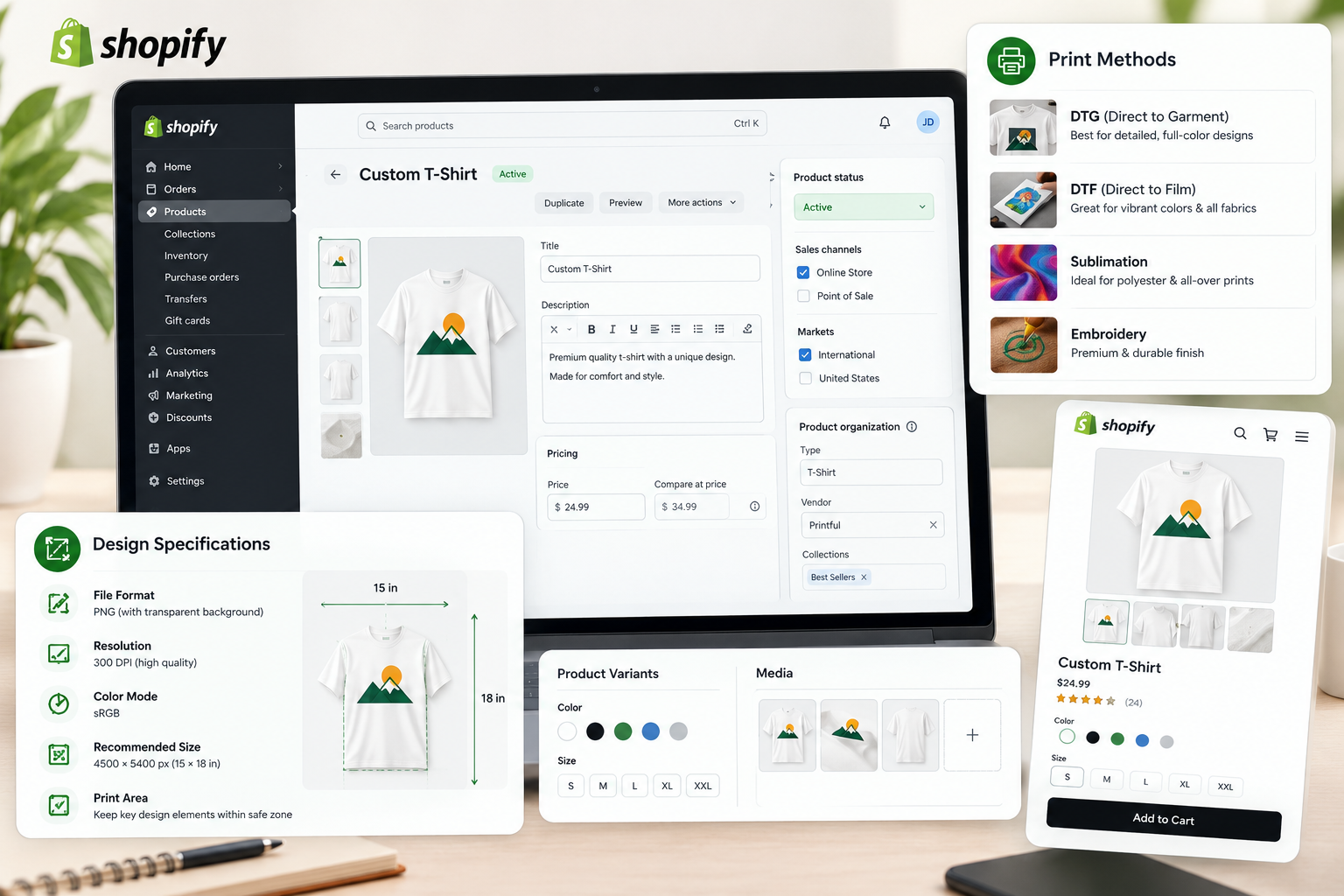
Print methods explained
| Method | How it works | Best for | Trade-offs |
| DTG (direct to garment) | Inkjet printing of water-based ink directly onto fabric | Detailed, colourful designs on cotton | Softer feel, best on light or cotton garments, durability depends on care |
| DTF (direct to film) | Design printed on film, then heat-transferred to fabric | Vibrant designs across many fabrics | Slightly raised feel, quality varies by supplier |
| Sublimation | Dye transferred to polyester or coated items through heat | Mugs, all-over apparel, phone cases | Needs polyester or coated surfaces, white backgrounds can be hard on dark items |
| Screen printing | Ink pressed through stencil screens | Simple designs at larger quantities | Rarely true on-demand, more setup |
| Embroidery | Thread stitched into fabric | Hats, polos, premium branding | Limited detail, higher cost |
| UV printing | UV-cured ink on rigid surfaces | Phone cases, signs, hard goods | Surface specific |
| Giclee and fine art printing | High-quality inkjet on paper or canvas | Art prints | Higher cost, premium positioning |
Suppliers often choose the method for you based on product, but knowing the differences helps you set expectations, write accurate descriptions and choose suitable artwork.
Design file specifications
Every supplier publishes print area dimensions and file requirements. As a general guide:
- Format: PNG with a transparent background for most apparel designs. JPEG or PNG for art prints. Some suppliers accept PDF or SVG for specific products.
- Resolution: aim for 300 DPI at the final print size. A design printed at 12 by 16 inches needs roughly 3,600 by 4,800 pixels.
- Colour mode: work in sRGB for most digital printers unless the supplier specifies otherwise. Colours can shift between screen and print, so test with samples.
- Safe zones and bleed: keep key elements away from edges, and add bleed for wraparound products such as mugs and all-over prints.
- Placement: follow print area templates for front, back, sleeve and neck-label placements.
- Fine details: avoid very thin lines and tiny text, which can lose definition in print. Test small text sizes with a sample.
- Dark garments: be aware that some methods print a white underbase, which affects colour and feel.
- File size limits: check upload limits in the app.
Creating designs
You can create designs with tools such as Canva, Adobe Photoshop, Illustrator, Affinity, Procreate or Figma, or hire freelance designers. AI image generators can help with concepts and variations, but check terms of use, avoid outputs that resemble protected works or trademarks, and check that the output is high enough resolution for print, often requiring upscaling and clean-up. Platform and supplier policies on AI-generated art are evolving, so read the current terms. Original, distinctive design is the main moat in POD, so invest time in typography, composition and a consistent brand style.
Personalised products
Personalisation, such as names, dates, photos or custom text, can raise perceived value and reduce price comparison. It usually relies on a product personaliser app or the supplier’s own personalisation tool. In Shopify, custom inputs are stored as line item properties, which pass through to the order so the supplier can print them. A simplified theme snippet looks like this:
<div class="personalise">
  <label for="custom-name">Name to print (max 20 characters)</label>
  <input type="text" id="custom-name" name="properties[Custom name]" maxlength="20" required form="{{ product_form_id }}">
</div>
The field must sit inside or be linked to the product form, and the supplier must be able to read the property from the order. Test the entire flow from product page to supplier order, because a property that never reaches the printer produces an unprintable order. Also state clearly that personalised items usually cannot be returned for change of mind.
What Are the Best Print-on-Demand Apps for Shopify?
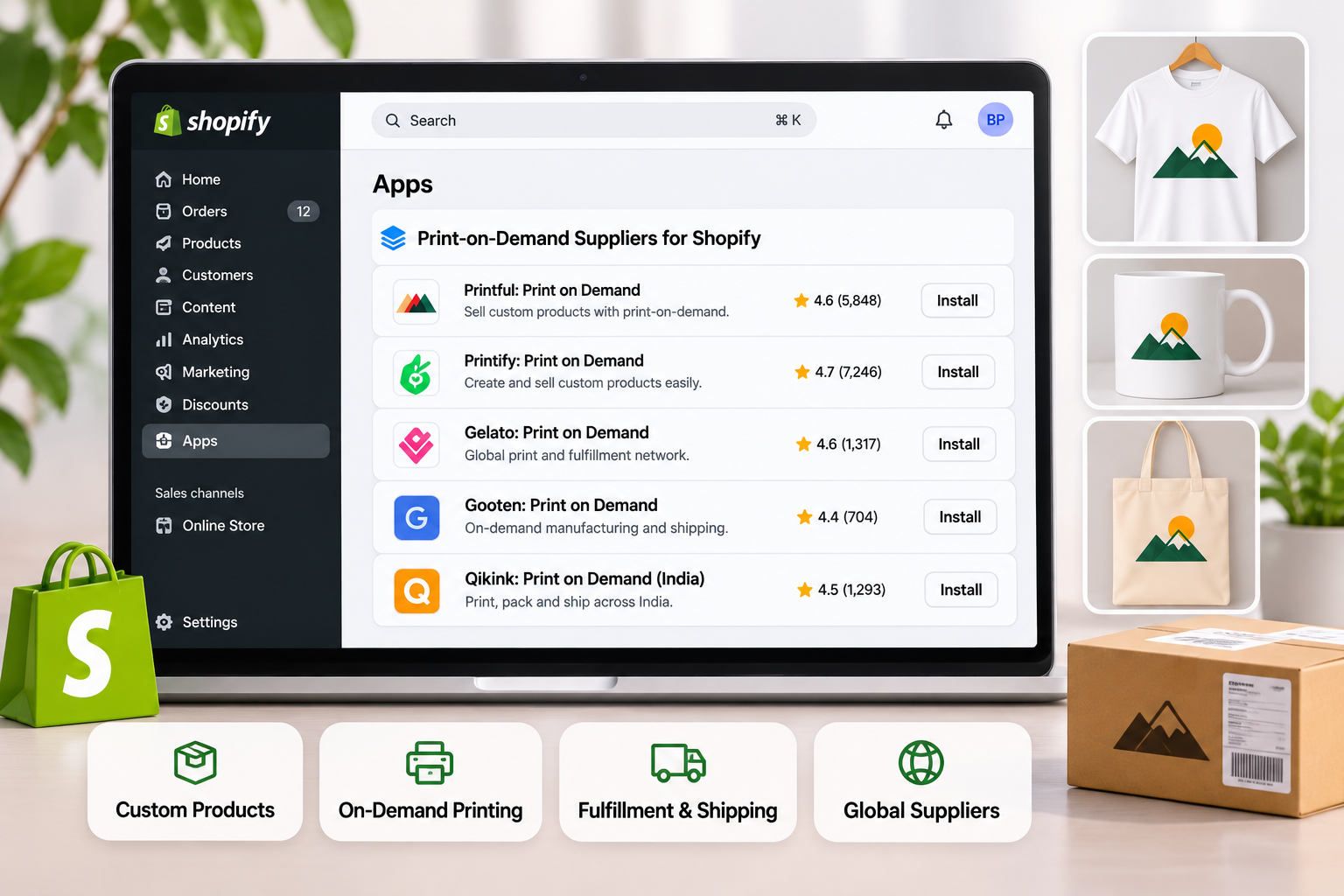
A print on demand app is the software layer that connects your Shopify store to a production partner. It creates products, syncs orders, charges you for production and returns tracking. Some apps belong to a single supplier that owns its print facilities. Others are marketplaces that route orders to a network of independent print providers. Knowing which model you are buying changes how you evaluate quality and risk.
The main Shopify print on demand apps
Availability, fees, product catalogues and policies change often, so verify current details in the Shopify App Store and on each vendor’s site before you commit.
| App | Model | Typically known for | Consider |
| Printful | Own facilities plus partner network | Consistent quality, strong branding options (custom packaging, inserts, labels), wide catalogue, mockup tools | Base costs are often higher than marketplace alternatives |
| Printify | Marketplace of independent print providers | Broad catalogue, competitive base costs, ability to compare providers per product | Quality and speed vary by provider, so choose and test providers carefully. A paid subscription tier may reduce product costs |
| Gelato | Global network of local production partners | Local production in many countries, which can cut shipping time, cost and carbon footprint | Product availability varies by country |
| Gooten | Network of production partners | Broad catalogue and multiple fulfilment locations | Check current integration and support quality |
| Prodigi | Fine art, prints and photo products | Art prints, framed prints, cards and photo gifts | Narrower apparel range |
| Spreadconnect (SPOD) | Production partner focused on Europe and the US | Fast production, EU fulfilment | Verify catalogue and branding options |
| Teelaunch, CustomCat, Apliiq and others | Specialised suppliers | Niche products, embroidery or custom cut-and-sew, depending on provider | Evaluate individually |
| Qikink and Printrove (India) | India-based print and fulfilment | INR pricing, domestic production and shipping for Indian sellers and customers | Check coverage for international shipping |
Marketplace apps versus single-supplier apps
- Single-supplier apps give you one quality standard, one point of contact and a simpler support path. They are easier for beginners and for brands that care about consistency.
- Marketplace apps give you choice and price competition, but you have to vet providers yourself. The same product can look and feel different depending on the provider you select, so order samples from each provider you plan to use.
- Using more than one app is common once you have winners. You may use one supplier for apparel and another for wall art, or one for each region.
What to check before installing an app
- Product catalogue and print methods for the items you want to sell.
- Production and shipping locations relative to your customers.
- Base costs and shipping rates for your target markets, including additional-item shipping.
- Branding options: custom packing slips, neck labels, inserts, branded tracking pages and blank packaging.
- Mockup generator quality and bulk product creation tools.
- Order automation: how fast orders are sent, what happens with failed payments, and whether orders can be edited or cancelled before production.
- Variant and SKU mapping and how stock-outs are handled.
- Support responsiveness and reprint policy for defects.
- App performance: a heavy app can add scripts to your storefront. Check page speed before and after installation.
- Reviews in the Shopify App Store, read for patterns rather than star counts alone, especially around quality, delays and billing.
Other apps that complete a POD stack
- Product personalisers and design tools for custom text and images.
- Reviews apps (Judge.me, Loox, Okendo, Yotpo) with photo reviews.
- Email and SMS (Klaviyo, Shopify Email, Omnisend).
- Size chart apps or native sections using metafields.
- Search and filter tools (Shopify Search & Discovery).
- Shipping and tracking pages for branded delivery updates.
- Upsell and bundle apps to raise order value.
Keep the stack lean. Each shopify app has a cost and a performance impact.
What Are the Best Print-on-Demand Suppliers for Shopify?
There is no single best supplier. The best print on demand suppliers for Shopify are the ones that fit your product, market, quality bar and budget. A supplier is the factory behind the app, and you should assess it like a manufacturing partner.
Supplier scorecard
| Criterion | What to look for |
| Print and product quality | Sharp, durable prints, good colour accuracy, quality blanks (fabric weight, stitching, fit) |
| Production time | Typically two to five business days for apparel, longer for custom or all-over items |
| Shipping speed and cost | Local production near your customers, tracked shipping, transparent rates |
| Base cost | Competitive product and print cost compared with similar quality alternatives |
| Catalogue | Products and brands of blanks that match your niche |
| Branding | Custom packaging, inserts, labels, white-label tracking |
| Reliability | Low error rate, consistent fulfilment, stock transparency |
| Reprint and refund policy | Clear, fair terms for defects, damage and lost parcels |
| Integration quality | Stable sync, accurate variants, fast tracking updates |
| Compliance | Product safety, labelling, ethical and environmental standards where relevant |
| Support | Reachable humans, reasonable response times |
A practical evaluation method
- Shortlist two or three suppliers that cover your products and markets.
- Order the same design from each and compare print, fabric, packaging and delivery time side by side.
- Test edge cases: a dark garment, a fine-detail design, a large size, an international destination.
- Measure delivery time from order date to delivery date, not just from shipment date.
- Contact support with a real question and see how they respond.
- Review reprint terms so you know what happens when a product arrives faulty.
- Start with the best performer and keep a second supplier as a backup for hero products.
Matching suppliers to your situation
- US and Canada customers: prioritise domestic production for speed and shipping cost.
- UK and EU customers: look for production in Europe to avoid customs delays and post-Brexit duty issues. Check your supplier’s compliance with EU product safety rules.
- Australia and New Zealand: local or regional production reduces transit time.
- Global audiences: a network with local production in multiple countries, or separate suppliers by region, helps control delivery times and cost.
- Premium or branded stores: favour suppliers with strong blanks, branding options and consistent quality control, even at a higher base cost.
- High-volume low-cost stores: compare providers on cost per unit and monitor defect rates closely.
Ethical and sustainable options
More shoppers ask where products are made. Some suppliers offer organic cotton, recycled materials, water-based inks or local production. If sustainability is part of your brand, verify claims and certifications rather than repeating marketing language.
Beyond POD: when to move to your own supplier
Once a design sells consistently, consider whether bulk production with a manufacturer, or a local screen printer, can lift your margin. Many brands run a hybrid: POD for testing and long-tail designs, inventory for proven best sellers.
How Much Does It Cost to Start a Shopify Print-on-Demand Business?
The headline cost is low, but a realistic budget includes more than a Shopify subscription. The figures below are planning estimates, not quotes. Prices, plans and exchange rates change, so verify current numbers.
Startup budget ranges
| Cost item | Lean | Standard | Growth |
| Shopify plan (monthly) | Entry plan | Basic or equivalent | Higher plan as volume grows |
| Domain (yearly) | $10 to $20 | $10 to $20 | $10 to $20 plus brand protection domains |
| Theme | Free theme | $0 to $400 one-time for a premium theme | Custom theme or customization |
| POD apps | Free to install (you pay per order) | $0 to $40 per month for premium tiers | Several apps and subscriptions |
| Other apps (reviews, email, personaliser) | $0 to $30 per month | $30 to $150 per month | $150+ per month |
| Product samples | $30 to $100 | $100 to $300 | $300+ |
| Design | Self-made, free tools | $0 to $500 freelance | $500 to several thousand for brand and art |
| Branding and photography | DIY mockups | $100 to $500 | $1,000+ for shoots and video |
| Marketing test budget | $100 to $300 | $300 to $1,500 | $2,000+ per month |
| Business registration, accounting, legal | Varies by country | Varies | Varies, often with professional help |
| Rough first-month total | A few hundred dollars | $800 to $3,000 | $3,000+ |
Ongoing and per-order costs
- Production cost per item (blank plus print), charged by the supplier on every order.
- Shipping cost from the supplier, per order and per additional item.
- Payment processing: card fees commonly around 2.9 percent plus a fixed fee in the US, with different rates elsewhere and extra charges for some international or non-Shopify-gateway transactions.
- Shopify transaction fees if you use an external payment gateway.
- App subscriptions and usage fees.
- Refunds, reprints and chargebacks.
- Advertising spend.
- Taxes and duties where applicable.
Where the money really goes
Newcomers often budget for the store and forget the three costs that decide results: samples (you must see the product), design (original art is the differentiator) and marketing (no traffic means no sales). A lean store can launch for little money, but traffic acquisition usually becomes the largest ongoing expense.
Trial and starter plans
Shopify has offered trial periods and low-cost starter options at various times, with differing limits on checkout and features. Check what is available now and whether the plan you choose supports the apps, markets and checkout features you need.
Pricing and Profit Margins
Pricing is where POD businesses are won or lost. Build your price from the cost stack, not from competitors’ sticker prices.
The contribution margin formula
Contribution margin per order = Retail price − Supplier production cost − Supplier shipping − Payment fees − Refund and reprint allowance − Apps allocation
Profit per order = Contribution margin − Customer acquisition cost (CAC)
Worked example: a standard t-shirt
The figures below are illustrative.
| Line item | Amount (USD) |
| Retail price | 29.99 |
| Supplier production cost (blank plus print) | 12.00 |
| Supplier shipping | 4.50 |
| Payment processing (about 2.9% plus 0.30) | 1.17 |
| Refund and reprint allowance (3%) | 0.90 |
| Apps allocation per order | 0.40 |
| Contribution margin | 11.02 |
| Customer acquisition cost (paid ads) | 10.00 |
| Profit per order | 1.02 |
The break-even return on ad spend is the retail price divided by contribution margin: 29.99 ÷ 11.02 = 2.72. At a ROAS of 2.72 you break even on the first order. This is why paid acquisition for single low-ticket POD items is hard, and why successful stores raise average order value, build email lists and rely on repeat purchases and organic traffic.
Ways to improve margin
- Raise perceived value through original design, brand story, quality photography and premium positioning, so you can charge more for the same blank.
- Bundle and upsell: a tee plus a mug, two-for-one, or a gift set increases revenue per shipment (though items from different suppliers ship separately).
- Tiered or free shipping thresholds to nudge larger baskets.
- Choose higher-margin products: hoodies, wall art, all-over prints and personalised items usually carry higher absolute margin than basic tees.
- Negotiate or upgrade: many suppliers offer subscription tiers or volume pricing once you have steady orders.
- Optimise suppliers by region: local production often reduces shipping cost.
- Reduce returns with accurate size charts, honest mockups and clear descriptions.
- Grow organic and owned channels: SEO, social content, email and referral reduce reliance on paid ads.
Pricing psychology
Use prices that fit your positioning: endings such as .95 or .99 can suggest value, while round prices suggest premium. Test price points, because a higher price can increase profit even if conversion dips. Avoid fake compare-at prices, which can break consumer protection rules.
How to Automate Print-on-Demand Order Fulfilment on Shopify
Automation is the main advantage of POD, and most of it is built into the app. Your job is to configure it properly, monitor exceptions and add automation around the edges.
What the app automates by default
- Product creation, mockups and variant mapping.
- Order transfer to the supplier when a payment is captured.
- Charging your account for production and shipping.
- Tracking updates written back to Shopify and sent to customers.
- Product availability updates where supported.
Settings to review
- Order submission mode: many apps offer automatic submission or manual approval. Beginners often start with manual approval for the first orders, then switch to automatic once confident.
- Payment method for supplier invoices: keep a valid card or balance, because failed supplier payments stall orders.
- Delay window: some apps let you add a short hold, giving you time to cancel or edit orders before production.
- Address validation: invalid addresses lead to returned parcels. Use Shopify’s address validation or an app.
- Notifications: make sure customers receive branded shipping confirmation emails and tracking links.
Automation around the app with Shopify Flow
Shopify Flow can add rules without code. Useful POD workflows include:
- Unfulfilled order alert: if an order has not been fulfilled after a set number of days, notify you and tag it for review.
- High-risk order hold: if fraud analysis flags an order, tag it and email you before it goes to production, so you avoid paying for printed goods that will be charged back.
- Personalised order check: if a line item has custom properties, tag the order for a quick review of the text before printing.
- Low-margin guard: alert when a price or cost change drops contribution margin below your threshold.
- VIP and repeat buyer tagging: trigger special flows for repeat customers.
- Delay communication: if an order exceeds the expected production time, automatically send a short delay message.
Custom automation with the Admin API and webhooks
If you manage a large catalogue or multiple suppliers, you may build custom routing. Key patterns:
- Subscribe to orders/paid webhooks, verify the HMAC signature, enqueue the event and respond with 200 quickly.
- Route each line item to the right supplier using SKU or product metafield mappings.
- Submit the order to the supplier’s API with retries, exponential backoff and an idempotency key.
- Poll the supplier or receive a supplier webhook for shipment events.
- Write tracking to Shopify using the fulfilment API. A simplified GraphQL example:
mutation FulfilOrder($fulfillment: FulfillmentInput!) {
fulfillmentCreate(fulfillment: $fulfillment) {
fulfillment {
id
status
}
userErrors {
field
message
}
}
}
The input includes lineItemsByFulfillmentOrder (the fulfilment order IDs and line items), trackingInfo (number, company and URL) and notifyCustomer. Always inspect userErrors and log failures for review. Use Shopify’s bulk operations when updating many products or orders, and keep API version pinned and upgraded on a schedule.
AI in the fulfilment workflow
AI can help with support replies, product description drafts, design variations, tagging and classification of customer messages, and summarising weekly performance. Keep human review on anything that affects money or print files, and keep deterministic rules for fulfilment decisions.
Monitoring exceptions
Automation does not remove the need to watch. Check daily for failed orders, address errors, supplier payment failures, out-of-stock variants, delayed shipments and returned parcels. Build a short checklist, or a Flow-driven daily digest, so exceptions never sit unnoticed.
Branding and Customer Experience
Because many stores sell similar blanks, brand and experience are the difference.
- Brand identity: a clear name, logo, colour palette, typography and voice that match your niche.
- Packaging and inserts: custom packing slips, thank-you cards, stickers and labels where the supplier supports them.
- White-label tracking: a branded tracking page and shipping emails keep customers inside your brand rather than the supplier’s.
- Honest product pages: actual product photography, real size charts, material details and print method, plus production and delivery times.
- Transparent policies: since POD items are made to order, spell out what you accept for returns (typically defects, damage or wrong items, not change of mind) and how long it takes.
- Proactive communication: order confirmation, production update, shipping notice and delivery follow-up.
- Fast, friendly support: respond within one business day, and have templates for sizing, delays and reprint requests.
- Handling misprints and damage: ask for a photo, confirm against the order, trigger the supplier’s reprint or refund process and update the customer quickly. Most reputable suppliers cover defective items, but only if you report them promptly, so check their time limits.
- Reviews and user content: request reviews after delivery with a photo incentive, and display real customer photos.
Marketing a Shopify Print on Demand Store
The store is not the business. Traffic is. Choose channels that match your audience and budget.
Organic channels
- TikTok and Instagram Reels: short videos showing the design process, product unboxing, fit checks, gift ideas and niche humour.
- Pinterest: strong for home decor, gifts and visual search, with long-lived pins.
- YouTube Shorts and long-form: product reviews, design stories and niche-related content.
- Reddit and communities: participate honestly, without spamming links.
- Creators and micro-influencers: send free products and offer commission through Shopify Collabs or affiliate apps.
- Content marketing: blog posts, gift guides and style guides targeted to your niche.
Paid channels
- Meta Ads (Facebook and Instagram): use interest and lookalike audiences, and test short vertical videos and UGC-style creative. Use the Conversions API for reliable tracking.
- TikTok Ads and Spark Ads: amplify organic posts that already perform.
- Pinterest Ads: good for gift and decor intent.
- Google Shopping and Performance Max: capture existing demand with a clean product feed.
- Retargeting: bring back visitors who viewed products or abandoned carts.
Start with small, structured tests: a few creatives, defined budgets and clear kill rules. Judge success on contribution margin and blended marketing efficiency, not clicks.
Owned channels
Build your email and SMS list from day one with a first-order incentive. Set up welcome, abandoned cart, browse abandonment, post-purchase and win-back flows. Seasonal and event-based campaigns (holidays, awareness days, niche events) are especially effective in POD.
Seasonality and timing
Gift demand peaks around Black Friday, Cyber Monday and the December holidays, and production plus shipping times lengthen in this period. If you are starting in mid-November 2026, you are already close to the peak, so move quickly. Confirm holiday cut-off dates with your supplier now, publish clear order-by dates on your store and keep your promises. With only a few weeks before the rush, launch a small number of tested designs and order samples immediately, rather than building a large catalogue at the last minute. If your timeline is too tight to deliver reliably before the holidays, use this window to validate your niche and build your email list, then aim for a full launch in the new year.
SEO and AI Search Visibility
SEO gives POD stores a way to reduce paid dependence. It also helps AI assistants understand and recommend your products.
Technical foundations
- Fast mobile performance and clean theme code.
- Descriptive collection and product handles, and logical navigation.
- Automatic Shopify sitemap submitted to Google Search Console and Bing Webmaster Tools.
- Canonical URLs, no duplicate thin content and proper indexing controls.
- Descriptive image file names and alt text for mockups and lifestyle images.
Product and collection pages
- Write unique titles and descriptions. Many POD sellers import generic text. Write copy that reflects your niche and audience.
- Include material, fit, print method, care instructions, dimensions and production time in structured sections.
- Use metafields for specifications so your theme can display consistent data and structured data can use it.
- Add reviews and FAQs to product pages.
- Build collection pages around search intent, with unique intro text, such as gifts for hikers or retro cat lover t-shirts.
Structured data
Ensure Product, Offer, AggregateRating (only with real reviews), BreadcrumbList and Organization schema are present and valid. Include shipping and return policy information where possible. Validate with Google’s Rich Results Test. Keep price and availability consistent between the page, structured data and your Merchant Center feed.
Content strategy
Publish helpful content for your niche: gift guides, care guides, size guides, style inspiration and behind-the-scenes design stories. Link them to relevant products. Use AI to speed up outlines and drafts, but add real experience, original images and accurate facts, because thin, mass-produced pages are a risk.
AI assistant visibility
- Provide complete, structured product data in visible text and metafields.
- Write answer-first content that directly addresses questions such as the best gifts for a given interest.
- Keep brand, About page and contact details consistent so systems can verify your business.
- Check your robots.txt and consider an optional llms.txt summary of key pages.
- Use Shopify’s catalogue and agentic commerce features where they are available to your store.
- Earn reviews and mentions from creators and community sites.
Legal, Tax and Compliance
POD removes inventory risk, not legal risk. Get advice for your country and markets.
- Intellectual property: do not use trademarked names, logos, characters, celebrity likenesses, sports team marks or copyrighted lyrics and quotes you do not have rights to. Meme and fan art are not safe by default. Marketplaces and suppliers remove infringing products and may suspend accounts.
- Original work and licences: keep records of design ownership, and check the terms of fonts, stock images and AI tools you use.
- Business registration and taxes: register as required, and understand sales tax, VAT or GST obligations, including thresholds in the places you sell. The EU, UK and other regions have specific rules for low-value imports and marketplaces.
- Consumer protection: accurate product claims, clear delivery estimates, lawful returns terms and statutory rights.
- Product safety and labelling: textile content, care labels, age-related rules for children’s products and, in the EU, general product safety requirements, including contact details for a responsible person where relevant. Ask your supplier what they provide.
- Privacy and consent: comply with GDPR, UK GDPR, CCPA and similar laws, including cookie consent and email and SMS consent.
- Advertising rules: follow platform policies and avoid misleading claims, fake scarcity and undisclosed influencer partnerships.
- Payment processor terms: read acceptable-use rules, and be careful with restricted content categories.
Scaling Beyond the First Products
Once you see consistent sales, scale deliberately.
- Double down on winners: create variants, colours, bundles and adjacent products for designs and niches that sell.
- Expand product types: move from a tee to a hoodie, mug, poster or tote in the same design family, using a unified collection.
- Add markets: use Shopify Markets for currency, language and local pricing, and choose local production partners to cut delivery times.
- Negotiate and upgrade: move to supplier subscription tiers or volume discounts, and ask about branding upgrades.
- Add a second supplier for resilience and for regional coverage.
- Build a brand layer: story, community, loyalty programme, limited drops and collaborations with creators.
- Strengthen operations: documented processes, support macros, reporting dashboards and Flow automations.
- Optimise performance: test product pages, shipping thresholds, upsells and checkout flows.
- Consider inventory for hero products to improve margin and delivery speed, while keeping POD for long-tail designs.
- Plan for Shopify Plus only if you need advanced checkout customisation, multiple storefronts or high-volume features. Most POD stores do not need it early.
KPIs to track
| Metric | Why it matters |
| Contribution margin per order | True profitability |
| Blended CAC and MER | Marketing efficiency across channels |
| Conversion rate by device | Store and offer performance |
| Average order value | Effectiveness of bundles and thresholds |
| Repeat purchase rate | Brand strength |
| Defect and reprint rate | Supplier quality |
| Delivery time (order to delivery) | Customer experience |
| Return and refund rate | Product accuracy |
| Support tickets per 100 orders | Operational friction |
Common Mistakes in Shopify Print on Demand
- Launching a huge catalogue without validation, which spreads effort and budget too thin.
- Skipping samples, and discovering quality problems through customer complaints.
- Using generic designs and mockups that look like every other store.
- Ignoring true margins, especially shipping and ad costs.
- Overpromising delivery times by quoting carrier transit and forgetting production.
- Weak size and fit information, causing avoidable returns on apparel.
- Infringing intellectual property, risking takedowns and account suspension.
- Installing too many apps, slowing the store.
- Sending orders to production without checking personalised text or risky orders.
- Depending only on paid ads, with no email list, SEO or community.
- No backup supplier for best sellers.
- Not reading supplier policy changes, which can alter costs, products and shipping.
A 90-Day Launch Plan
Days 1 to 14: Foundation. Choose and validate your niche, shortlist two suppliers, order samples, set up Shopify, policies, payments, taxes and tracking.
Days 15 to 30: Catalogue. Create 10 to 20 products with strong original designs, accurate mockups, size charts and complete descriptions. Configure shipping profiles. Run test orders. Set up email flows and review requests.
Days 31 to 60: Launch and learn. Publish content on two organic channels, send products to a few creators, run small paid tests with strict budgets, and collect feedback. Fix friction points on product pages and checkout.
Days 61 to 90: Optimise and expand. Cut weak products, expand winners into new product types, add bundles and thresholds, build collection and gift-guide content for SEO, and add a backup supplier. Review margins and adjust pricing.
Print on Demand with Shopify in India
Indian sellers can run the same model with some local differences:
- Local suppliers: India-based POD providers such as Qikink and Printrove offer INR pricing, domestic production and shipping, and Shopify integrations. Compare print quality, branding options, shipping coverage and COD handling.
- Domestic versus export: local production usually gives faster, cheaper delivery in India, while international customers may be better served by suppliers with production near them. Some sellers use Indian suppliers for the home market and global networks for export.
- Payments: Shopify Payments is not available in every country. Indian merchants commonly use supported local gateways and UPI-enabled options. Check the current list in your Shopify admin.
- Cash on delivery (COD): popular in India but increases return-to-origin risk and cash-flow delays. Consider partial prepayment or COD verification, and confirm whether your supplier and courier support COD.
- Taxes: GST registration thresholds, rates on apparel and invoicing requirements apply. Consult a chartered accountant, and check how your supplier handles invoices.
- Pricing and psychology: Indian shoppers are price-sensitive but respond to value, festival offers and trust signals such as reviews and clear return rules.
- Festive demand: Diwali, wedding season, cricket events and regional festivals create strong gifting and merchandise demand, so plan designs and stock-free campaigns around them.
Features and fees vary by provider, so verify details directly before committing.
Working With Viha Digital Commerce
Viha Digital Commerce helps merchants build and grow Shopify stores, including print on demand brands. Depending on your stage, we can help with:
- Shopify Development and theme customisation: fast, mobile-first themes with size-chart sections, personalisation fields, design galleries and metafield-driven product content.
- App selection and integration: evaluating POD apps and suppliers, configuring product sync, shipping profiles and order routing.
- Automation: Shopify Flow workflows, webhook and API integrations, reporting dashboards and exception alerts.
- Performance optimisation: app audits, speed work and checkout testing.
- SEO and AI search visibility: structured data, collection strategy, product data quality and content planning.
- Marketing foundations: tracking setup, email and SMS flows, feed management and campaign structure.
- Ongoing support and maintenance as your catalogue and traffic grow.
If you want a second opinion on your supplier choice, a clean launch plan or a custom Shopify build, talk to Viha Digital Commerce and we will recommend the simplest route that fits your goals.
Frequently Asked Questions
Do I need a registered business before my first sale?
It depends on your country. Many people start as sole proprietors, and some jurisdictions require tax or business registration before or soon after you earn income. Shopify also asks for tax and payout details when you enable payments. Speak to a local accountant about thresholds and invoicing so your first payout does not create a surprise.
Can I sell designs based on memes, movie quotes or popular characters?
Generally no, unless you hold a licence. Memes, catchphrases and fan art can still be owned or trademarked, and platforms and suppliers act on complaints quickly. Original artwork, your own typography and humour, and licensed collaborations are safer foundations.
Can I upload the same design to several suppliers?
Yes. Your artwork is yours, and many sellers list the same design through different suppliers for different regions or product types. Make sure customers see consistent product pages, and map each product to the right shipping profile.
Can I combine print on demand with products I stock myself?
Yes. Hybrid stores are common. Sell tested best sellers from your own inventory or a manufacturer for better margin and speed, while keeping long-tail and new designs on demand. Use separate locations and shipping profiles so delivery estimates stay accurate.
Can I use AI-generated artwork?
Often yes, but check the terms of the AI tool you use, your supplier’s content policy and the rules of any marketplace you also sell on. Copyright protection for AI-generated images is unsettled in many countries, so you may have limited ability to stop copycats. Make sure the output is print-resolution and does not resemble protected works. Adding original human design work strengthens both quality and ownership.
How long does it take to get a first sale?
There is no reliable timeline. Stores with an existing audience, such as a creator community, can sell in days, while cold-start stores often take weeks of content and testing before the first order. Treat the first 90 days as a learning period, and judge progress by traffic, email signups and conversion signals, not only revenue.
Can I sell the same products on Etsy or Amazon too?
Yes, many suppliers connect to Etsy and other channels, and a multi-channel approach can improve discovery. Watch each channel’s rules on handmade versus print on demand listings, disclosures and branding, and keep prices and branding consistent to avoid confusion.
Do I need Shopify Plus for print on demand?
Almost never at the start. Standard Shopify plans support POD apps, discounts, markets and the checkout features most stores need. Plus becomes relevant at high volume or when you need advanced checkout customisation or multiple storefronts.
Conclusion
A Shopify print on demand business is one of the most accessible ways to start an ecommerce brand in 2026, but it rewards focus rather than speed. Choose a niche you can reach, partner with a supplier whose quality you have verified with your own eyes, price from your real cost stack, automate the repetitive fulfilment work and put your time into design, brand and traffic. Margins on single low-ticket items are thin, so build for higher order value, repeat customers and owned channels as early as you can.
The tools are available to nearly everyone. What sets successful stores apart is original design, honest product pages, reliable delivery and a brand customers want to come back to. Start small, test properly, measure contribution margin and expand what works.
Ready to build your print on demand brand on Shopify? Viha Digital Commerce can help you plan, build and optimize a store that is ready to scale. Get in touch to discuss your project.






 All-in-One Solution
 Customizable Services
 Assortment of Payment Options
 Optimized Sales Processes
 Omnichannel Maintenance & Support
 Custom Shopping Cart
 Advanced Security & Support
 API Payment & Logistic Integrations
 Social Media Integration
 Professional Communication
 Skilled Developers
 Timing is Everything
 Secure Agreements
 Support Tilt
 Quality Top Up Most
 White Development Pathway
 Competitive Price Point