
Headless Shopify Development: Benefits, Costs, and When Your Business Needs It
Key Takeaways
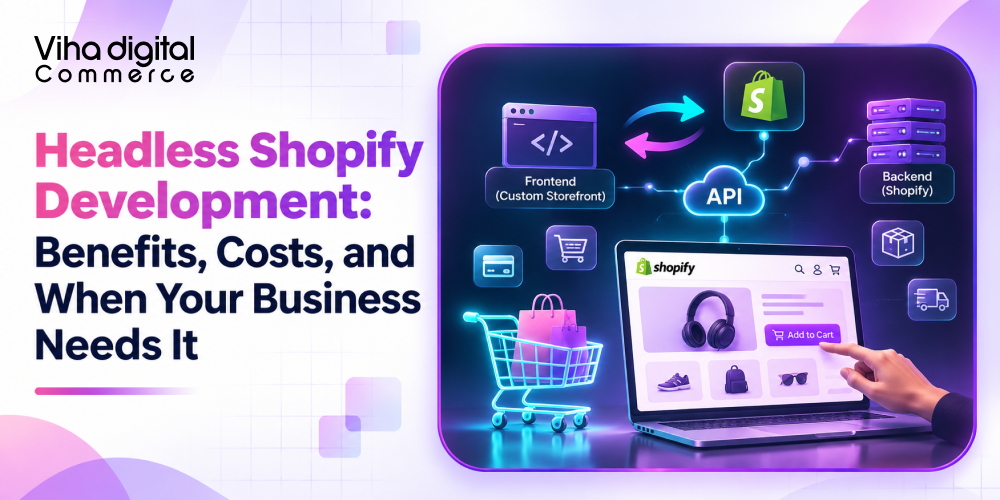
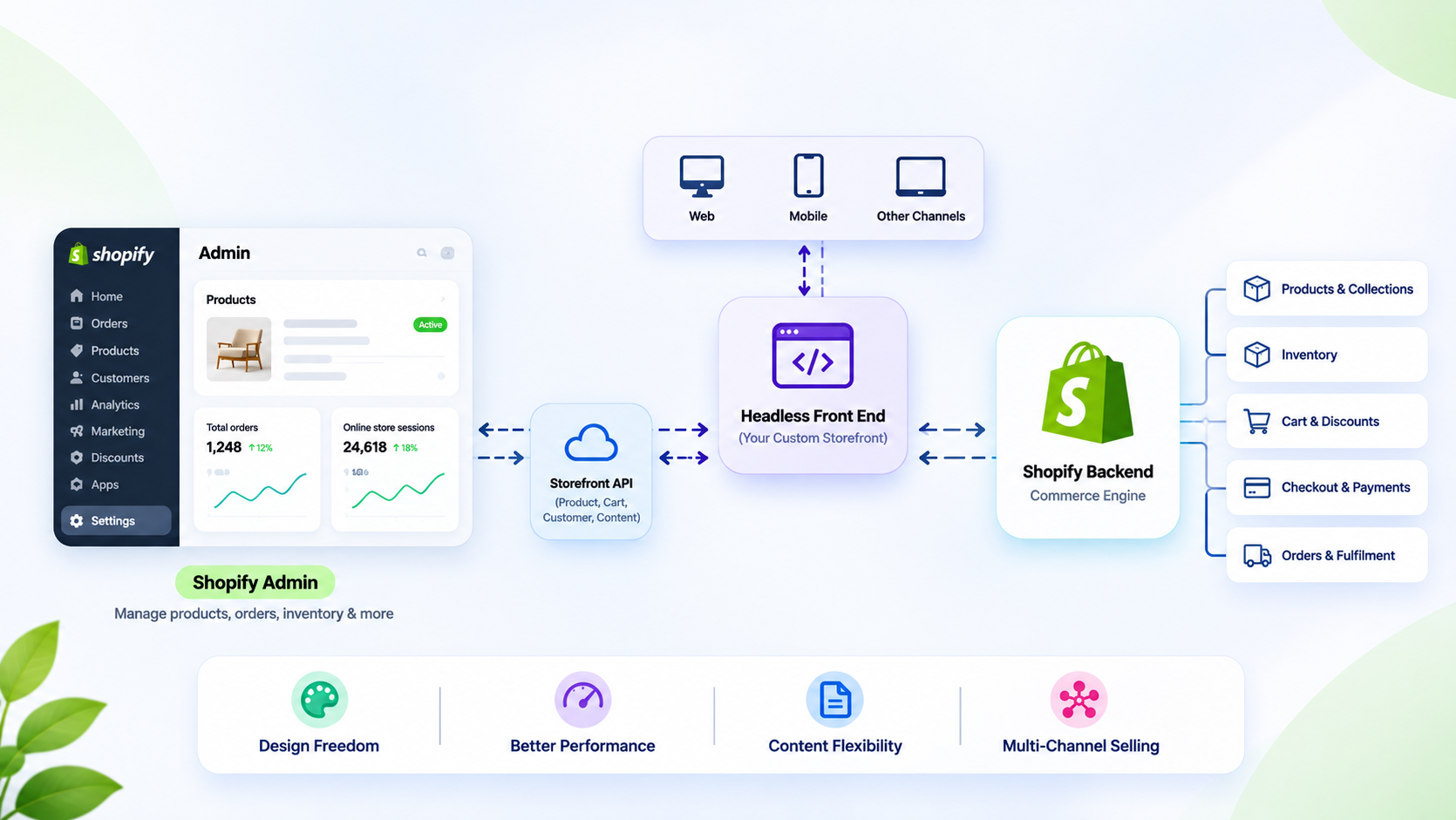
- Headless Shopify development separates the customer-facing storefront from Shopify’s commerce back end. Shopify still runs products, cart, checkout, payments and orders. Your own front end talks to it through APIs, most importantly the Storefront API.
- The main payoffs are design freedom, tighter performance control, content flexibility and one commerce engine feeding many channels. The main costs are higher build and maintenance effort, the loss of some theme and app conveniences, and the need to own SEO and infrastructure details.
- Headless is not automatically faster or better for SEO. It gives you control, and control cuts both ways.
- Most stores do not need headless. A well-built Online Store 2.0 theme, or a hybrid approach, covers the majority of brands.
- Typical project budgets are materially higher than theme work. Plan for a build, a content and tooling stack, hosting, and a standing engineering team or retainer.
- Migrate in phases, protect URLs and rankings, and keep a rollback path.
Quick Answer: What Is Headless Shopify Development?
Headless Shopify development is a way of building an online store in which the front end (what shoppers see) is a separate application that fetches product, cart, customer and content data from Shopify through APIs, instead of rendering pages from a Liquid theme inside Shopify. Shopify remains the commerce engine: it stores products and inventory, manages carts and discounts, processes payments and hosts checkout. The custom front end can be built with Shopify’s React-based framework Hydrogen, or with other frameworks such as Next.js, Astro, Nuxt or native mobile code. Brands choose it when they need highly custom experiences, strict performance budgets, advanced content or multi-channel selling that a standard theme cannot deliver. For most small and mid-sized stores, a customised theme is cheaper, faster to launch and easier to maintain.
This guide from Viha Digital Commerce explains how headless commerce works under the hood, compares Hydrogen and Liquid, weighs benefits against risks, breaks down costs, answers the SEO and performance question honestly, and gives you a step-by-step migration and agency selection framework.
What Is Headless Shopify Development and How Does It Work?
In a traditional Shopify store, one system does everything. Shopify stores your data, renders your pages from a Liquid theme, runs the cart and hosts checkout. The “head” (the presentation layer) and the “body” (the commerce engine) are bundled together.
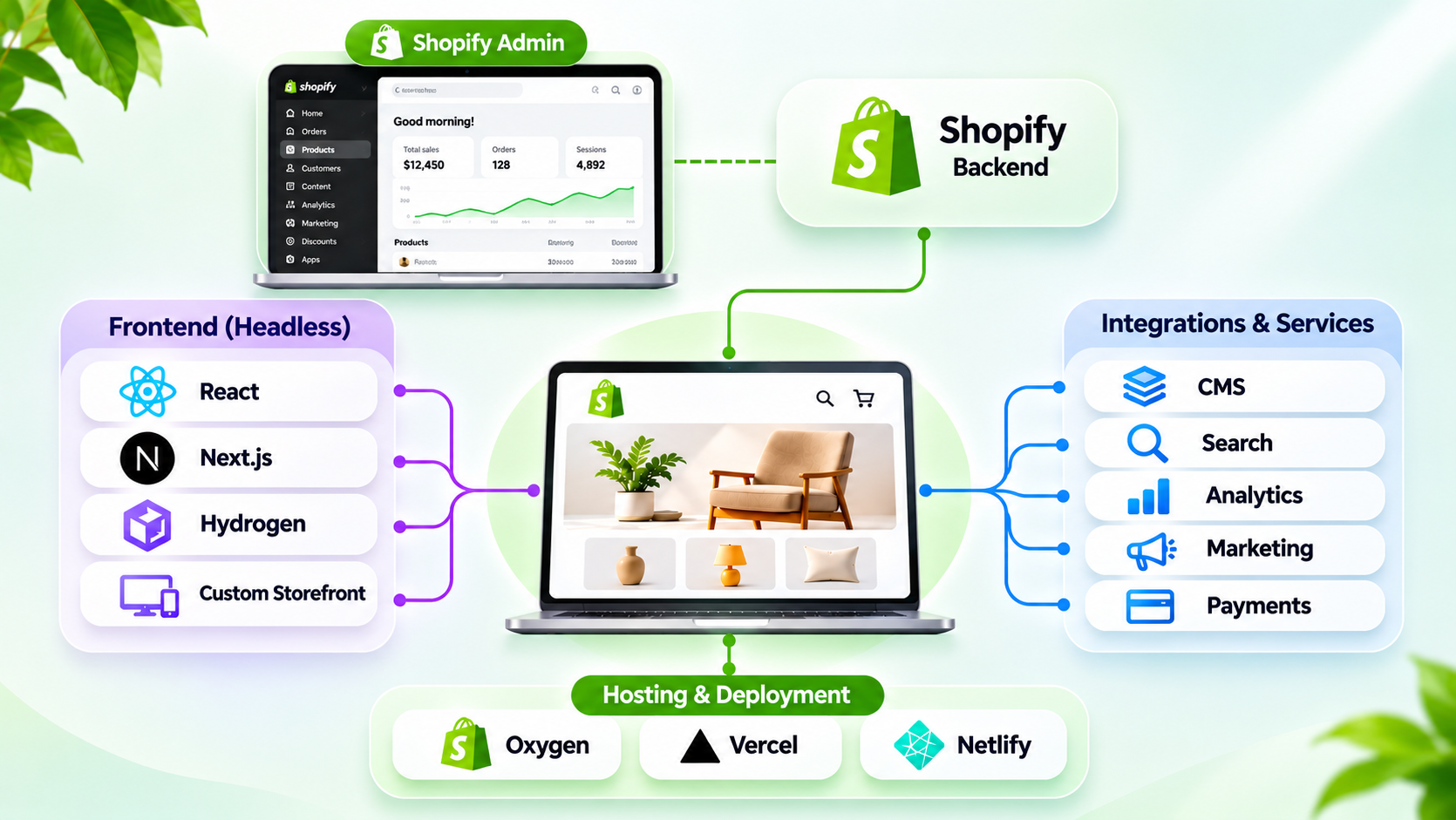
In a headless Shopify store, the head is removed from the body. Shopify continues to handle commerce, while a separate front-end application takes responsibility for design, page rendering, routing, content and user interaction. The two communicate through APIs.
How a request flows
- A shopper opens a product page on your domain.
- Your front-end application (running on a host such as Shopify Oxygen, Vercel, Netlify, Cloudflare or your own infrastructure) receives the request.
- It queries the Shopify Storefront API for product data (title, images, variants, prices, availability, metafields) and, if needed, your CMS for editorial content and your search provider for results.
- It renders HTML on the server or at the edge, sends it to the browser, and hydrates interactive components.
- When the shopper adds an item to the cart, the front end calls Storefront API cart mutations.
- At checkout, the shopper is sent to a Shopify-hosted checkout using the cart’s checkoutUrl. Payments, taxes, shipping, discounts, Shop Pay and fraud tools run inside Shopify.
- Order data lands in Shopify admin, where fulfilment, inventory and apps continue as normal.
What stays on Shopify, and what moves to you
| Capability | Where it lives in a headless build |
| Products, variants, inventory, collections | Shopify (read through the Storefront API, managed in admin) |
| Cart and discounts | Shopify (Storefront API cart), controlled by your UI |
| Checkout, payments, Shop Pay, fraud analysis | Shopify-hosted checkout |
| Orders, fulfilment, returns, customers | Shopify admin and Admin API |
| Customer accounts | Shopify Customer Account API, surfaced in your UI |
| Storefront design and page layout | Your front-end code |
| Page routing, URLs and redirects | Your front-end application (with Shopify data) |
| Editorial content and landing pages | Shopify metaobjects or an external headless CMS |
| SEO tags, sitemaps and structured data | Your front-end application |
| Theme editor and sections | Replaced by CMS tooling or custom editors |
| Theme app extensions | Mostly unavailable, apps need headless-compatible SDKs or APIs |
The role of the Storefront API
The Storefront API is a GraphQL API designed for customer-facing experiences. It exposes products, collections, search and predictive search, product recommendations, carts, localisation context, selling plans, metaobjects and more. Key technical points:
- Authentication: public access tokens are safe for browser use and carry limited, read-focused permissions. Private (delegate) tokens are for server-side calls, and Shopify expects a buyer IP header on server-to-server requests so bot protection and rate controls can work correctly.
- Versioning: the API is versioned quarterly. Pin a version, test new versions in staging and schedule upgrades.
- Localisation: the @inContext directive sets country, language and, for B2B, buyer context so prices, availability and translated content match your Shopify Markets setup.
- Metafields and metaobjects: to read a metafield or metaobject from the Storefront API, you must expose it to the Storefront through its definition settings.
- Cart: a cart object holds lines, buyer identity, discount codes, attributes and delivery options, and returns a checkoutUrl.
- Customer accounts: the separate Customer Account API supports login and account management using OAuth-based flows.
An example product query with localisation looks like this:
query ProductByHandle($handle: String!, $country: CountryCode, $language: LanguageCode)
@inContext(country: $country, language: $language) {
product(handle: $handle) {
id
title
handle
descriptionHtml
seo { title description }
featuredImage { url altText width height }
priceRange { minVariantPrice { amount currencyCode } }
variants(first: 50) {
nodes {
id
title
availableForSale
price { amount currencyCode }
selectedOptions { name value }
}
}
}
}
And a cart creation mutation:
mutation CartCreate($input: CartInput!) {
cartCreate(input: $input) {
cart { id checkoutUrl }
userErrors { field message }
}
}
Always read userErrors, handle out-of-stock and quantity limits gracefully, and keep the cart ID in a cookie so shoppers can return to their basket.
Headless is a spectrum
| Approach | Description |
| Traditional theme | Liquid theme renders everything inside Shopify |
| Customised theme | Liquid theme with custom sections, templates and features |
| Hybrid or partial headless | Most pages remain on a Liquid theme, while selected experiences (a configurator, a campaign hub, a content area) are served by a separate app under the same domain |
| Full headless | A custom front end serves all storefront pages, Shopify handles commerce and checkout |
| Composable commerce | Headless front end plus best-of-breed services for CMS, search, PIM, personalisation and more, with Shopify as one component |
Many brands benefit from the middle options before committing to full headless.
Shopify Headless Architecture in Depth
A production headless architecture has several layers. Understanding each one explains where cost and risk come from.
Layer 1: The front-end application
This is the code shoppers interact with. Options include Hydrogen (React), Next.js (React), Remix or React Router apps, Astro, Nuxt (Vue), SvelteKit, or native iOS and Android apps. The front end handles routing, data fetching, state, UI components, accessibility, analytics and SEO output.
Layer 2: Data and API layer
- Shopify Storefront API for commerce data.
- Shopify Customer Account API for authentication and account data.
- Optional backend-for-frontend (BFF) that aggregates calls, hides secrets, normalises responses and applies caching. This is useful when combining Shopify with a CMS, search service and personalisation engine.
- Admin API and webhooks for server-side workflows such as inventory syncing and order processing.
Layer 3: Content layer
Because there is no theme editor, merchandisers need another way to build and update pages. Options include Shopify metaobjects, or a headless CMS such as Contentful, Sanity, Storyblok, Prismic or Builder.io. Choose based on editorial workflow, visual editing and preview support, localisation and pricing.
Layer 4: Search, merchandising and personalisation
Shopify’s own search and the Search & Discovery data are available through the Storefront API (including filters and predictive search). Larger catalogues often add Algolia, Klevu, Searchspring, Constructor or similar services for advanced relevance, synonyms, merchandising rules and personalisation.
Layer 5: Hosting and delivery
Front ends are usually server-rendered or statically generated and distributed through edge networks. Hosting options include Shopify Oxygen (built for Hydrogen), Vercel, Netlify, Cloudflare Pages or Workers, AWS and others. Pick a host with edge caching, preview deployments, rollbacks, observability and strong build pipelines.
Layer 6: Checkout and post-purchase
Checkout stays on Shopify. It can be customised through checkout branding, UI extensions and Shopify Functions (with Shopify Plus unlocking the deepest customisation). Since checkout is hosted by Shopify, you retain Shop Pay, accelerated checkouts and a significantly reduced PCI compliance burden compared with building your own checkout.
Rendering and caching strategies
| Strategy | How it works | Best for |
| Server-side rendering (SSR) | HTML is generated per request on the server or edge | Personalised or frequently changing pages |
| Static generation (SSG) | Pages are pre-built at deploy time | Content that rarely changes |
| Incremental static regeneration (ISR) | Static pages refreshed in the background after a set time or on demand | Large catalogues with periodic updates |
| Streaming and deferred data | Critical content is sent first, slower sections follow | Complex pages with slow third-party calls |
| Client-side rendering | The browser fetches data after load | Highly interactive widgets, not core SEO content |
Caching is where headless builds succeed or fail. Cache product and collection queries at the edge with sensible freshness windows, use on-demand revalidation triggered by Shopify webhooks (for example products/update), and avoid caching anything that depends on the buyer’s cart, session or price context unless the cache key accounts for it.
Security and reliability
- Keep private tokens on the server and never expose them in client bundles.
- Verify webhook signatures (X-Shopify-Hmac-Sha256) and process events idempotently.
- Set a strict Content Security Policy, and review third-party scripts.
- Implement rate limiting and bot protection on custom endpoints.
- Monitor errors, latency and API failures, with fallbacks for when a service is slow.
- Plan for Storefront API version upgrades and deprecations.
Shopify Hydrogen Development and Oxygen Hosting
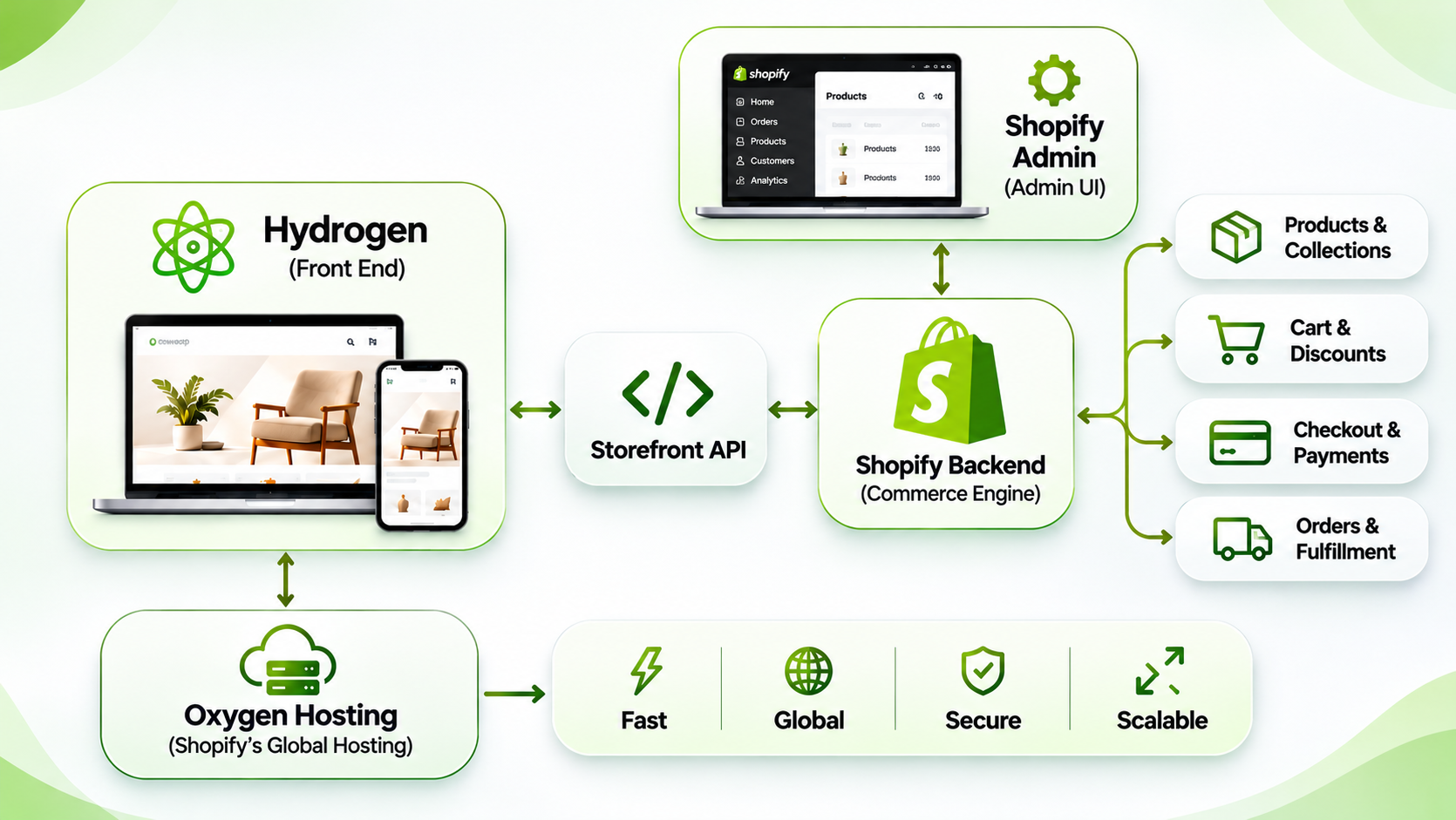
Hydrogen is Shopify’s framework for building headless storefronts. It is a React-based toolkit with Shopify-specific components, hooks and utilities, built on a modern routing and server-rendering stack. Shopify has evolved the underlying framework over time (it was originally built on Remix and has moved toward React Router), so check current documentation when starting a project.
What Hydrogen provides
- A starter template (Skeleton) and CLI tooling (shopify hydrogen commands) for local development, builds, previews and deployment.
- A Storefront API client with built-in caching strategies, so queries can be cached for a short or long period or not at all.
- Cart helpers that manage cart creation, line updates, discounts and buyer identity.
- Components for products and media, including image and variant selection helpers that integrate with Shopify’s CDN.
- SEO helpers to generate meta tags and structured data from fetched data.
- Analytics and consent integration to send standard events to Shopify and other tools, working with the Customer Privacy API.
- Internationalisation support through the @inContext directive and Shopify Markets.
- GraphQL code generation for typed queries.
- Streaming and progressive rendering patterns to improve perceived speed.
Oxygen
Oxygen is Shopify’s hosting platform for Hydrogen storefronts. It runs on a globally distributed edge runtime and integrates with Shopify admin through the Hydrogen sales channel, which handles storefront configuration, environment variables, deployments from Git and preview environments. Check Shopify’s current terms to see how Oxygen is included with your plan, because packaging and limits may change.
When Hydrogen makes sense
- You want the most Shopify-native path, with a React-based front end and first-party support.
- Your team knows React and is comfortable with modern server-rendering patterns.
- You want tight integration with Shopify features, analytics and hosting.
When to use something else
- Your engineering team already uses Next.js, Astro, Nuxt or another framework and has existing infrastructure, design systems and CI/CD.
- You are adding commerce to an existing site or app and need to fit its stack.
- You need native mobile apps or other non-web front ends. These can use the Storefront API directly.
- Your hosting or compliance requirements point to a specific vendor.
The Storefront API works with any framework. Shopify also publishes hydrogen-react, a set of framework-agnostic React components and hooks that work in Next.js and similar environments. The framework matters less than the team’s skill and the quality of the architecture.
What Is the Difference Between Shopify Hydrogen and Liquid?
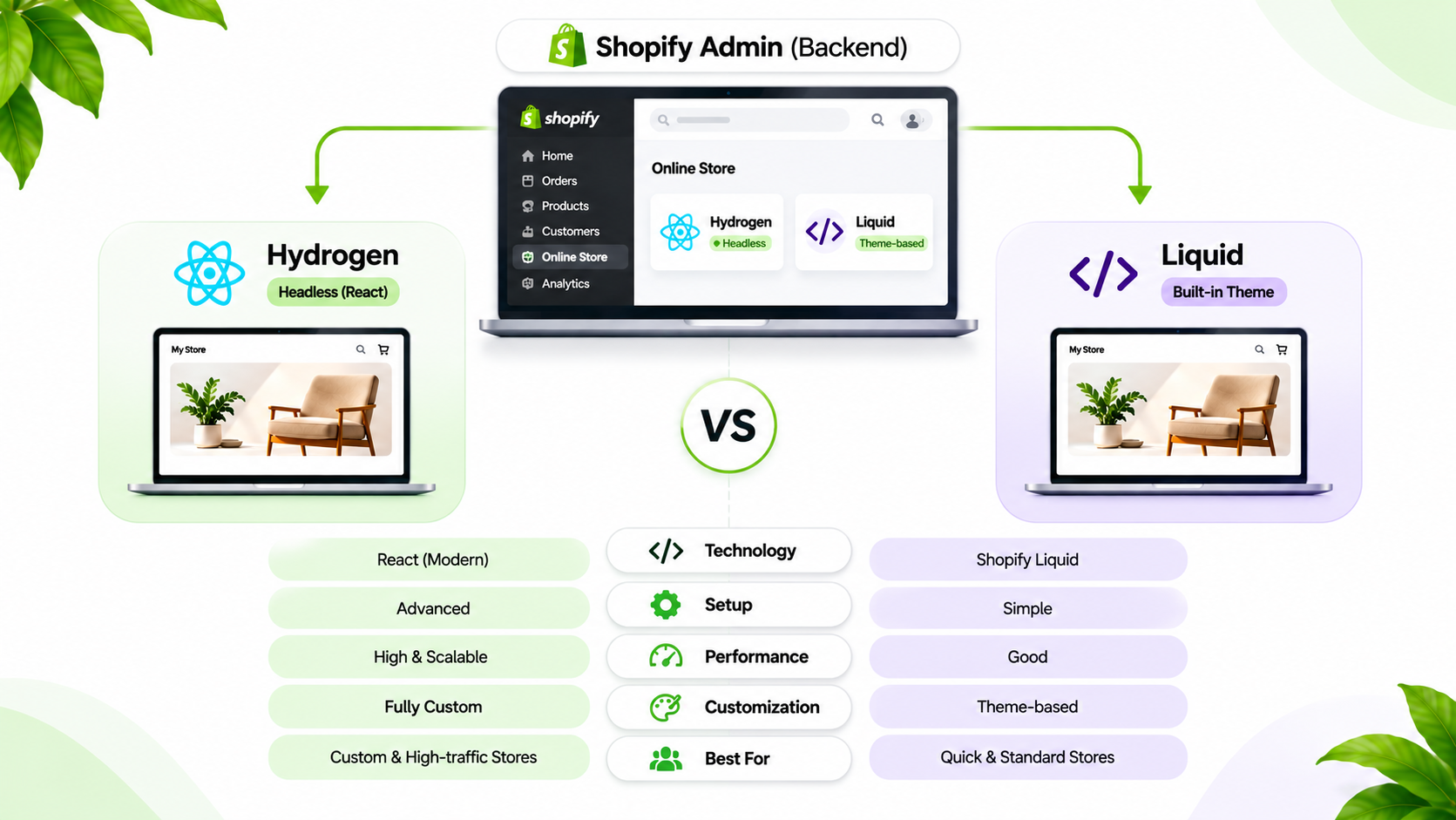
Liquid is Shopify’s open-source templating language, used in Online Store themes. Hydrogen is a React-based framework for building a separate storefront application. They solve the same visible problem (render a storefront) in fundamentally different ways.
| Factor | Liquid themes | Hydrogen (headless) |
| Language and skills | Liquid, HTML, CSS, JavaScript | React, JavaScript or TypeScript, GraphQL, Node-style tooling |
| Where code runs | On Shopify’s servers, with JS in the browser | On your edge or server runtime, with JS hydrating in the browser |
| Data access | Liquid objects provided by Shopify | You fetch data via the Storefront API with GraphQL queries |
| Routing and URLs | Fixed Shopify structure (/products/, /collections/, /pages/) | Fully defined by you, though matching Shopify URLs helps SEO continuity |
| Content editing | Theme editor with sections and blocks | CMS, metaobjects or custom editing tools |
| App compatibility | Large ecosystem through theme app extensions and app blocks | Only apps with headless support or APIs, some require custom work |
| Hosting | Included with Shopify | Oxygen or another host you manage |
| Performance control | Constrained by the theme and apps, but fast baseline | Full control, with full responsibility |
| Time to launch | Weeks | Months |
| Cost to build and maintain | Lower | Higher |
| Previewing and QA | Built-in theme previews | Preview deployments you configure |
| Typical team | Theme developer or agency | Front-end engineers, DevOps and often a CMS specialist |
The practical difference is ownership. With Liquid, Shopify owns the rendering platform and you customise within it. With Hydrogen, you own the rendering platform and Shopify provides the commerce data.
What Are the Benefits of Headless Shopify Development?
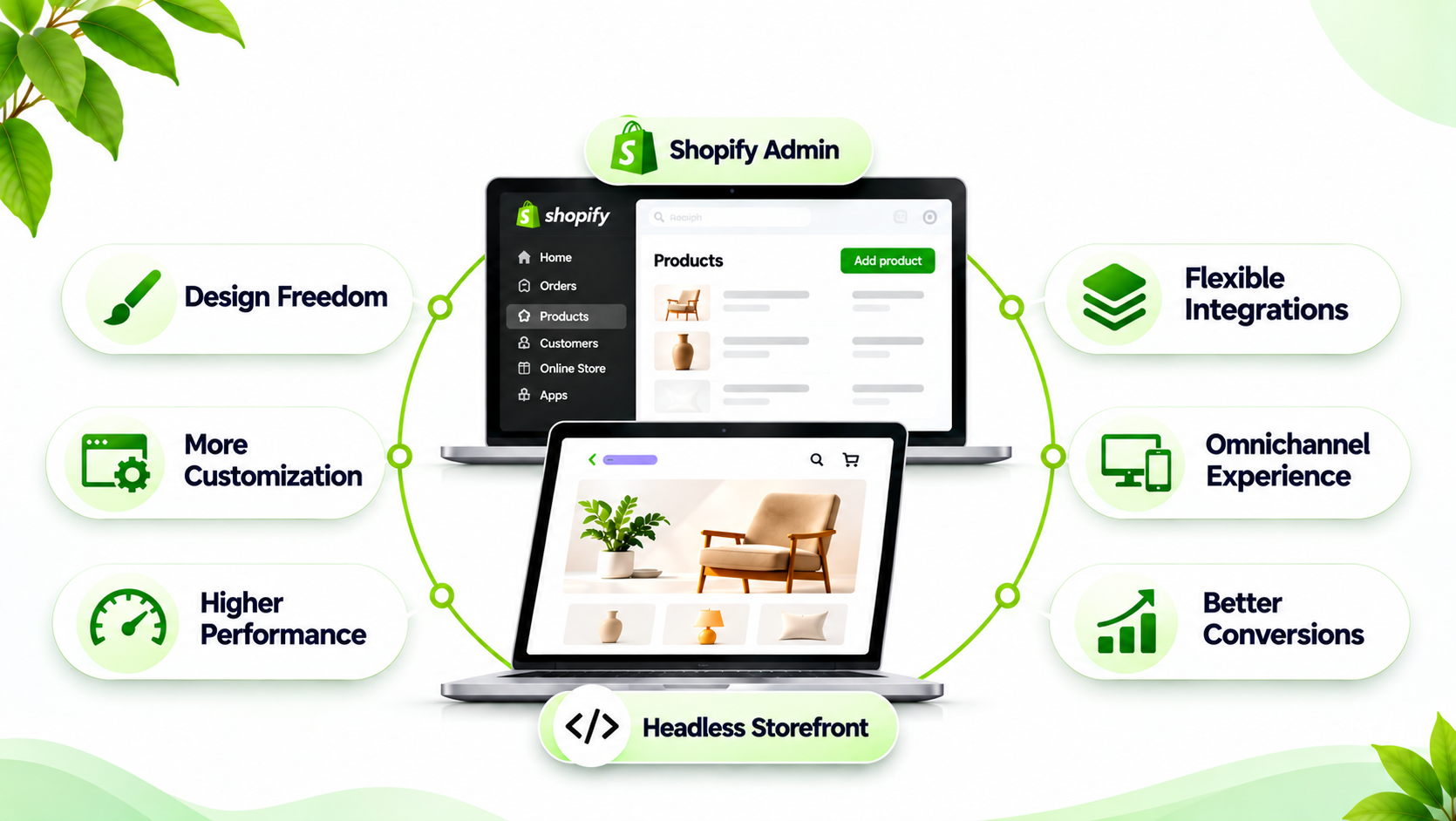
1. Design and experience freedom
Without theme constraints, designers can build any interface: immersive storytelling, configurators, interactive product visualisation, unconventional navigation and custom checkout entry points. Brands whose identity depends on a distinctive digital experience gain the most.
2. Performance control
You decide exactly what code ships. A lean headless build can deliver fast Largest Contentful Paint, small JavaScript bundles and edge-cached pages. You can use streaming, prefetching and component-level loading to tune perceived speed. This is a possibility, not a guarantee. Poorly built headless stores are often slower than good themes.
3. Flexible content and merchandising
A headless CMS lets content teams build rich pages, localise content independently of products, schedule campaigns and reuse content across channels. Structured content models can support editorial commerce and complex landing pages that are hard to manage with theme sections.
4. One commerce engine, many channels
The same Shopify back end can power a website, a native app, in-store kiosks, smart displays, social storefronts and partner portals. Product data, inventory and orders stay consistent while each channel gets its own interface.
5. Composable freedom
You can pick the best search, personalisation, reviews, subscriptions and PIM tools and combine them in your own front end, rather than accepting theme and app limitations.
6. Scalability and resilience
Shopify handles commerce load, including peak events, and a well-designed edge-hosted front end can absorb traffic spikes through caching. You can also add fallbacks so browsing continues even if a non-critical service is slow.
7. Developer experience and testing
Modern front-end tooling brings component libraries, automated tests, type safety, preview deployments and CI/CD pipelines. For engineering-led organisations, this is a significant productivity gain.
8. Advanced internationalisation
Combining Shopify Markets with a custom front end enables market-specific layouts, content and merchandising, local URL structures and per-market experiments beyond what a single theme supports.
9. Future flexibility
Because the front end is decoupled, you can redesign it, replace it or add new channels without replatforming commerce. You also avoid being constrained by theme update cycles.
Who benefits most
| Business profile | Why headless helps |
| Design-led or luxury brands | Experience is the product |
| Content-driven commerce | Editorial and shopping are deeply connected |
| Large catalogues with complex search | Custom discovery and merchandising |
| Multi-brand or multi-region groups | Shared commerce engine, distinct experiences |
| Brands with apps and non-web channels | Single source of truth across touchpoints |
| Engineering-led teams | They can use and maintain a modern stack |
The Trade-Offs and Risks
Headless trades convenience for control. Before committing, understand what you give up.
- Higher build cost and longer timelines. You build and test things a theme provides by default: navigation, cart drawer, search UI, filters, account pages, localisation, accessibility, analytics, consent and error states.
- Ongoing engineering dependency. Content, design and merchandising changes that were theme-editor tasks may now need developers or a well-configured CMS.
- App compatibility. Many Shopify apps work by injecting code into themes through theme app extensions or app blocks. These generally do not run in a custom front end. You need apps that publish headless SDKs or APIs, or you must build the feature yourself. Review reviews, subscriptions, loyalty, bundles, search and personalisation apps before you commit.
- No theme editor and theme previews. You need a replacement editing workflow and preview environments. Merchandisers who rely on drag-and-drop sections will feel the loss if the CMS is not set up well.
- SEO responsibility moves to you. Meta tags, canonicals, sitemaps, redirects, structured data and rendering must all be implemented and tested.
- Performance is not automatic. Heavy JavaScript, unoptimised images, client-side data fetching and slow third-party calls can make a headless site slower than a decent theme.
- Infrastructure and observability. You own hosting configuration, caching, logging, error monitoring and incident response.
- Version and dependency upkeep. Frameworks, the Storefront API version and libraries need regular upgrades.
- Checkout context switching. Checkout is hosted by Shopify. Branding it to match your custom storefront, and keeping tracking consistent across domains, takes planning.
- Complexity in testing. More moving parts mean more integration points to test, and more failure modes.
These are manageable with the right team and budget. They are unmanageable when headless is chosen for fashion rather than need.
Is Headless Shopify Better Than Traditional Shopify?
Neither is better in general. Each is better for a different business context.
| Dimension | Traditional Shopify (themes) | Headless Shopify |
| Speed to launch | Fast | Slower |
| Initial cost | Lower | Higher |
| Ongoing cost | Lower | Higher, with infrastructure and engineering |
| Design flexibility | High within theme limits | Very high |
| Performance potential | Good baseline, limited by theme and apps | Excellent potential, but dependent on engineering |
| Content management | Theme editor, metaobjects | CMS or custom tools, more flexible, more setup |
| App ecosystem | Full | Partial, headless-compatible only |
| SEO | Strong defaults | Strong potential, manual implementation |
| Maintenance | Shopify handles platform, theme updates optional | You maintain front end, hosting and dependencies |
| Multi-channel | Limited | Strong |
| Risk | Lower | Higher |
| Team required | Merchant plus theme developer | Product, design, front-end engineers, DevOps, QA |
A weighted decision framework
Score each criterion from 1 (low) to 5 (high), multiply by the weight and add. A high total supports headless.
| Criterion | Weight | A score of 5 looks like |
| Experience differentiation need | 20% | The storefront experience is a core competitive advantage |
| Requirements a theme cannot meet | 20% | Features that cannot be built or maintained inside Liquid themes |
| Content and campaign complexity | 10% | Editorial commerce, many markets and landing pages |
| Multi-channel plans | 10% | Web, apps, kiosks or partner experiences from one commerce engine |
| Performance sensitivity | 10% | Paid mobile traffic where speed directly affects margin |
| Engineering capacity | 15% | In-house team or retained agency able to own the stack |
| Budget and runway | 10% | Funding for build and a multi-year maintenance plan |
| Tolerance for risk and longer timelines | 5% | No hard launch deadline |
Totals below about 2.5 point toward an optimised theme, 2.5 to 3.5 suggest a hybrid approach, and above 3.5 make full headless worth serious evaluation. Treat the thresholds as guidance, not law.
Also weigh the alternative honestly. A custom Online Store 2.0 theme with metaobjects, custom sections, Shopify Functions and a performance-focused build can deliver 80 to 90 percent of what many merchants want from headless, at a fraction of the cost.
Is Headless Shopify Better for SEO and Website Performance?
Headless can be excellent for SEO and speed, but it is not inherently better. It shifts responsibility from Shopify’s defaults to your implementation.
Performance: potential and pitfalls
Shopify’s Liquid themes are server-rendered and delivered through Shopify’s CDN, so a lean theme is fast out of the box. Where themes slow down is usually app bloat and heavy scripts. Headless offers these advantages:
- Full control over JavaScript, CSS and asset loading.
- Edge rendering and caching close to shoppers.
- Streaming and deferred loading for slow components.
- Granular image optimisation and responsive loading.
- Route-level code splitting so shoppers only download what a page needs.
Headless also introduces risks:
- Hydration cost: large React bundles can hurt Interaction to Next Paint (INP) on mid-range phones.
- Waterfall data fetching: multiple sequential API calls add latency.
- Cache misses: uncached personalised or localised pages hit APIs on every request.
- Third-party scripts: analytics, chat, review widgets and tag managers still load in the browser.
- Layout shift: client-rendered content that appears late can raise Cumulative Layout Shift (CLS).
Use real-user data (Chrome User Experience Report, Search Console Core Web Vitals and your own RUM) as your benchmark: Largest Contentful Paint under 2.5 seconds, INP under 200 milliseconds and CLS under 0.1 on mobile. Agree budgets before you build and test against them throughout.
SEO: what you must implement
| SEO element | Headless requirement |
| Rendering | Server-side or static rendering so crawlers receive complete HTML. Do not rely on client-only rendering for core content |
| Title tags and meta descriptions | Pull from Shopify SEO fields and CMS, then output in the document head |
| Canonical tags | Set explicitly, consistent with your URL strategy |
| URL structure | Preserve existing /products/, /collections/ and /pages/ paths wherever possible to avoid redirects |
| Redirects | Maintain Shopify URL redirects and any legacy mappings, returning single-hop 301s |
| XML sitemaps | Generate from Storefront API data, include products, collections, pages and blog content, and keep them fresh |
| robots.txt | Configure to allow important content, block internal search and parameter traps |
| Structured data | Output Product, Offer, BreadcrumbList, Organization, FAQPage and Article JSON-LD with accurate prices and availability |
| Hreflang and Markets | Implement correct alternates for languages and regions |
| Faceted navigation | Control crawlable filter URLs, use canonicals or noindex for low-value combinations |
| Pagination and internal linking | Crawlable links, not JavaScript-only navigation |
| Status codes | Return proper 404 and 410 responses, not soft 404 pages with a 200 code |
| Images | Descriptive alt text, modern formats, correct dimensions |
| Analytics and consent | Server-compatible tracking that respects consent |
SEO monitoring for headless
Because there is no Shopify-managed theme output to rely on, add checks to your pipeline: automated crawls on preview builds, schema validation, Lighthouse CI, broken link detection, redirect tests and comparison of rendered HTML with the source of truth. After launch, monitor Search Console coverage, Crawl Stats, indexing, rankings and server logs.
AI search and answer engines
Structured, complete product and content data helps AI assistants and answer engines understand your catalogue. Headless gives you freedom to publish rich structured data and clean semantic HTML, but you must do it deliberately. Keep prices, availability and policies consistent across your pages, structured data and product feeds, and review your robots.txt for AI crawlers according to your policy.
Verdict
A disciplined headless build can beat a typical theme on speed and give SEO teams more control. A rushed one can lose rankings through missing redirects, client-side rendering problems and slower pages. If your main motivation is SEO or speed alone, first see how far a clean-up of your current theme and apps takes you.
How Much Does Headless Shopify Development Cost?
Costs vary widely with scope, team and region. The figures below are planning estimates drawn from the shape of typical projects. They are not quotes and are not published market benchmarks, so use them to frame conversations and ask agencies for itemised proposals.
Indicative build budgets
| Project type | Typical scope | Indicative range (USD) |
| Hybrid or partial headless | A few custom experiences (configurator, campaign hub, content area) alongside a Liquid theme | $15,000 to $50,000 |
| Mid-market full headless | Custom front end on Hydrogen or Next.js, CMS, standard integrations, one or two markets | $50,000 to $150,000 |
| Enterprise composable | Multi-market, multi-brand or B2B, custom search and personalisation, ERP and PIM integration | $150,000 to $500,000+ |
Smaller experimental builds can cost less, and large enterprise programmes can run well beyond the top of these bands.
An illustrative effort model
Here is how a mid-market full headless build might be estimated. The numbers are for demonstration only.
| Workstream | Estimated hours |
| Discovery, architecture and technical planning | 80 to 140 |
| UX, UI design and design system | 140 to 260 |
| Front-end foundation (routing, layout, data layer, caching) | 120 to 220 |
| Commerce features (product, collection, search, cart, account, localisation) | 300 to 520 |
| CMS modelling and integration | 100 to 200 |
| Third-party integrations (reviews, search, subscriptions, analytics, consent) | 100 to 220 |
| SEO, structured data and redirects | 60 to 120 |
| Accessibility and performance engineering | 80 to 160 |
| QA, UAT and bug fixing | 160 to 280 |
| DevOps, hosting, CI/CD and monitoring | 60 to 120 |
| Project management and launch | 100 to 180 |
| Total | 1,300 to 2,420 |
At blended rates of $60 to $120 per hour, that is roughly $78,000 to $290,000. Rates vary by region and seniority, and efficient teams often finish in fewer hours.
Cost drivers
- Number of unique templates and custom interactions.
- Catalogue complexity, variants, bundles and configurators.
- Number of markets, languages and currencies.
- B2B requirements such as company accounts, price lists and quotes.
- Integrations with ERP, PIM, OMS, loyalty, subscription and personalisation tools.
- Design depth, animation and 3D or video experiences.
- Accessibility and performance targets.
- Number of apps that need replacing with headless-compatible alternatives or custom builds.
- Content migration and CMS setup.
- Team location, seniority and timeline pressure.
Ongoing costs
| Item | Typical considerations |
| Maintenance and development | Often 15 to 30 percent of the build cost per year, or a monthly retainer |
| Hosting | Can be low on managed edge platforms, and rise with traffic, builds and enterprise plans |
| CMS | Free tiers to thousands of dollars per month depending on seats, locales and volume |
| Search and personalisation | Hundreds to thousands of dollars per month based on records and queries |
| Monitoring and observability | Error tracking, logs, uptime and RUM tools |
| Shopify plan | Standard plans, or Plus if you need advanced checkout customisation or multiple storefronts. Verify current pricing with Shopify |
| Apps and APIs | Subscription and usage fees for headless-compatible tools |
| Upgrades | Quarterly Storefront API versions, framework upgrades and security patches |
Three-year total cost of ownership
Compare options over three years: initial build, platform and hosting fees, tooling, maintenance, and the expected revenue effect. A headless build that costs three times as much as a custom theme needs to produce a clearly higher return, through conversion lift, faster campaigns, new channels or reduced app spend, to justify itself. Build a simple model:
- Estimate annual revenue and gross margin.
- Estimate a realistic uplift range, from conservative to optimistic, from performance, conversion or new-channel revenue.
- Subtract added three-year costs relative to your alternative.
- Include a contingency of 15 to 25 percent for complexity and change.
If the numbers only work under optimistic assumptions, start with a hybrid approach.
Ways to control cost
- Start with a hybrid scope and extend later.
- Use Hydrogen’s starter template and proven component libraries rather than building from zero.
- Choose headless-ready apps early.
- Limit custom interactions to those that move metrics.
- Reuse design systems and templates across pages.
- Phase markets and languages.
- Invest in documentation and automated testing to keep maintenance predictable.
When Does Your Business Need Headless Commerce?
Signals that headless is a good fit
- Your brand experience cannot be built inside a theme without constant workarounds.
- You are selling through multiple front ends: web, native apps, in-store displays, partner portals.
- Your content and commerce need to be tightly merged, with editorial teams publishing at volume.
- You run many markets, brands or storefronts that share a catalogue but need different experiences.
- You have specific performance requirements and the engineering team to deliver them.
- Your tech stack is already composable (headless CMS, PIM, search) and the front end is the missing piece.
- You have outgrown a customised theme, and the cost of fighting it is higher than the cost of a rebuild.
- You need advanced B2B or catalogue experiences that standard themes struggle with.
Signals that you should not go headless yet
- Your main motivation is that it sounds modern or that competitors are doing it.
- You do not have front-end engineers or a retained agency to maintain the stack.
- Your app stack depends heavily on theme-based apps with no headless equivalents.
- Your catalogue is simple, your traffic modest and your budget limited.
- You need to launch quickly, or to change content daily without developers.
- Your problems are page speed or conversion on a heavy theme, which can often be solved by clean-up and optimisation.
- You are a new store without proven demand.
Alternatives to consider first
- Optimise your current theme: audit apps, trim scripts, fix images and improve templates.
- Customise a strong base theme with targeted sections and Liquid work.
- Build a custom Online Store 2.0 theme, with a design system, metaobjects and performance budgets.
- Go hybrid, adding a headless experience for the one area that needs it.
- Use Shopify Plus features such as checkout extensibility and Functions to improve the funnel without changing the storefront architecture.
Headless is a strategic architecture choice. Treat it like one, with clear business cases and an honest view of team capacity.
Shopify Headless Integration: The Surrounding Stack
A headless storefront is only as good as the services around it. Each integration needs a plan for data flow, caching, authentication, failure handling and ownership.
| Capability | Examples | Headless considerations |
| Headless CMS | Contentful, Sanity, Storyblok, Prismic, Builder.io, Shopify metaobjects | Content modelling, live preview, localisation, role-based editing, webhooks to rebuild or revalidate pages |
| Search and merchandising | Shopify Storefront search, Algolia, Klevu, Searchspring, Constructor | Index sync from Shopify, filter and facet design, analytics, synonyms, ranking rules |
| Reviews and UGC | Judge.me, Okendo, Yotpo, Stamped | Use the vendor’s API or headless widget, pass structured data for rich results, avoid layout shift |
| Subscriptions | Recharge, Loop, Shopify selling plans | Storefront API selling plans, customer portal integration, checkout behaviour |
| Loyalty and referrals | Smile, Yotpo, LoyaltyLion | API-driven balances and redemption inside your UI |
| Email and SMS | Klaviyo, Omnisend, Attentive | Send events and identify customers from the front end or server, handle consent |
| Analytics | GA4, server-side tagging, Shopify analytics, Meta Conversions API | Consistent event schema, deduplication, cross-domain tracking to checkout |
| Consent and privacy | Shopify Customer Privacy API, consent management platforms | Respect consent before firing scripts, pass signals to checkout |
| Personalisation and testing | Server-side experimentation, recommendation engines | Avoid flicker, keep caching strategy compatible |
| PIM, ERP and OMS | Akeneo, Pimcore, NetSuite, SAP, custom services | Sync via Admin API, bulk operations and webhooks, idempotent processing |
| B2B | Shopify B2B, company locations, catalogs | Pass buyer context to the Storefront API, handle price lists and net terms |
| Markets and localisation | Shopify Markets, translation tools | @inContext, localised URLs, hreflang, currency formatting |
| Shop Pay and wallets | Shop Pay, Apple Pay, Google Pay | Hosted in checkout, but entry points can be surfaced on product and cart pages |
Shopify Flow, Functions and checkout extensibility still apply
Because orders, discounts and checkout remain in Shopify, Shopify Flow automations, Shopify Functions (custom discounts, shipping and payment logic, cart validation) and checkout UI extensions continue to work in a headless setup. This is a major advantage over fully custom commerce stacks.
Integration design principles
- Use a BFF layer when a page needs data from several systems, so the browser makes one call rather than many.
- Define timeouts and fallbacks for each external dependency, so a failing review widget does not take down a product page.
- Keep secrets server-side and rotate them.
- Use webhooks plus revalidation to refresh caches when product or content data changes.
- Maintain an integration map documenting each service, owner, data direction, error handling and runbook.
How to Migrate a Shopify Store to Headless Commerce
Migration is less about moving data (your products, customers and orders already live in Shopify) and more about replacing the presentation layer without damaging revenue, SEO or operations. Follow this phased approach.
Phase 1: Discovery and business case
- Define goals with measurable targets: conversion, speed, content velocity, new channels.
- Audit the current store: templates, theme customisations, apps, scripts, integrations, markets and content volume.
- Capture a baseline: Core Web Vitals, conversion by device, organic traffic and rankings, top landing pages, crawl data and revenue by template.
- Choose scope: hybrid, phased full headless or big-bang. Phased migration is generally safer.
- Decide framework, hosting, CMS and search with a written architecture decision record.
Phase 2: App and feature audit
List every app and custom feature and classify it as:
| Category | Action |
| Works in headless through an API or SDK | Keep and integrate |
| Theme-only app | Replace with a headless-compatible alternative |
| Native Shopify feature now | Retire the app and use the native capability |
| Custom Liquid feature | Rebuild as a component |
| No longer used | Remove |
This step often changes the project budget more than any other.
Phase 3: Set up Shopify for headless
- Install the Shopify Headless or Hydrogen sales channel to create storefronts and generate Storefront API tokens and Customer Account API credentials.
- Expose the product, variant and collection metafields and the metaobjects your front end needs to the Storefront API.
- Configure Markets, languages, domains and checkout domain settings.
- Set checkout branding and extensions so the handoff from your storefront looks consistent.
- Create separate development, staging and production configurations with their own tokens.
Phase 4: Architecture and design
- Design a system of reusable components and templates rather than page-by-page layouts.
- Model content: which content lives in Shopify (products, metaobjects) and which in the CMS.
- Plan routing to preserve existing URLs: /products/handle, /collections/handle, /pages/handle, /blogs/news/article, and any custom paths. Keeping URLs identical removes most redirect risk.
- Define caching and revalidation rules per page type.
- Agree performance and accessibility budgets.
Phase 5: Build
Build in vertical slices, shipping working end-to-end paths early: product page, collection page, cart, then checkout handoff and account. Build the SEO layer from the start: metadata, structured data, sitemaps, redirects and robots. Configure CI with linting, type checks, tests, Lighthouse budgets and preview deployments on every pull request.
Phase 6: SEO and redirect preparation
- Crawl the live store and export all indexable URLs, titles, descriptions, canonicals, hreflang and structured data.
- Compare the same fields on the headless staging site using a crawler. Fix every gap.
- Export Shopify URL redirects and legacy mappings, and implement them in the new routing layer with single-hop 301s.
- Validate structured data in Google’s Rich Results Test.
- Prepare XML sitemaps and confirm they list only canonical, indexable URLs.
- Make sure staging is not indexed, and plan removing any block at launch.
Phase 7: Test
- Functional: variants, inventory states, discount codes, selling plans, cart edits, gift cards, localisation, search and filters.
- Checkout and payments: test orders across payment methods, shipping rates, taxes and markets.
- Analytics: purchase and funnel events firing once, consent respected, attribution across the checkout handoff.
- Performance: lab and field tests on mid-range mobile devices and slow networks.
- Accessibility: keyboard, screen reader and contrast testing.
- Resilience: simulate API errors, slow responses and third-party failures.
- SEO: crawl comparison, redirect tests and rendered HTML checks.
- User acceptance: merchandisers and marketers edit content and publish a campaign in the staging environment.
Phase 8: Launch with a low-risk rollout
Options, from safest to boldest:
- Hybrid or path-based rollout. Serve selected paths from the headless app (for example a new campaign hub) behind the same domain using a reverse proxy or edge routing, while the rest remains on the Liquid theme.
- Gradual traffic split. Route a percentage of visitors, or a set of templates, to the new front end, compare metrics, then increase.
- Full cutover. Switch DNS or routing for the entire storefront at a quiet time, with the old theme kept ready for rollback.
For every option, prepare a rollback plan, lower DNS TTLs in advance, freeze content during the switch, and monitor errors, conversion, search coverage and server logs in real time.
Phase 9: Post-launch
- Watch Search Console coverage, crawl errors and rankings daily for two weeks, then weekly.
- Compare conversion and Core Web Vitals against the baseline.
- Fix 404s, redirect gaps and tracking issues quickly.
- Keep the old theme unpublished but available for a defined period.
- Document runbooks, upgrade procedures and ownership.
- Plan a regular cadence for Storefront API version upgrades and dependency updates.
Typical timeline
| Scope | Typical duration |
| Hybrid experience | 6 to 12 weeks |
| Mid-market full headless | 4 to 8 months |
| Enterprise composable | 8 to 14 months |
These are planning ranges, not guarantees. Delays usually come from app replacements, content migration, integration readiness and slow decisions.
How to Choose a Headless Shopify Development Agency
Headless projects fail more often from poor architecture and weak delivery than from technology limits. Choose a partner with real evidence.
Evaluation checklist
- Relevant headless portfolio: live stores of similar scale and complexity, not only design mock-ups. Test their Core Web Vitals and SEO health yourself.
- Shopify depth: experience with the Storefront API, Customer Account API, Hydrogen or alternative frameworks, Markets, Functions and checkout extensibility, and Shopify Plus development where relevant.
- Architecture capability: can they explain trade-offs in rendering strategy, caching, state management and hosting, and document decisions?
- SEO competence: a dedicated plan for URL parity, redirects, structured data, sitemaps and post-launch monitoring.
- Performance engineering: budgets, tooling and evidence of past improvements.
- Team composition and seniority: who actually builds the project, and who owns architecture.
- Process and transparency: discovery, backlog, demos, preview environments, QA practices and weekly reporting.
- App and integration experience: how they replace theme-based apps and integrate CMS, search, subscriptions and ERP systems.
- Ownership and exit: you own the code, the repositories, the infrastructure accounts and the documentation.
- Maintenance model: retainer terms, response times, upgrade responsibilities and incident handling.
- Honest advice: a good shopify development agency will tell you if hybrid or an optimised theme is a better fit.
- References: at least one current client you can speak to about delivery and aftercare.
Questions to ask in the first call
- What would you keep, change or retire from my current setup, and why?
- Which of my apps will not work headless, and what are the alternatives?
- How will you protect my organic traffic during migration?
- What is your rollout and rollback plan?
- How will my marketers edit and preview content?
- What performance budgets will you commit to, and how will you measure them?
- Who maintains the system after launch, and what does it cost?
- What are the top three risks you see in my project?
Proposal red flags
- A fixed price without discovery or architecture work.
- No mention of SEO, redirects, accessibility or testing.
- Promises of guaranteed speed or ranking gains.
- Vague plans for content editing and previews.
- Reluctance to give code and infrastructure ownership.
- Recommending headless without questioning your goals.
- No maintenance or upgrade plan.
- Heavy reliance on a single developer.
Comparing quotes
Ask for an itemised proposal by workstream (discovery, design, front end, CMS, integrations, SEO, QA, DevOps, project management), the assumptions behind each estimate, the team and rates, and the change-order process. Compare deliverables and risk allocation, not only totals.
Headless Shopify Development Services From Viha Digital Commerce
Viha Digital Commerce works with Shopify merchants on custom storefronts, themes, migrations and integrations. Depending on what your business actually needs, we can help you with:
- Headless readiness review: a candid assessment of whether headless, hybrid or an optimised Online Store 2.0 theme is the right route, with a scored decision model and budget range.
- Architecture and planning: framework, hosting, CMS, search and integration decisions documented for your team.
- Custom Shopify storefront development: Hydrogen or other framework builds on top of the Storefront API, with design systems and reusable components.
- Shopify headless integration: CMS, search, reviews, subscriptions, analytics, consent and back-office systems.
- Shopify Migration and SEO preservation: URL parity, redirects, structured data, staged rollouts and post-launch monitoring.
- Performance engineering: budgets, audits and optimisation for Core Web Vitals.
- Support and maintenance: upgrades, monitoring and continuous improvement after go-live.
If you are weighing headless against a custom theme, talk to Viha Digital Commerce. We will review your store, goals and constraints and recommend the simplest architecture that meets them.
Frequently Asked Questions
Can I go headless on any Shopify plan?
The Storefront API is available across Shopify plans, so technically yes. Advanced checkout customisation, multiple storefronts and some B2B capabilities depend on Shopify Plus. Check Shopify’s current plan comparison and Hydrogen and Oxygen terms before you budget.
Can I reverse a headless build and return to a Liquid theme?
Yes, because products, customers and orders never left Shopify. You would republish or build a theme and reroute traffic. What you cannot easily reverse is the investment in custom components and CMS content, so keep content models portable and document the front end.
How big a team does a headless storefront need?
A mid-market store typically needs a product owner, a designer, two or more front-end engineers, someone for DevOps and QA, and a CMS or merchandising lead, whether in-house or through an agency retainer. A single developer can build a prototype, but sustained operation, upgrades and incident response need shared ownership.
Is a headless storefront more secure or less secure?
Checkout, payment data and Shopify admin remain on Shopify, which keeps most payment security and PCI responsibility with the platform. Your new risks sit in the front end and middleware: exposed tokens, insecure custom endpoints, vulnerable dependencies and third-party scripts. Security reviews and dependency scanning should be part of your pipeline.
How do merchandisers preview unpublished content?
Use preview deployments and your CMS’s draft mode, which render unpublished entries on a protected URL. Draft products can be previewed with a token that has the right access. Test this workflow with your editors during UAT, not after launch.
Do Shopify Flow and Shopify Functions still work?
Yes. Flow automations and Functions operate on Shopify’s side of the stack, so discounts, shipping rules, cart validation and back-office workflows continue unchanged. Your front end simply needs to display the results, such as applied discounts, correctly.
Conclusion
Headless Shopify development is a powerful architecture for brands that have outgrown what themes can deliver. It offers freedom over design, performance, content and channels while keeping Shopify’s proven commerce engine and checkout. It also asks for more budget, stronger engineering and careful SEO and operations management than a theme-based store.
The right question is not whether headless is better, but whether it is better for your business, right now. Score your requirements honestly, test the alternatives, start with a hybrid scope if the case is unclear, and choose a partner who is willing to tell you what you do not need. When the case is real, a phased, well-instrumented migration lets you capture the benefits without putting revenue at risk.
Considering headless for your Shopify store? Viha Digital Commerce can assess your requirements, recommend the right architecture and build and support it. Get in touch to start with a readiness review.








 All-in-One Solution
 Customizable Services
 Assortment of Payment Options
 Optimized Sales Processes
 Omnichannel Maintenance & Support
 Custom Shopping Cart
 Advanced Security & Support
 API Payment & Logistic Integrations
 Social Media Integration
 Professional Communication
 Skilled Developers
 Timing is Everything
 Secure Agreements
 Support Tilt
 Quality Top Up Most
 White Development Pathway
 Competitive Price Point