
Custom Shopify App Development vs. Third-Party Apps: Which Is Better for Your Business?
Key Takeaways
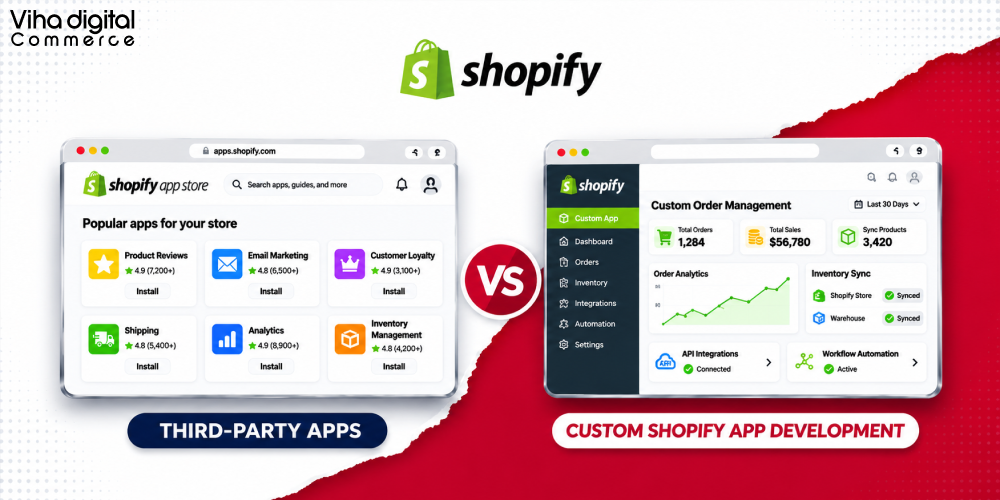
- Third-party Shopify apps are ready-made products you install from the Shopify App Store. Custom Shopify apps are built for one business, around its exact workflows, data, and systems.
- Neither is better in general. Third-party apps win on speed, cost, and low risk for common needs. Custom apps win when your process is unique, your volume makes subscriptions expensive, or off-the-shelf tools create friction, performance problems, or data risks.
- The cheapest path is often a third-party app plus light integration. The best path for many growing stores is a hybrid: buy commodity features, build the differentiating ones.
- Custom development is a product, not a project. Budget for hosting, monitoring, API version upgrades, and ongoing improvements, typically a meaningful percentage of build cost every year.
- Decide with numbers: three-year total cost of ownership, revenue or time saved, risk, and the capacity of your team to own what gets built.
Quick Answer: Custom Shopify Apps or Third-Party Apps?
Choose a third-party app when a well-reviewed app already solves your problem, your volume is moderate, and your process is standard. It launches in hours, costs a predictable subscription, and is maintained by the vendor. Choose custom Shopify app development when no app fits your workflow, when you need to connect Shopify to ERP, WMS, PIM, or other internal systems, when you need custom discount, checkout, or B2B logic, when subscription costs scale unreasonably with orders, or when you must control data, performance, and security tightly. Many businesses combine both, using third-party apps for reviews, email, and loyalty while building custom apps for operations and integrations that give a competitive edge. Custom Shopify app development typically starts around $5,000 to $15,000 for a focused app and reaches well beyond $100,000 for complex, multi-system platforms, according to the planning ranges in this guide.
This guide from Viha Digital Commerce explains the technical and commercial differences, shows how a custom app is built, compares costs over three years, and gives you a decision framework and an agency checklist.
What Is the Difference Between Custom Shopify Apps and Third-Party Apps?
A Shopify app is software that extends a store through Shopify’s APIs and extension points. It can read and write store data, add interfaces to the admin, add blocks to the storefront, change checkout behaviour, run background jobs, and connect Shopify to other systems.
Third-party apps are built by independent vendors and sold to many merchants, usually through the Shopify App Store. You install them, grant permissions, configure settings, and pay the vendor’s pricing plan. The vendor owns the code, roadmap, hosting, and support.
Custom Shopify apps are built for a specific merchant or group of stores. The business (or its agency) owns the requirements and, typically, the code and infrastructure. The app does exactly what that business needs, and nothing else.
Side-by-side comparison
| Factor | Third-party app | Custom Shopify app |
| Built for | Many merchants with common needs | One business and its workflows |
| Time to value | Minutes to days | Weeks to months |
| Upfront cost | Low or free trial | Higher build cost |
| Ongoing cost | Subscription, often scaling with orders, products, or usage | Hosting, maintenance and enhancements |
| Feature fit | Broad, sometimes bloated, sometimes missing what you need | Exact fit |
| Customisation | Limited to vendor settings and sometimes APIs | Unlimited within Shopify’s platform rules |
| Control of code and data | Vendor controls code; data handling follows vendor policy | You control code, hosting, data model and retention |
| Roadmap | Vendor decides | You decide |
| Support | Vendor support, quality varies | Your agency or team, as agreed |
| Performance impact | Varies, some add storefront scripts | You control what is shipped |
| Risk | Vendor changes pricing, features, or shuts down | Delivery risk, key-person dependency, maintenance burden |
| Best for | Standard needs, speed, low risk | Unique workflows, integrations, scale, competitive differentiation |
The types of Shopify apps in more detail
| App type | How it is distributed | Typical use |
| Public app listed on the App Store | Reviewed by Shopify, installed by any merchant, billed through Shopify’s Billing API | Third-party products |
| Public app with custom distribution | Not listed, installed on specific stores through an install link | Agency-built apps for a few clients, or a private tool across several of your stores |
| Custom app for a single store | Created for, and installed on, one store (Shopify has been moving custom app creation toward the Dev Dashboard, so check the current process) | Internal tools and integrations for one merchant |
| Store-owned scripts and theme edits | Not apps | Often used in place of apps, but harder to maintain and not portable |
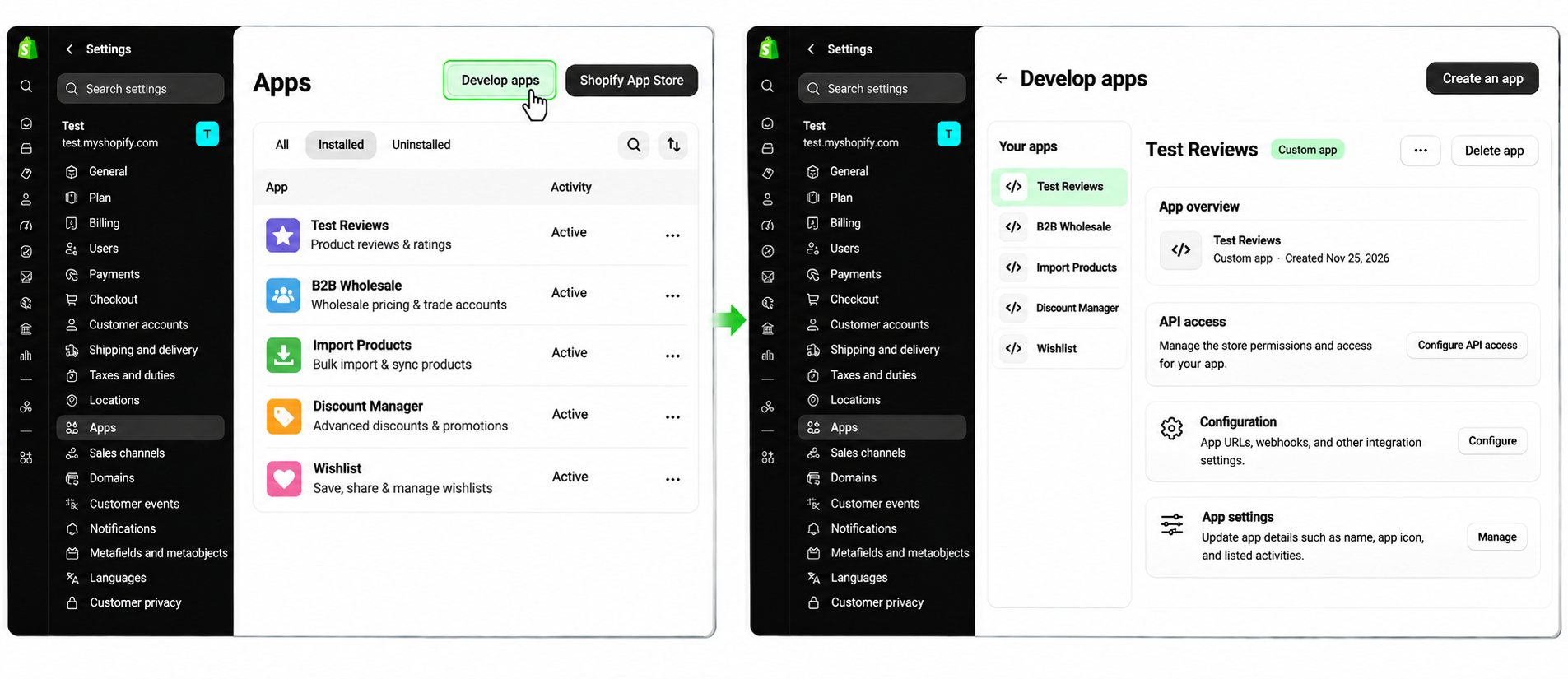
When businesses say custom app, they usually mean one of the middle two: an app built for them and installed only on their stores. Whether you need a listed product or a private tool changes the work: public apps must pass Shopify’s review, implement mandatory privacy webhooks and use Shopify Billing, while private tools can skip those steps.
Extension points: where apps live in Shopify
Shopify apps are not just back-end scripts. They can appear and act in many places:
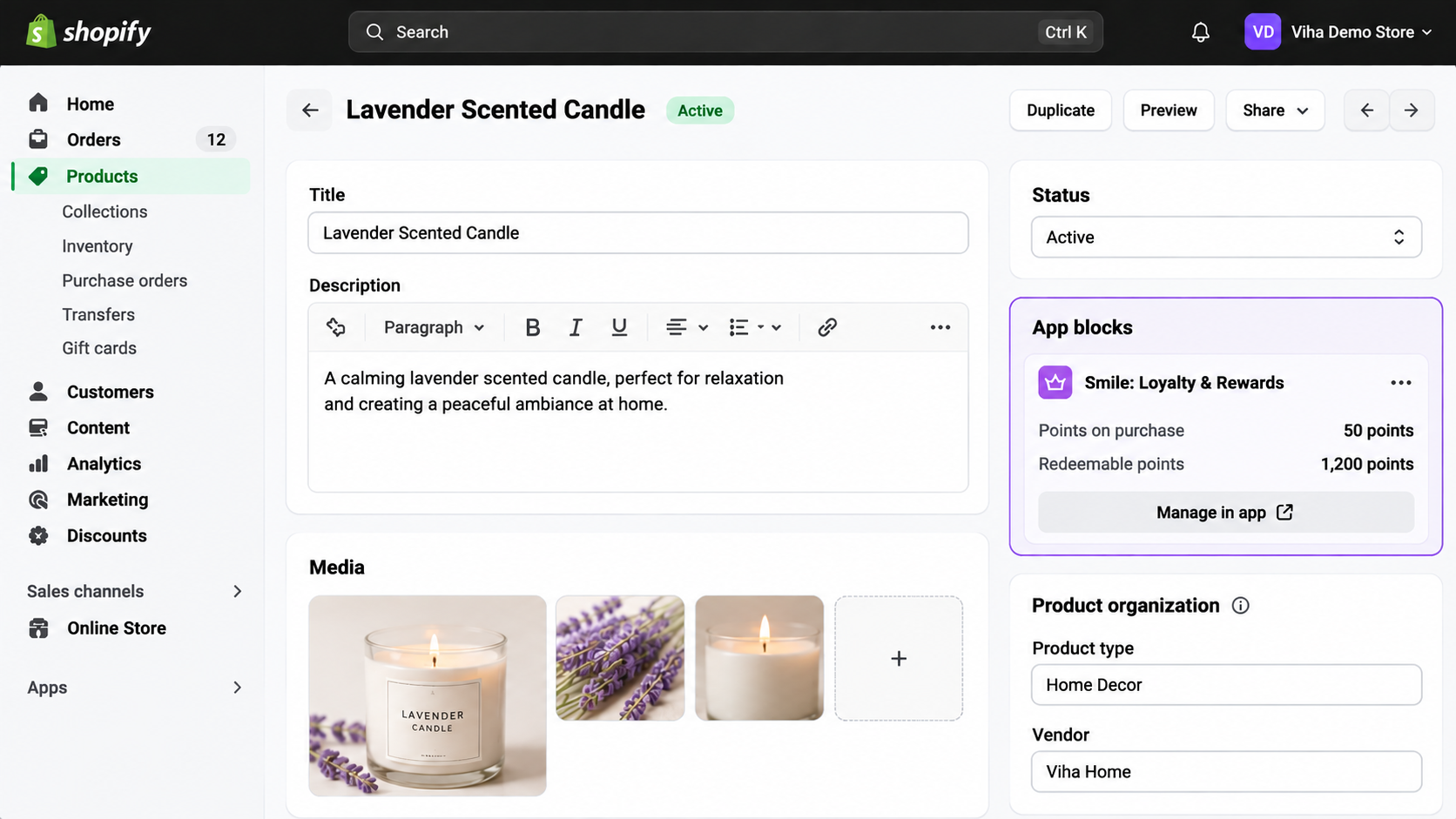
- Admin: embedded app pages, admin blocks on product or order pages, and admin actions.
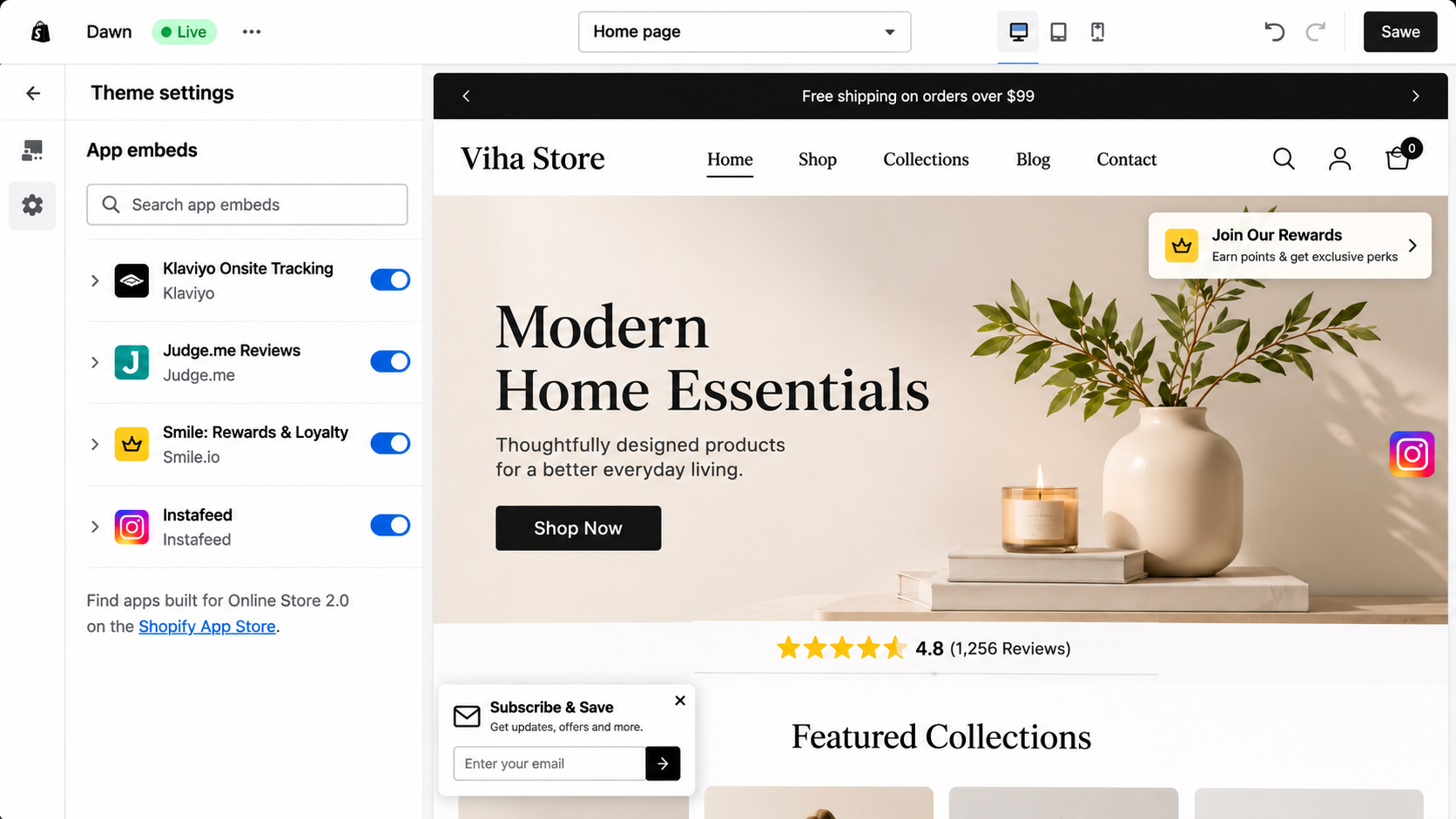
- Storefront: theme app extensions and app blocks, app embeds, and the app proxy for server-rendered storefront content.
- Checkout: checkout UI extensions and Shopify Functions for custom discounts, delivery options, payment methods, and validation.
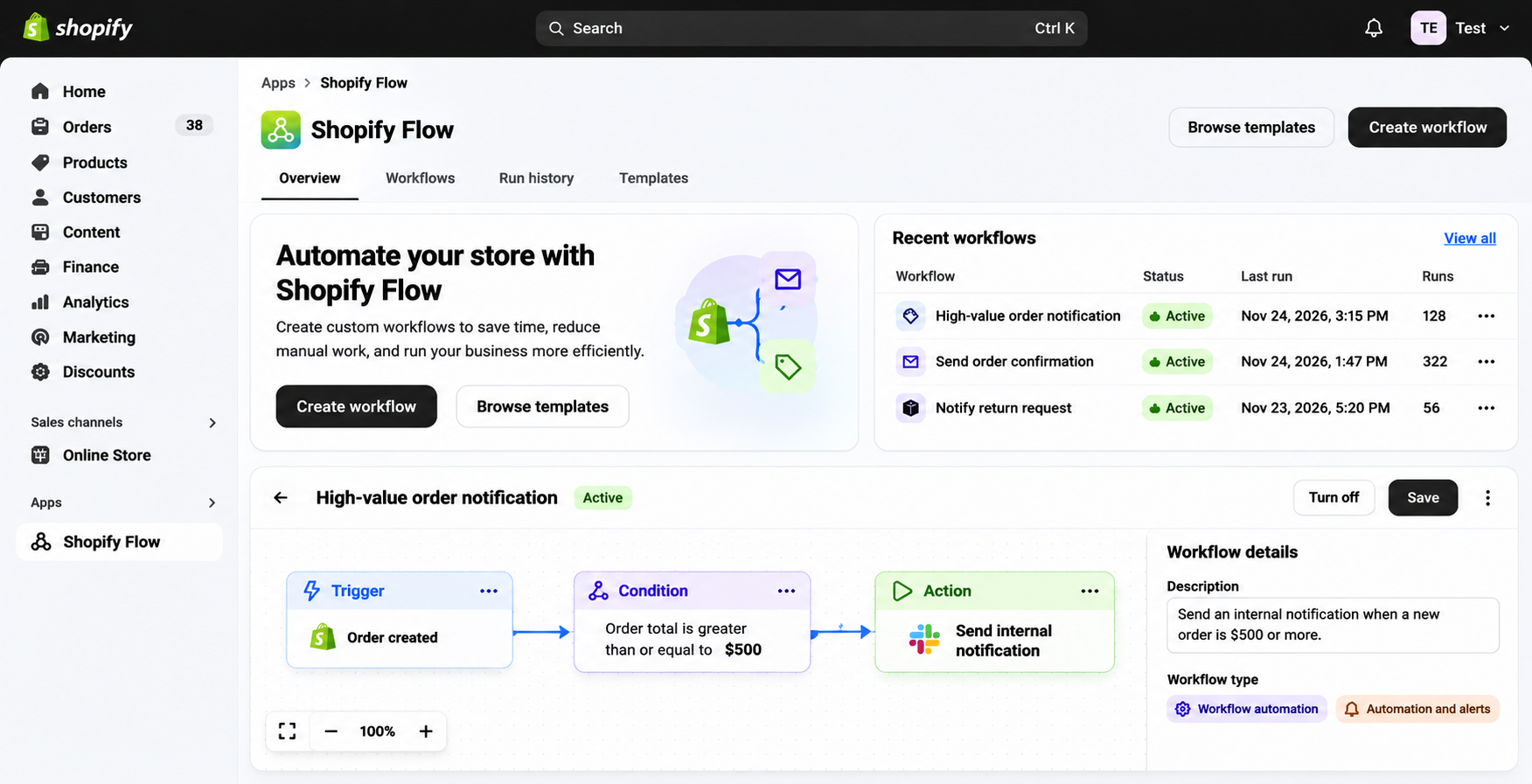
- Back office automation: webhooks, scheduled jobs, Shopify Flow custom triggers and actions.
- Point of sale: POS UI extensions for in-store workflows.
- Data: app-owned metafields and metaobjects, for structured data that belongs to the app.
Not every extension point is available on every plan or to every app type. For example, some checkout customisation and the use of Functions from a custom app depend on Shopify Plus, while public apps often have broader availability. Verify current rules in Shopify’s developer documentation before you design around them.
Shopify Third-Party Apps: Strengths and Limits
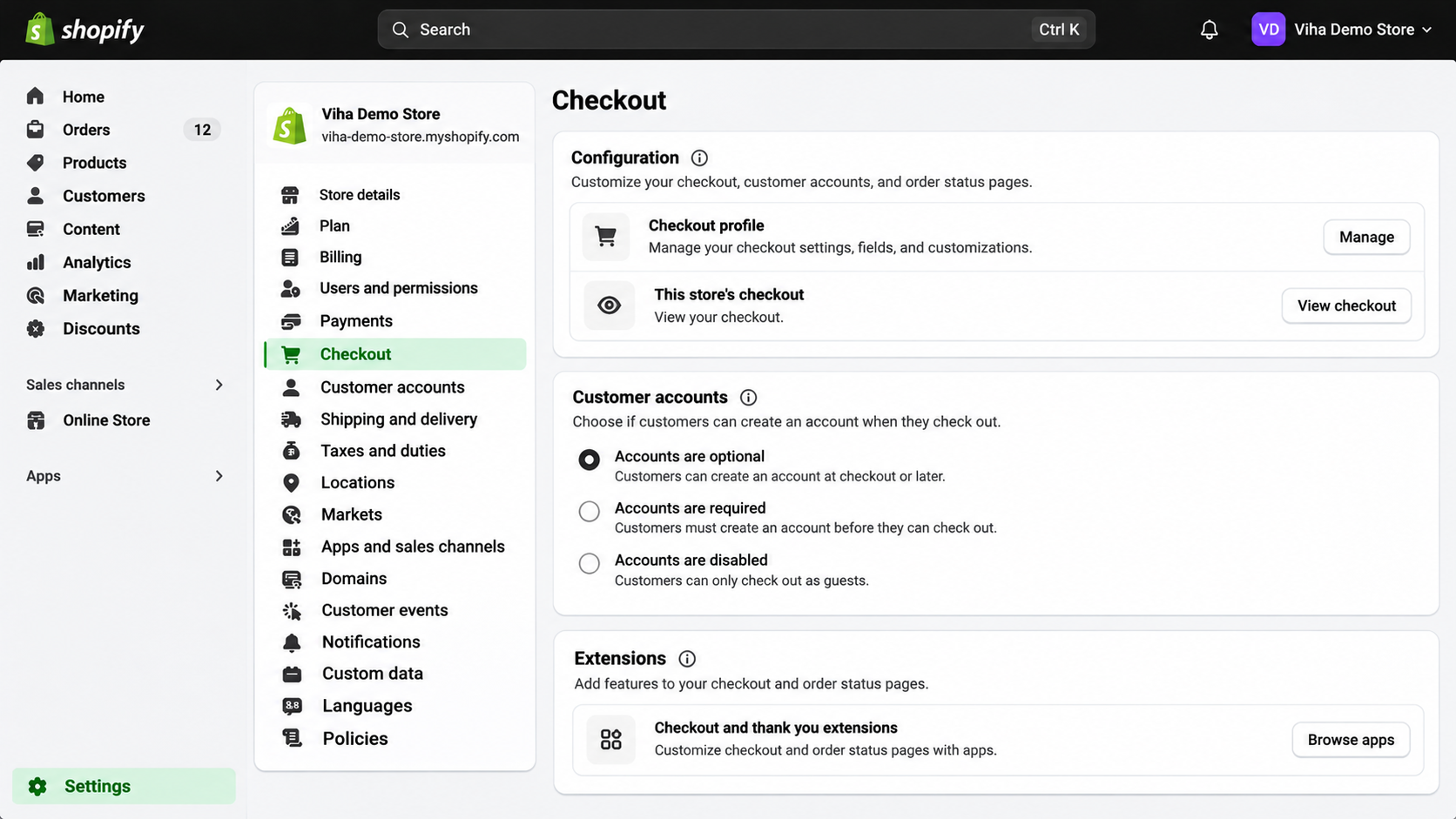
Shopify third-party apps are the right answer more often than developers like to admit. The App Store has apps for reviews, email, subscriptions, loyalty, search, upsells, shipping, returns, translations, analytics, and thousands of niche tasks, all built and tested across many stores.
Strengths
- Speed: install and configure the same day.
- Low upfront cost: monthly subscriptions instead of a build budget.
- Maintained for you: the vendor handles bug fixes, Shopify API upgrades, and new features.
- Proven at scale: popular apps have been tested against many edge cases.
- Community and support: documentation, reviews, tutorials, and vendor support.
- Reversible: you can usually uninstall and switch.
Limits and hidden costs
- Feature mismatch. You may pay for features you do not use and still miss the one you need.
- Pricing that scales against you. Many apps price by orders, products, contacts, API calls, or revenue. A reasonable fee at 500 orders a month can become painful at 20,000.
- App stacking. Five or six apps doing overlapping jobs create conflicting scripts, duplicated data, and unclear ownership.
- Performance impact. Apps that inject JavaScript or CSS into the storefront can slow pages and hurt Core Web Vitals. Audit the real cost of each app on mobile.
- Data and privacy exposure. Each app you install receives permissions to some store data. Review scopes, where data is stored, and what the vendor does with it.
- Vendor dependency. Pricing changes, discontinued features, acquisitions, and shutdowns are real risks.
- Limited integration depth. Connecting an app to your ERP or internal systems may be impossible or require brittle workarounds.
- Workflow compromise. You adapt your process to the app, rather than the other way around.
- Residual code. Some apps leave code in theme files after uninstall, which must be cleaned up.
How to evaluate a third-party app
- Does it solve the actual problem? Test with real data on a development store or trial.
- Reviews and recency: read recent reviews for patterns about bugs, support, and billing, not just the average rating.
- Built for Shopify status and update history: signals of quality and active maintenance.
- Scopes requested: does the app ask for more access than it needs?
- Performance: test page speed before and after installation, on mobile.
- Pricing at your future scale: model the cost at two and five times your current volume.
- Data handling: privacy policy, data location, deletion process, and compliance with the laws that apply to you.
- Integration options: APIs, webhooks, and compatibility with your other tools.
- Exit plan: can you export your data and switch without losing history?
- Support: response times and channels.
The app audit habit
Whether or not you ever build a custom app, audit your installed apps every quarter: remove unused ones, consolidate overlapping ones, check permissions, and measure performance. This alone often cuts costs and speeds up stores.
Inside a Custom Shopify App: Architecture and Technology
Understanding how a custom app is built helps you judge proposals and plan ownership.
Core components
| Component | Purpose | Typical technology |
| App server | Handles authentication, business logic, API calls, and webhooks | Node.js with the Shopify app template (React Router or Remix-based), or other languages such as Ruby, PHP, Python, Go |
| Database | Stores app data, settings, job state, and mappings | PostgreSQL or MySQL, often with Prisma or another ORM |
| Admin UI | Embedded interface inside Shopify admin | Polaris components, App Bridge |
| Extensions | Storefront, checkout, admin and POS surfaces | Theme app extensions, checkout UI extensions, admin extensions |
| Functions | Server-side commerce logic executed by Shopify | Compiled to WebAssembly, written in JavaScript or Rust |
| Background jobs and queues | Retry-safe processing of webhooks, syncs, and batch work | Redis with BullMQ, SQS, Cloud Tasks, or similar |
| Hosting | Runs the app server and workers | Fly.io, AWS, Google Cloud, Azure, Vercel, Render, Heroku, or Cloudflare |
| Monitoring | Errors, logs, uptime, and alerting | Sentry, Datadog, Grafana, CloudWatch, or similar |
Authentication and permissions
Apps authenticate to Shopify using OAuth or Shopify’s managed installation and token exchange, and request access scopes such as read_products, write_inventory, or read_orders. Embedded apps use session tokens issued through App Bridge to authenticate requests between the admin and the app server. Good practice is least privilege: request only the scopes you need, store tokens encrypted, and rotate secrets.
An example app configuration
Shopify’s CLI scaffolds apps and manages configuration in a shopify.app.toml file. A simplified example for an inventory sync app:
name = “inventory-sync”
client_id = “YOUR_CLIENT_ID”
application_url = “https://app.example.com”
embedded = true
[access_scopes]
scopes = “read_products,write_inventory,read_orders”
[webhooks]
api_version = “2026-07”
[[webhooks.subscriptions]]
topics = [“orders/paid”]
uri = “/webhooks/orders-paid”
[[webhooks.subscriptions]]
topics = [“inventory_levels/update”]
uri = “/webhooks/inventory-update”
Use a current stable API version, and plan upgrades on Shopify’s quarterly release schedule.
Webhooks done properly
Webhooks tell your app when something happens in the store. Production-grade handling includes:
- Signature verification using the HMAC header, computed over the raw request body.
- Fast acknowledgement: return a 200 quickly and process the work asynchronously.
- Idempotency: webhooks can be delivered more than once or out of order, so store the webhook ID and ignore duplicates.
- Reconciliation: run periodic jobs that compare Shopify data with your system, because no webhook pipeline is perfect.
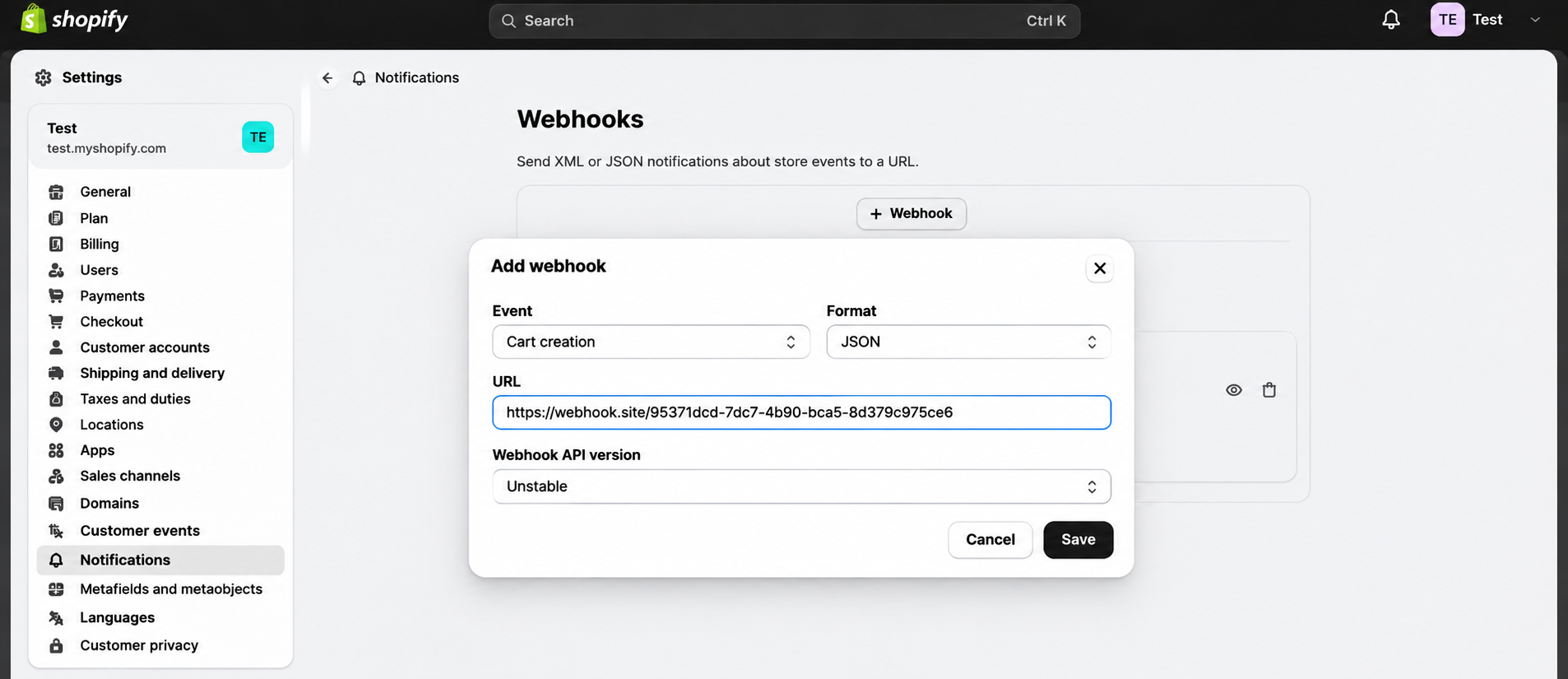
A minimal verification function in Node.js looks like this:
import crypto from "crypto";

export function verifyShopifyWebhook(rawBody, hmacHeader, secret) {
  const digest = crypto
    .createHmac("sha256", secret)
    .update(rawBody, "utf8")
    .digest("base64");

  const a = Buffer.from(digest);
  const b = Buffer.from(hmacHeader || "");

  return a.length === b.length &&
    crypto.timingSafeEqual(a, b);
}
Working with the Admin API at scale
The GraphQL Admin API uses a cost-based rate limit (a leaky bucket), so well-built apps read the cost data returned with each response and throttle accordingly. For large reads and writes, they use bulk operations, which run asynchronously and return results as a file. They also paginate with cursors, request only the fields they need, and retry safely with exponential backoff.
Shopify Functions
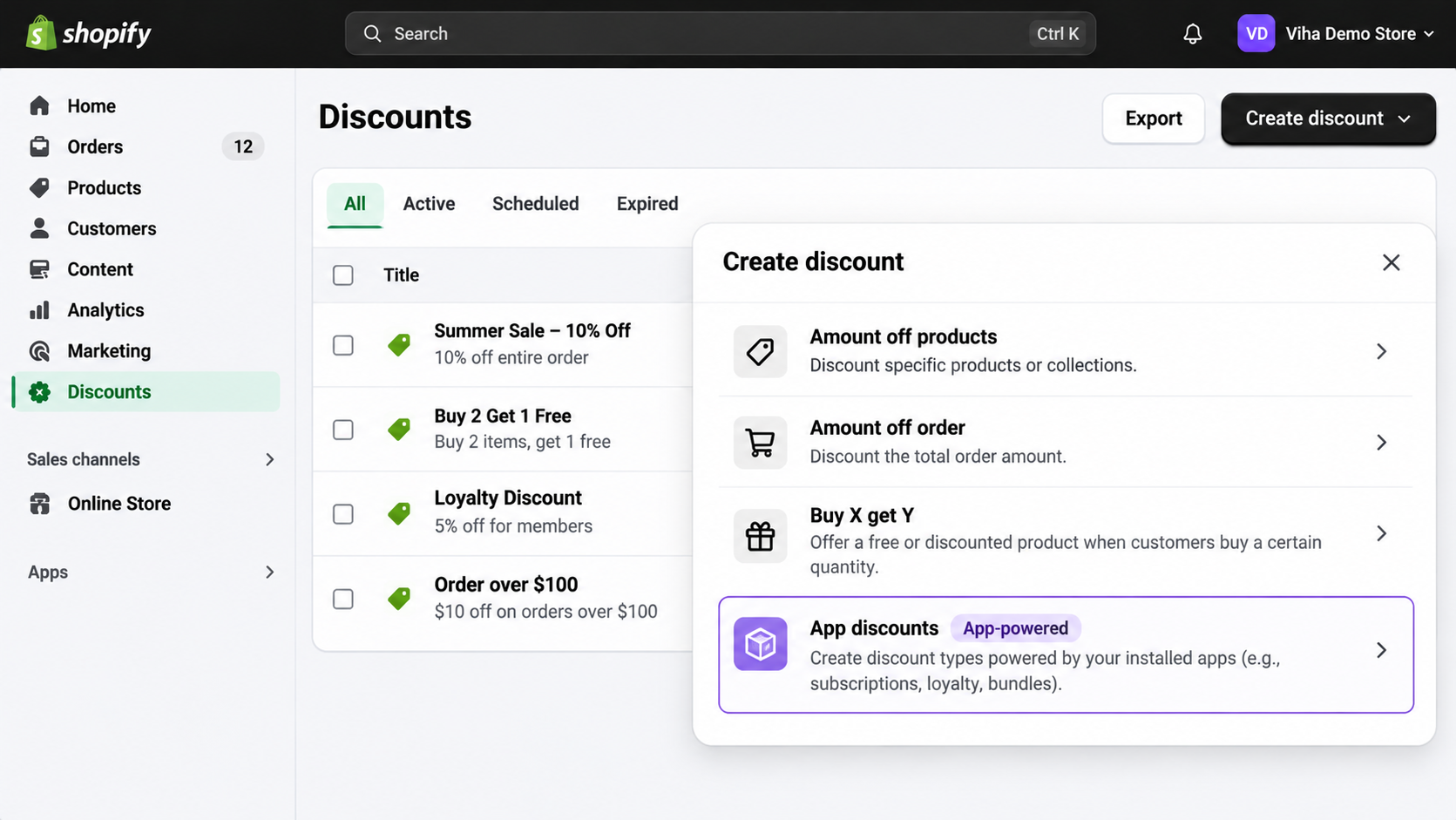
Functions let your code run inside Shopify’s own infrastructure to change commerce behaviour with very low latency: product, order and shipping discounts, delivery option customisation, payment method customisation, cart and checkout validation, and order routing, depending on the API versions available. A Function receives a JSON input defined by a GraphQL query, and returns operations such as applying a discount or hiding a payment method. They replace much of what was once done with Shopify Scripts, so any legacy Script logic should be migrated.
Public app requirements, if you plan to list
If you intend to publish on the App Store, plan for Shopify’s review, mandatory data privacy webhooks (customer data requests and data erasure), the Billing API for charging merchants, performance and UX standards, and a support process. Private tools avoid most of this overhead.
What Are the Benefits of Custom Shopify App Development?
1. Exact fit for your workflow
The app mirrors how your business actually operates: your approval steps, your data fields, your pricing rules, and your terminology. Teams spend less time on workarounds and training.
2. Deep integration with your systems
A custom app can synchronise Shopify with ERP, accounting, WMS, 3PL, PIM, CRM, marketplaces, and legacy systems, using the right data model, error handling, and reconciliation. Third-party connectors often cover only the common cases.
3. Competitive differentiation
If a capability is part of what makes your business different (a configurator, a custom B2B ordering flow, a proprietary pricing engine), keeping it in an app you own protects it from competitors who can install the same off-the-shelf tool.
4. Cost control at scale
Subscriptions that grow with orders or revenue can cost more over time than building and running your own app. At high volume, flat hosting and maintenance costs may be cheaper than usage-based fees.
5. Performance control
You decide what code ships to the storefront. A purpose-built app can avoid heavy scripts, load only where needed, and run logic server-side or in Shopify Functions, which helps Core Web Vitals.
6. Data ownership and governance
You choose where data is stored, how long it is kept, who can access it, and how it is encrypted, which matters for regulated industries and privacy-sensitive markets.
7. Consolidation of app sprawl
One well-designed app can replace several overlapping third-party tools, which means fewer subscriptions, fewer scripts and fewer places where data can go wrong.
8. Roadmap and speed of change
You prioritise features based on business value, rather than waiting for a vendor roadmap or negotiating a feature request.
9. Reliability and accountability
You can design for your own peak traffic, set service levels, add monitoring and decide how failures are handled, rather than relying on a vendor’s shared infrastructure.
10. Intellectual property
When you commission the app and own the code, it becomes a business asset that can be reused across stores, brands, and markets.
Are Custom Shopify Apps Better Than Third-Party Apps?
Not automatically. A custom app is better only when its extra control and fit are worth its extra responsibility. A third-party app is better when the problem is common and well solved.
Where each option wins
| Situation | Better choice | Why |
| Product reviews, email marketing, basic loyalty | Third-party | Mature, inexpensive, widely tested |
| Standard subscriptions with common billing rules | Third-party | Complex billing logic is already solved by specialist vendors |
| Unique approval workflow for wholesale orders | Custom | No app mirrors your process |
| ERP or WMS synchronisation with custom data mapping | Custom (or iPaaS plus custom code) | Off-the-shelf connectors rarely match your data |
| Custom discount logic using customer, product and order rules | Custom Function (or a strong discount app) | Precision and low latency at checkout |
| Fast launch for a new store with a small budget | Third-party | Speed and low upfront cost |
| High-volume store with usage-based app fees | Custom, evaluated by total cost | Fees can exceed cost of ownership |
| Regulated data or strict data residency needs | Custom | You control storage and access |
| Short-term campaign or experiment | Third-party | Easy to start and stop |
| Proprietary feature that differentiates your brand | Custom | Protects competitive advantage |
A weighted scoring model
Score each criterion from 1 (low) to 5 (high) for the capability you are considering. A high total points toward custom.
| Criterion | Weight | A score of 5 looks like |
| Uniqueness of the workflow | 20% | No existing app comes close to your process |
| Business value of the capability | 20% | It drives revenue, margin, or major time savings |
| Integration depth required | 15% | Two-way sync with several internal systems |
| Scale and volume | 10% | Thousands of orders or records per day; usage-based fees would be high |
| Data, security or compliance needs | 10% | Sensitive or regulated data requiring control |
| Quality of available apps | 10% | Poor: apps are missing features, slow or unreliable (score 5 for poor options) |
| Ownership capacity | 10% | You have developers or an agency retainer to maintain it |
| Time and budget flexibility | 5% | No hard deadline, budget approved for build and upkeep |
Totals below about 2.5 usually favour a third-party app, 2.5 to 3.5 suggest integration or customisation of an existing app, and above 3.5 suggest a custom build. Treat the cut-offs as guidance, not law.
The three-year cost lens
Compare options over three years, not three months. The figures below are illustrative.
| Cost item | Third-party app (flat fee) | Third-party app (usage fee grows) | Custom app |
| Setup or build | $0 to $1,000 | $0 to $1,000 | $18,000 |
| Monthly fee or hosting | $499 | $300 rising to $1,500 | $50 |
| Maintenance and enhancements | Included | Included | About 20 percent of build cost per year ($3,600) |
| Three-year total (approximate) | About $18,000 | About $36,000 | About $30,600 |
In the first scenario, the third-party app wins clearly. In the second, where fees climb with orders, the custom app becomes cheaper over three years, and the gap widens afterwards. This ignores benefits that are harder to price: fit, speed, data control, and differentiation. Substitute your own numbers.
Risk comparison
| Risk | Third-party | Custom |
| Vendor stops supporting or raises prices | Yes | No, but you carry maintenance |
| App is slow or conflicts with others | Possible | You control quality |
| Delivery overruns | Low | Moderate, mitigated by phased scope |
| Key-person dependency | Low | Real, mitigated by documentation and a reliable partner |
| Shopify API changes | Vendor handles | You or your agency must handle |
| Data exposure through many vendors | Higher with many apps | Lower with fewer, controlled integrations |
When Should You Choose Custom Shopify App Development?
Custom Shopify app development earns its cost when one or more of these conditions are true.
- No app fits and workarounds are expensive. Your team spends hours each week copying data, fixing errors, or navigating around an app’s limits.
- You must integrate deeply with internal systems. ERP, WMS, PIM, CRM, custom pricing engines, or legacy databases need reliable two-way sync with proper error handling.
- Your pricing, discount, or checkout rules are complex. Tiered B2B pricing, bundle logic, customer-specific terms, region-based rules, or validation requirements go beyond standard discount apps.
- Usage-based fees are scaling against you. Your app bill is rising faster than the value it delivers.
- Performance matters. Third-party scripts slow your storefront, and a leaner custom implementation or a Shopify Function can do the job.
- You need control of data. Compliance, security, or contractual obligations require specific hosting, retention, and access rules.
- A capability is core to your brand. A configurator, a custom customer portal, a unique loyalty mechanism, or an operational process is a competitive advantage.
- You run multiple stores or brands and need one consistent tool across all of them.
- You have too many overlapping apps and want to consolidate.
- You plan to productise the idea, perhaps to sell it as a public app later.
When to hold back
- A good app already solves 90 percent of the need.
- The requirement is unclear, or still changing weekly. Validate it with an app or a manual process first.
- You cannot fund maintenance after launch.
- The store is new, and demand is unproven.
- The goal is purely cosmetic, which a theme change can handle.
Sequencing: prove it first
A useful pattern is to use a third-party app or manual workflow to prove the process, measure the pain, then replace the weak part with a custom app once the requirements are stable and the business case is clear. This avoids building the wrong thing.
Not sure which side of the line you fall on? Our Shopify app developers will audit your installed apps, test the available options against your must-haves, and give you a scored build-or-buy recommendation. Talk to our Shopify app developers.
How Can Custom Shopify Apps Improve Ecommerce Operations?
Custom apps are most valuable behind the scenes, where small inefficiencies multiply across thousands of orders. Typical applications include:
| Operational area | What a custom app can do | Typical outcome |
| Inventory and ERP sync | Two-way stock, price and order synchronisation using webhooks, bulk operations and reconciliation jobs | Fewer oversells, no manual data entry |
| Order routing and fulfilment | Route orders to warehouses, 3PLs or dropship suppliers by rules such as stock, location, product type or margin, then write tracking back | Faster, cheaper fulfilment |
| B2B and wholesale | Quote requests, approval workflows, company hierarchies, credit limits, quick order forms and customer-specific pricing | Higher wholesale conversion, less back-and-forth |
| Custom discounts and promotions | Shopify Functions for tiered, bundled, loyalty-based or segment-specific rules | Precise promotions without storefront scripts |
| Checkout validation and customisation | Block invalid combinations, enforce purchase limits, hide or reorder delivery and payment options by rule | Fewer errors and returns |
| Product data management | Sync from a PIM, enrich with AI-assisted descriptions, validate required fields and publish in bulk | Faster launches and cleaner data |
| Returns and exchanges | Rules-based returns portal linked to your warehouse and finance systems | Fewer support tickets |
| Customer service tools | Admin blocks that show order, subscription and loyalty context in one view | Faster resolutions |
| Finance and reporting | Scheduled exports, reconciliation, tax and revenue reports tailored to your accounting | Faster month-end close |
| Marketplace and channel sync | Push catalogue and inventory to marketplaces, pull orders back | Wider reach, consistent stock |
| Personalisation and made-to-order | Collect customisation inputs, validate them, pass them to production systems | Fewer manual errors in bespoke products |
| Subscriptions and memberships | Custom billing rules, membership benefits or gated content | Differentiated customer experience |
| Automation and alerts | Custom Shopify Flow triggers and actions, exception dashboards, Slack and email alerts | Problems caught earlier |
| Point of sale | POS extensions for in-store lookups, endless aisle and custom discounts | Consistent omnichannel experience |
| AI-assisted workflows | Classify support requests, draft product copy, flag risky orders or forecast stock, with human review on important decisions | Time savings with oversight |
Measuring the impact
Define success before building. Useful measures include hours of manual work saved per week, order processing time, error and refund rates, inventory accuracy, on-time delivery, conversion rate on affected pages, average order value, support tickets per hundred orders, and app subscription spend removed. If you cannot name the metric a custom app will move, reconsider whether to build.
A worked example
Imagine a wholesale and retail brand processing 600 orders per week. Staff spend 12 minutes per wholesale order re-keying data into the ERP and checking stock, and 150 of the weekly orders are wholesale. That is 30 hours a week. A custom app that syncs orders and stock automatically, flags exceptions, and writes tracking back might cut that to about 5 hours of exception handling. At a loaded cost of $25 per hour, that saves roughly $31,000 per year (25 hours × 52 weeks × $25), before counting fewer mistakes and faster shipping. If the build costs $20,000 with $4,000 yearly maintenance, payback is under a year. The numbers are illustrative, but the method is how to build a business case.
How Much Does Custom Shopify App Development Cost?
Cost depends on scope, integrations, number of extension surfaces, security needs, and the agency’s rates and region. The figures below are planning estimates, not quotes and not published market benchmarks. Ask any agency for an itemised proposal.
Indicative build budgets
| App type | Typical scope | Indicative range (USD) |
| Focused utility | One admin tool, one integration or a single Shopify Function, minimal UI | $5,000 to $15,000 |
| Mid-complexity app | Embedded admin UI, several webhooks, one or two extensions or Functions, one or two integrations, background jobs | $15,000 to $50,000 |
| Complex platform | ERP, WMS or PIM integration, B2B workflows, multiple extensions, reporting, multi-store support | $50,000 to $150,000+ |
| Public App Store product | Everything above plus onboarding, billing, multi-tenant architecture, compliance webhooks, support tooling and store review | $50,000 to $200,000+, with ongoing product costs |
An illustrative effort model
Here is how a mid-complexity app might be estimated. The numbers are for demonstration only.
| Workstream | Estimated hours |
| Discovery, requirements and technical design | 30 to 60 |
| App scaffolding, authentication and data model | 30 to 60 |
| Admin UI (Polaris, App Bridge) | 50 to 110 |
| Webhooks, jobs and sync logic | 60 to 140 |
| Extensions or Functions | 40 to 120 |
| Third-party and internal integrations | 40 to 140 |
| Testing and QA (unit, integration, end-to-end) | 40 to 100 |
| Security review and hardening | 15 to 40 |
| DevOps, hosting and monitoring | 20 to 50 |
| Documentation, training and launch | 20 to 50 |
| Project management | 30 to 70 |
| Total | 375 to 940 |
At blended rates of $40 to $120 per hour, that is roughly $15,000 to $113,000. A small, well-scoped app lands at the low end, while a complex build with several integrations sits higher. Rates vary by region and seniority, and efficient teams often need fewer hours.
What drives cost
- Number of systems integrated, and the quality of their APIs.
- Data volume, sync frequency, and error-handling requirements.
- Number of extension surfaces: admin, storefront, checkout, POS, Flow.
- Shopify Plus requirements for certain checkout capabilities.
- UI complexity and polish.
- Multi-store, multi-currency or multi-language needs.
- Security, compliance, and audit requirements.
- Quality of existing documentation and test environments for your internal systems.
- Speed: compressed timelines cost more.
- Whether you are building for one store or as a product for many.
Ongoing costs
| Item | Typical range |
| Hosting and database | $20 to $500+ per month, rising with volume |
| Monitoring and logging | $0 to $200+ per month |
| Maintenance, upgrades and bug fixes | Often 15 to 25 percent of build cost per year, or a retainer |
| Enhancements | Budget separately, tied to business priorities |
| Third-party services | Email, SMS, mapping, AI, and other APIs the app calls |
| Shopify plan implications | Standard plans, or Plus if you need certain checkout features. Verify current pricing with Shopify |
Ways to control cost
- Start with a proof of concept or a minimum viable app that solves the most valuable 20 percent of the problem.
- Reuse proven components: Shopify’s app template, Polaris components, managed installation, and existing libraries.
- Prefer Shopify Functions and native features over bespoke systems when they fit.
- Keep the scope tight and phase integrations.
- Invest in automated tests, which cut long-term maintenance costs.
- Choose boring technology your team or agency already knows.
- Fix the requirements before the build, because change during development is the main cause of overruns.
Want a quote you can compare? Our Shopify app development services start with a short discovery phase, then an itemised estimate by workstream, so you know what you are paying for before we write any code. Request an estimate.
Shopify App Integration and App Customization: The Middle Path
The choice isn’t just buy or build. There are intermediate options that often deliver most of the value at lower cost.
| Option | What it means | Best for |
| Configure an existing app | Use its settings, rules and templates fully | Standard needs |
| Shopify app customization | Extend an app through its own API, webhooks, custom fields or theme extension settings, or ask the vendor for a tailored plan | Almost-right apps |
| Shopify app integration through middleware | Connect apps and systems with iPaaS tools such as Make, Zapier, Workato or Celigo, or with a small custom connector | Moving data between existing tools |
| Shopify Flow | No-code automations that react to store events and call app actions | Rule-based admin tasks |
| Custom wrapper or companion app | A small custom app that adds missing features around a third-party product | Filling a specific gap |
| Open-source app fork | Customise an open-source app and host it yourself | Teams with strong engineering and a well-maintained base |
| Full custom build | A new app designed around your workflow | Unique needs and differentiation |
Integration patterns that work
- Event-driven: webhooks trigger processing as things happen, with queues and retries. Best for orders, inventory changes, and customer updates.
- Scheduled batch: jobs run at set times and use bulk operations. Best for large catalogue syncs and reporting.
- Request-response: an app calls an external API in real time, for example, to check stock or calculate shipping. Needs timeouts and fallbacks so storefront and checkout stay fast.
- Hybrid with reconciliation: events for speed, plus periodic comparisons to catch missed or failed updates.
Integration design essentials
- Define the system of record for each data type (products, prices, inventory, customers, orders), so updates flow in one direction and conflicts are rare.
- Map fields and units carefully: SKUs, variants, taxes, currencies, units of measure, statuses.
- Use stable identifiers and store cross-system IDs, often in metafields.
- Design for failure: retries, dead-letter queues, alerting, and manual replay tools.
- Make operations idempotent, so duplicate events do not create duplicate orders or adjustments.
- Respect rate limits with throttling and bulk operations.
- Log and trace each record through the pipeline, so support can answer what happened to order 1234.
- Test with realistic data and edge cases, including cancellations, partial refunds, split shipments and out-of-order events.
Customising how third-party apps look and behave
Many apps expose theme app extension settings, CSS variables, metafields, or API endpoints that let a developer match your brand and layout without forking anything. This lightweight Shopify app customization is often the cheapest way to improve an app’s fit, and a sensible first step before commissioning new code.
10. How Do You Choose the Right Shopify App Development Solution for Your Business?
A structured decision process prevents both over-building and under-investing. Work through these steps.
Step 1: Define the problem and the value
Write one paragraph on the problem, who is affected, how often it occurs, and what it costs in time, money, or lost sales. Attach a metric and a target. If the problem is vague, the solution will be too.
Step 2: List requirements by priority
| Priority | Meaning | Example |
| Must have | The solution fails without it | Sync inventory from ERP every five minutes |
| Should have | Valuable but workable without it | Admin dashboard of failed syncs |
| Could have | Nice to have later | Slack alerts for sync errors |
| Will not have now | Explicitly out of scope | Multi-store support |
Step 3: Scan the market
Search the App Store and your industry for existing options. Shortlist two or three apps that cover the must-haves. Check the reviews, pricing at your scale, scope, and performance impact.
Step 4: Test before you decide
Install candidates on a development store or in trial, load real or realistic data, and run the real workflow, including edge cases. Document gaps in a simple fit table.
Step 5: Run a gap analysis
| Requirement | App A | App B | Custom |
| Must have 1 | Yes | Partial | Yes |
| Must have 2 | No | Yes | Yes |
| Integration with ERP | No | Limited | Yes |
| Performance impact | Medium | Low | Low |
| Three-year cost | Low | Medium | Medium to high |
If an app meets every must-have, choose it. If a small gap remains, ask whether customisation or integration can close it. If the gaps are large or critical, move toward custom.
Step 6: Build the three-year business case
Include build or setup cost, subscriptions or hosting, maintenance, expected benefit (time saved, revenue protected or gained, cost removed), and a contingency of 15 to 25 percent. Show conservative and optimistic cases. If the project only pays off in the optimistic case, narrow the scope.
Step 7: Assess risk and capacity
Who will own the app after launch? Who will approve changes? What is the plan if the lead developer leaves, or the agency relationship ends? Custom apps are only as safe as the ownership model around them.
Step 8: Decide: buy, customise, integrate or build
| If this is true | Then |
| A solid app meets all must-haves at a fair price | Buy |
| An app meets most needs and can be extended | Buy and customise |
| Apps exist, but data must flow between systems | Buy and integrate |
| The requirement is unique, valuable and stable | Build |
| The requirement is uncertain | Prototype with an app or a minimal build first |
Step 9: Pilot and measure
Launch to a subset of users, products or markets. Compare metrics against your baseline, collect feedback, and refine before a full rollout.
The Custom App Development Process: Security, QA and Maintenance
A predictable process reduces risk and cost. Here is how a well-run project proceeds.
| Phase | What happens | Typical output |
| Discovery | Interviews, workflow mapping, data and system review, constraints and success metrics | Requirements document and scope |
| Solution design | Architecture, data model, extension choices, integration design, hosting plan, security approach | Technical design and estimate |
| UX and prototype | Wireframes for admin and storefront surfaces, review with users | Approved flows |
| Build in increments | Short iterations with working demos on a development store | Working software each sprint |
| Testing | Automated unit and integration tests, end-to-end tests on realistic data, performance and failure testing | Test reports and fixes |
| Staging and UAT | Real users run real scenarios, with sign-off against acceptance criteria | Approved release |
| Launch | Install on production, migrate data, enable monitoring and alerts, run a short parallel period if needed | Live app |
| Hypercare and handover | Close monitoring, rapid fixes and training | Stable operation |
| Ongoing improvement | Roadmap, maintenance and upgrades | Continuous value |
Indicative timelines
| App type | Typical duration |
| Focused utility | 3 to 6 weeks |
| Mid-complexity app | 2 to 4 months |
| Complex platform | 4 to 9 months |
| Public App Store product | 4 to 12 months, plus review time |
These are planning ranges. Delays usually come from unclear requirements, slow access to internal systems, and late decisions.
Security essentials
- Least-privilege scopes and periodic scope review.
- Secure token storage: encrypted at rest, never in client-side code or logs.
- Webhook verification and replay protection.
- Input validation and output encoding to prevent injection and cross-site scripting.
- Authentication of every request coming from the admin or storefront, using session tokens or app proxy signature checks.
- Dependency management: automated vulnerability scanning and timely updates.
- Secrets management through a vault or the hosting provider’s secret store.
- Access control and audit logs for people using the app.
- Data protection: minimise stored personal data, set retention periods, and handle deletion requests. Respond correctly to the app uninstall webhook by cleaning up data and revoking access.
- Backups and recovery with tested restore procedures.
- Penetration testing or a security review for apps handling sensitive data or high volumes.
Quality assurance
Test the paths that cost money when they fail: order processing, inventory updates, discounts, refunds, and anything that touches payment or fulfilment. Use a development store with realistic catalogues, simulate webhook retries and out-of-order events, test API rate limiting, and run load tests that match your peak volumes. Add automated regression tests so changes do not break old behaviour.
Observability and operations
- Structured logs with correlation IDs per order or event.
- Dashboards for queue depth, error rates, latency, and sync lag.
- Alerts that go to a person who can act, with runbooks for common failures.
- A simple admin screen where non-developers can see failed jobs and replay them.
Maintenance
Shopify releases API versions quarterly and supports each for a limited period, so an app needs scheduled upgrades. Add dependency updates, security patches, performance tuning, and small enhancements. Agree on a maintenance plan, response times, and monthly or quarterly review, so the app evolves with your business instead of decaying.
How to Choose a Shopify App Development Company
The right partner matters more than the framework they choose. Use this checklist.
- Shopify-specific experience: apps built and running in production, including extensions, Functions, webhooks, Admin API at scale, and Shopify Plus where relevant.
- Relevant domain knowledge: experience with your type of problem, such as ERP integration, B2B, or fulfilment.
- Architecture thinking: can they explain trade-offs, data models, failure handling, and scaling in plain language?
- Discovery discipline: they ask hard questions about process, data, and metrics before quoting.
- Honest recommendations: they will tell you if an existing app is the better answer.
- Team and seniority: who designs, who builds, who tests, and who is accountable.
- Engineering practice: version control, code review, automated tests, CI/CD, staging environments, and documentation.
- Security practice: how they handle tokens, secrets, data protection, and reviews.
- Project transparency: regular demos, clear backlog, visible progress and risk reporting.
- Pricing clarity: itemised estimate, assumptions, change process, and ongoing support terms.
- Ownership and transition: you own the code and accounts, and the agency provides documentation.
- Support model: response times, maintenance scope, and escalation paths.
- References and evidence: case studies, live examples, and a client you can call.
Questions to ask
- Could an existing app solve this, and why or why not?
- What is the smallest version that proves value?
- How will you handle Shopify API changes over the next two years?
- How will the app behave when a system it depends on is down?
- What does a typical month of support and maintenance cost?
- What are the top three risks, and how will you reduce them?
- How will you measure whether the app worked?
Red flags
- A fixed price quoted without discovery.
- No questions about your current process or data.
- Reluctance to discuss testing, security, or monitoring.
- Promises of unrealistic speed or cost.
- Lock-in: unclear code ownership or hosting under the agency’s account only.
- No maintenance plan.
- Recommending a custom build for everything.
Comparing proposals
Compare scope by workstream, the assumptions behind estimates, the team, rates, timeline, risks, and post-launch terms. A lower price with vague scope often costs more later.
Looking for a Shopify app development company that will tell you what you don’t need? Viha Digital Commerce builds, integrates, and maintains custom Shopify apps, and we will say so if an existing app is the better answer. See how we work or get in touch.
Shopify App Development Services From Viha Digital Commerce
Viha Digital Commerce helps Shopify merchants decide what to buy, what to integrate, and what to build. Depending on your situation, we can help with:
- App audit and consolidation: reviewing your installed apps for overlap, cost, performance, and data exposure.
- Build-versus-buy analysis: a scored recommendation with a three-year cost comparison.
- Custom Shopify app development: embedded admin apps, storefront and checkout extensions, Shopify Functions and background services.
- Shopify app integration: connecting ERP, WMS, PIM, CRM, marketplaces, shipping and marketing tools with reliable sync and monitoring.
- Shopify app customisation: extending and tailoring third-party apps through their APIs, settings and theme extensions.
- Workflow automation: Shopify Flow and custom triggers, alerts and dashboards.
- Performance and security reviews of existing apps and integrations.
- Support and maintenance for custom apps, including API version upgrades and enhancements.
If you are deciding between a subscription and a build, talk to Viha Digital Commerce. We will review your workflow, test the available apps, and recommend the option that makes sense on both cost and risk.
Frequently Asked Questions
Can a custom app be listed on the Shopify App Store later?
Sometimes. An app built for one store usually needs rework before it can serve many merchants: multi-tenant data handling, onboarding, Shopify Billing, mandatory privacy webhooks, support processes, and passing store review. If you might productise an idea, say so during design so the architecture does not need to be rebuilt.
Who owns the code and intellectual property?
That depends on your contract, so settle it before work begins. Most merchants want full ownership of the source code, the repositories and the cloud accounts, with the agency granted a licence to reuse generic components. Insist on access to the repository and hosting accounts from day one, plus documentation, so work can continue with another team if the relationship ends.
Do I need to run my own server?
Usually yes, in some form. Admin apps, integrations, and background jobs need hosting for the app server, a database, and workers, though managed platforms keep the operational load modest. Pure Shopify Functions and some extensions run on Shopify’s infrastructure with no server of your own, which is one reason to use them where they fit.
What happens to the data in the apps I replace?
Plan a data migration before you uninstall anything. Export history from the old app (customers, points, subscriptions, reviews, rules), map it to the new structure, load it, and verify it. Run both in parallel briefly if you can. Also check for leftover theme code, tracking tags, and webhooks from the old app, and clean them up so they do not cause errors or slow pages.
Can I test an idea cheaply before committing to a full build?
Yes, and you should. Options include running the process manually for a few weeks, using a low-cost app or a Flow automation as a stand-in, or commissioning a short proof of concept on a development store that tests the riskiest assumption, such as whether your ERP’s API can support the sync you want. A one or two-week spike costs little and can save a failed project.
Can non-technical staff manage a custom app day to day?
They can if it is designed for it. Ask for an admin interface that shows sync status, failed jobs, and settings in plain language, role-based access, in-app help, and a simple way to replay failed items. Requirements that need a developer for every routine change usually signal an under-designed app.
Conclusion
Custom Shopify apps and third-party apps are tools for different jobs. Third-party apps give you speed, low upfront cost, and vendor-maintained software for common needs. Custom apps give you precision, deep integration, data control, and differentiation when your process or scale demands it, at the price of higher build cost and ongoing ownership.
The smartest approach is rarely all or nothing. Buy what is commodity, integrate what must connect, customise what is almost right and build only what is truly yours. Back every decision with a three-year cost view, a clear metric, and a plan for who will maintain the result. When you do build, start small, prove value early and treat the app as a product that will evolve alongside your business.
Not sure whether to buy or build? Viha Digital Commerce can audit your apps, compare the options, and recommend the right route for your store. Get in touch to discuss your project.













 Professional Communication
 Skilled Developers
 Timing is Everything
 Secure Agreements
 Support Tilt
 Quality Top Up Most
 White Development Pathway
 Competitive Price Point
 All-in-One Solution
 Customizable Services
 Assortment of Payment Options
 Optimized Sales Processes
 Omnichannel Maintenance & Support
 Custom Shopping Cart
 Advanced Security & Support
 API Payment & Logistic Integrations
 Social Media Integration