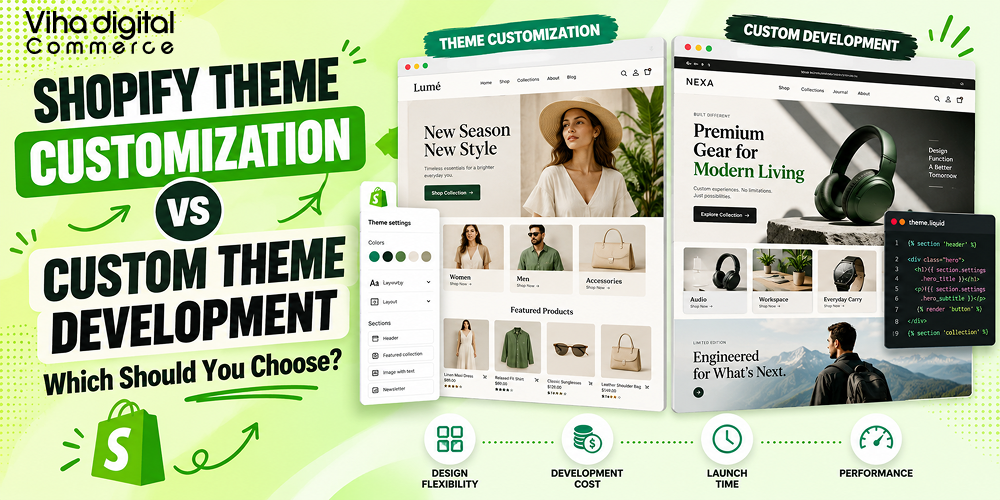
Shopify Theme Customization vs Custom Theme Development: Which Should You Choose?
Key Takeaways
- Shopify theme customization changes an existing theme. Custom theme development builds a new one from scratch around your brand.
- Published 2026 estimates put customization at roughly $2,000 to $10,000+, and fully custom themes at $10,000 to $40,000+.
- Most growing stores do best with a strong base theme plus targeted customization.
- Choose a fully custom build when your experience, catalogue or scale outgrows what a theme can do.
- Cost is only half of the decision. Maintainability, performance, app compatibility and who supports the code after launch matter just as much.
Shopify theme customization means modifying an existing free or paid theme: restyling layouts and colours, adding sections, and writing targeted Liquid, CSS and JavaScript. Custom Shopify theme development means building a new theme from scratch around your brand, your catalogue and your conversion goals. Customization is faster and cheaper (roughly $2,000 to $10,000+ in published 2026 estimates) and suits most small and growing stores. Custom development costs more (roughly $10,000 to $40,000+, and higher for large builds) and makes sense when no existing theme can deliver the experience you need, when performance and code control are critical, or when you are scaling on Shopify Plus.
A simple rule: start with the least change that solves your problem, then invest more when growth demands it.
This guide from Viha Digital Commerce explains the real differences, shows how both routes work technically, breaks down cost and timeline drivers, and gives you a decision framework you can apply to your own store.
What Is the Difference Between Shopify Theme Customization and Custom Theme Development?
Your theme shapes how shoppers see your brand, how fast pages load, and how easily they buy. The big decision is whether to adapt a theme you already have or build something new.
Theme customization modifies an existing theme, such as its layouts, colours and features. Custom Shopify theme development builds a new theme from scratch around your brand. The first starts from a ready foundation, while the second starts from a blank page. The table shows how they compare.
| Factor | Theme customization | Custom theme development |
| Starting point | An existing free or paid theme | A new theme built from scratch |
| Design freedom | Flexible within the theme’s structure | Unlimited, built around your brand |
| Typical work | Layouts, colours, sections, Liquid tweaks | Design, custom sections, bespoke features |
| Timeline | Shorter | Longer |
| Cost | Lower | Higher |
| Best for | Growing stores that like a theme’s base | Brands with unique needs or large scale |
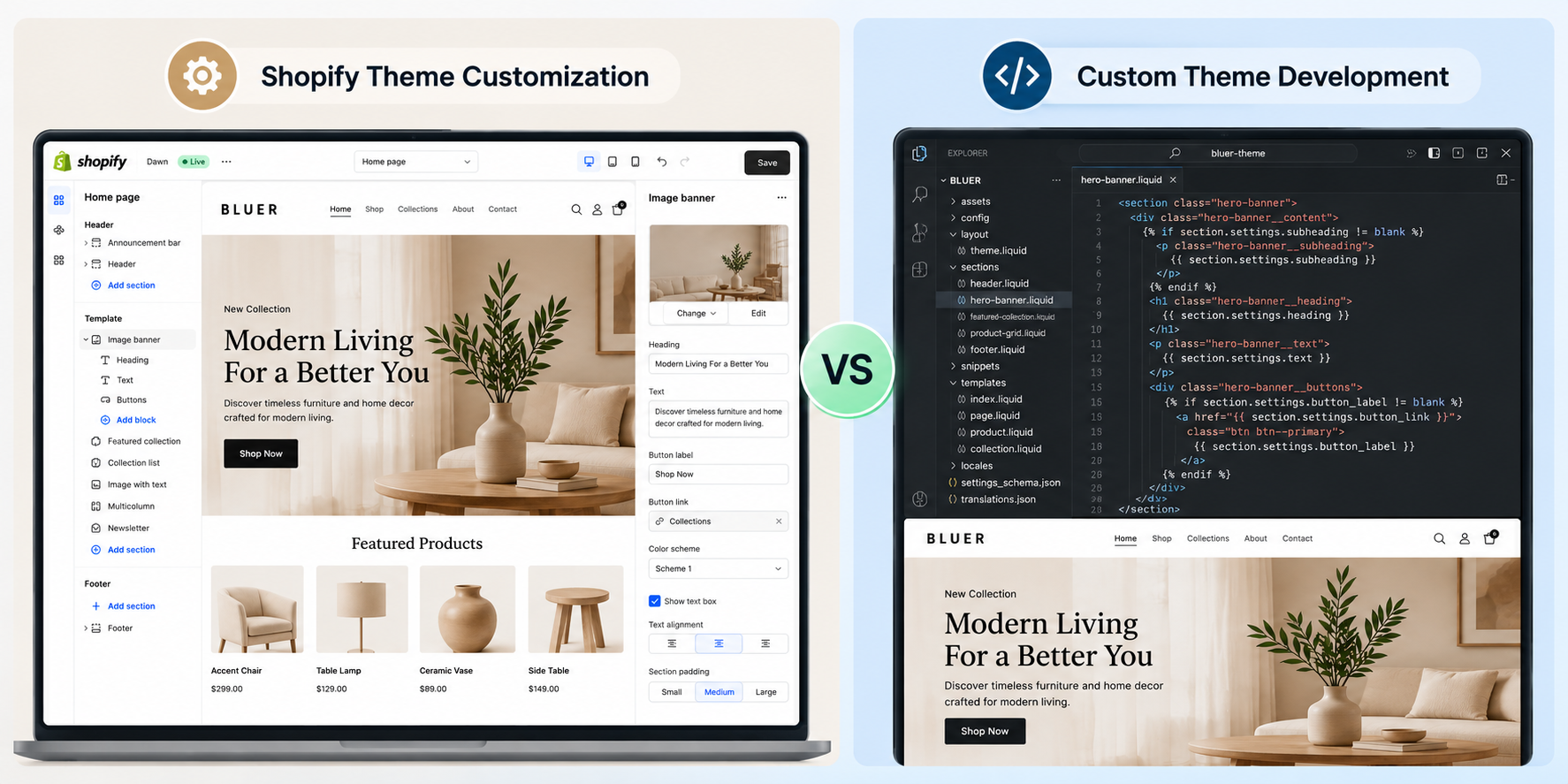
It is a spectrum, not a switch
In practice there are more than two options. Thinking of them as a spectrum helps you choose a point that fits your budget and goals.
| Level | Description | Typical owner of the code |
| 1. Theme settings only | Use the theme editor to change colours, fonts, sections and content with no code | You |
| 2. Light customization | Small CSS and Liquid edits, new sections, layout tweaks on a purchased theme | Shared with the theme vendor’s update path |
| 3. Deep customization | Substantial rework of templates, custom sections, metafield-driven features, app integrations | Your agency and you |
| 4. Custom theme build | New theme architecture, design system and sections built from scratch | Your agency and you |
| 5. Headless storefront | Front end built in a separate framework using the Storefront API | Your engineering team or agency |
Levels 2 and 3 are what agencies mean by Shopify theme customization services. Level 4 is custom Shopify theme development. Level 5 is a different architecture, covered later in this guide.
The key technical difference: who owns the foundation
When you customize a theme, someone else owns the foundation. The vendor decided the file structure, the CSS approach, the JavaScript patterns and the section library. You inherit their strengths and their technical debt. When you build custom, you own the foundation: every section, snippet, stylesheet and script exists because your store needs it. That is why custom builds can be leaner and more distinctive, and why they also carry the full burden of design, build, testing and long-term maintenance.
What Shopify Theme Customization Includes
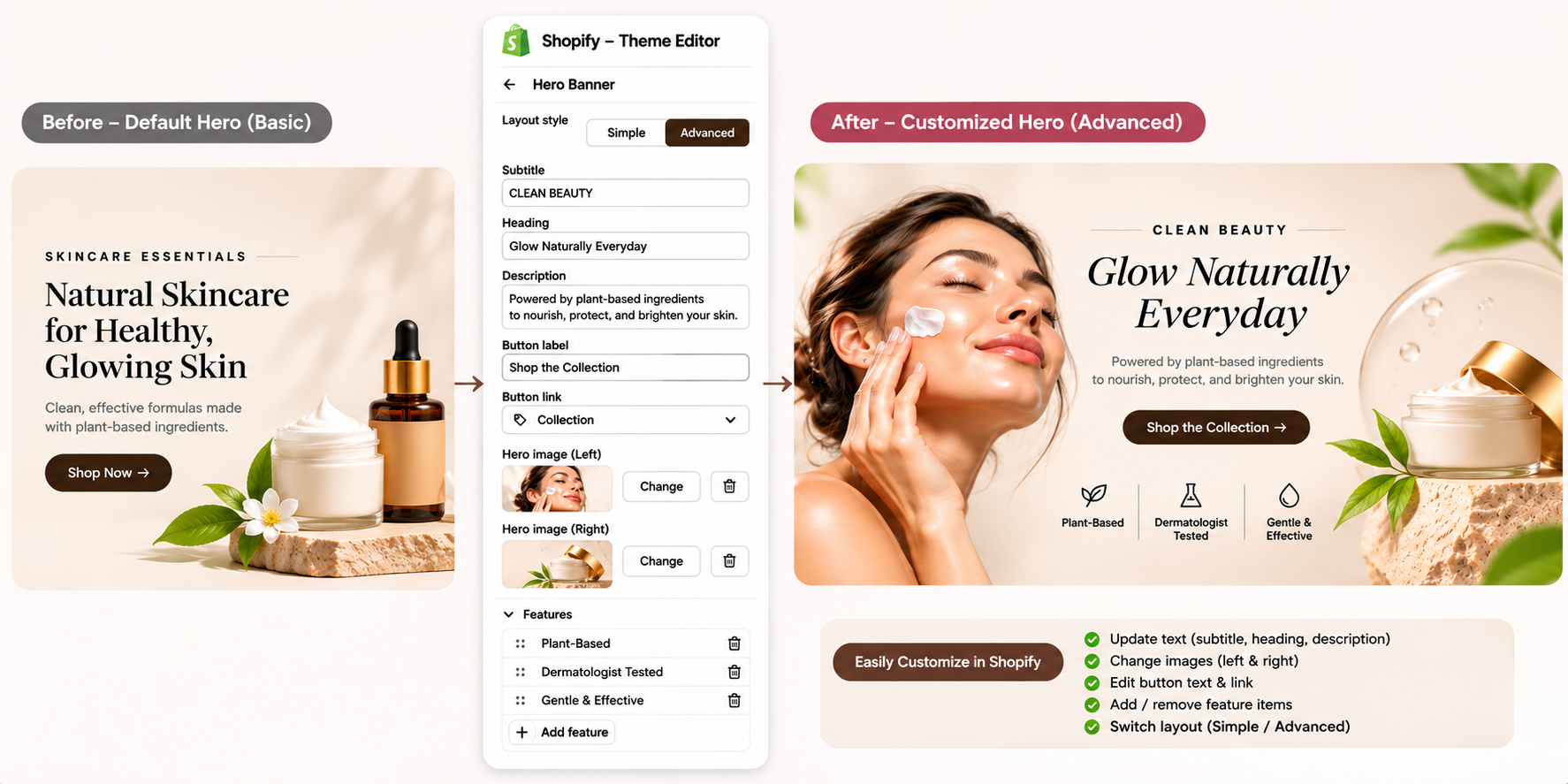
Our Shopify theme customization services adjust a theme you already own so it fits your brand and goals. Typical work includes:
- Layouts and colour schemes: restyled pages that match your brand identity.
- Custom sections and features: new product displays, filters and interactive elements.
- Shopify Liquid customization: custom Shopify Liquid code for dynamic sections and tailored storefront features.
- Theme modification: updates and fixes, from layout tweaks to new sections.
Because Shopify theme customization services build on a tested base, they usually carry lower risk and reach launch sooner. You can also add further changes in phases as sales grow.
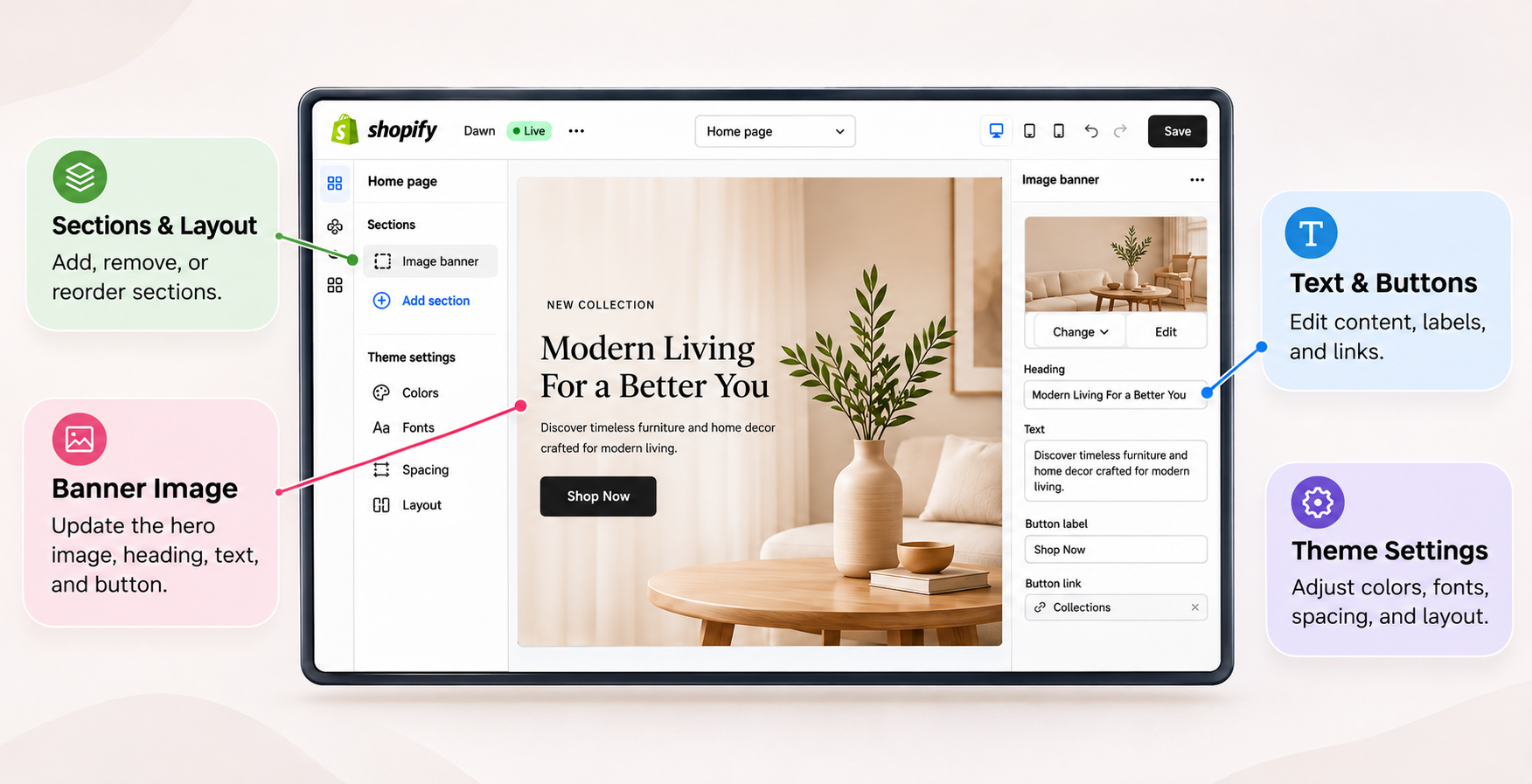
What this looks like under the hood
Modern Shopify themes follow the Online Store 2.0 architecture. A theme is a folder of files organised by purpose:
- layout/ holds the wrappers (such as theme.liquid) that load fonts, scripts, global styles and the content_for_header that Shopify and apps inject.
- templates/ holds JSON templates (for example product.json, collection.json) that list which sections appear on a page and in what order. Templates can also be Liquid files for special cases.
- sections/ holds reusable page modules, each with a {% schema %} block that defines the settings and blocks merchants can edit in the theme editor.
- blocks/ (in newer themes) holds reusable theme blocks that can be nested inside sections.
- snippets/ holds small Liquid partials rendered with the {% render %} tag.
- assets/ holds CSS, JavaScript, images and fonts.
- config/ holds settings_schema.json (global theme settings) and settings_data.json (the saved values).
- locales/ holds translation files for storefront language strings and theme editor labels.
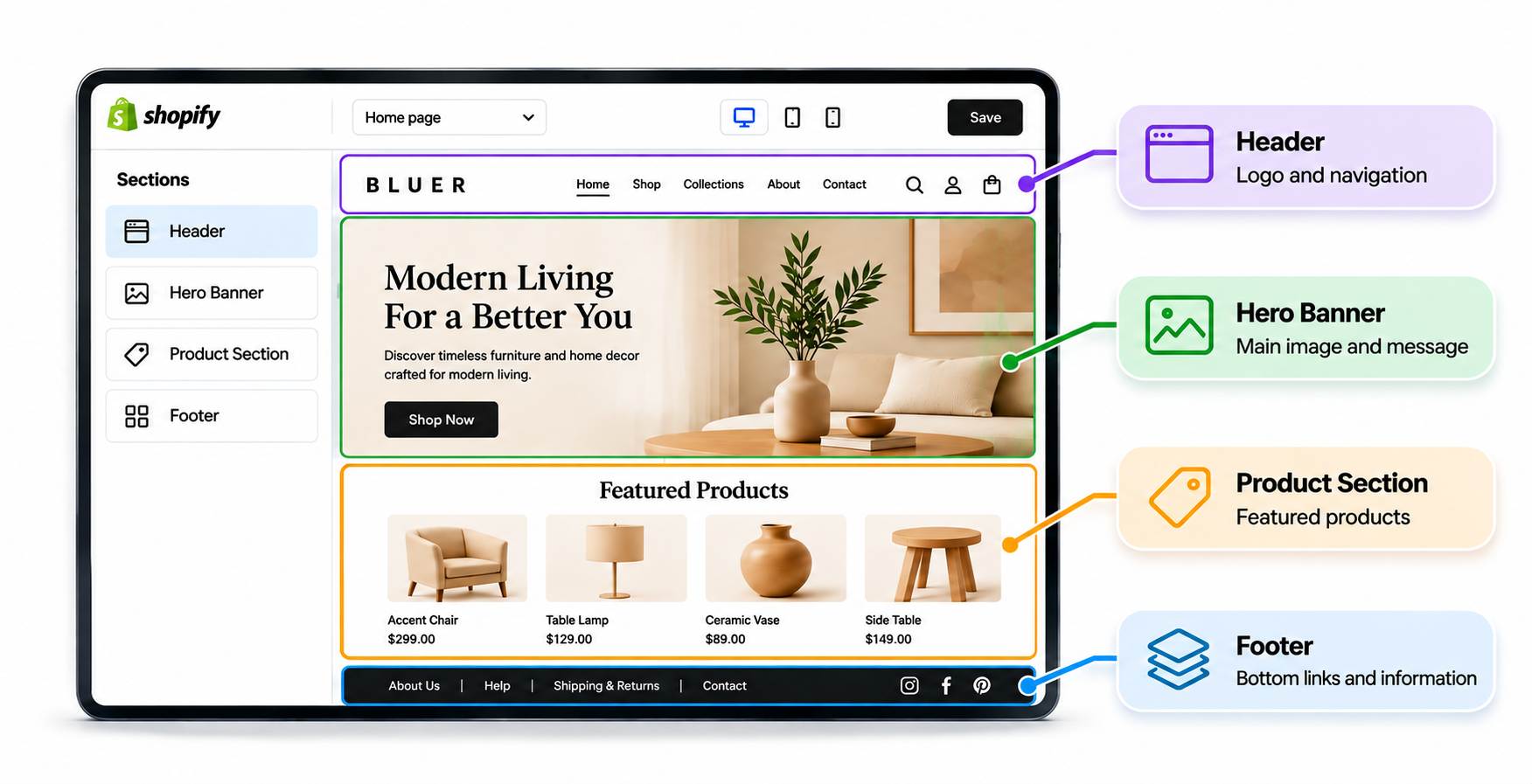
Typical customization tasks map onto these folders:
| Task | Where the work happens |
| Change colours, typography, spacing | config/settings_schema.json, CSS variables in assets/ or layout/theme.liquid |
| Add a new homepage module | A new file in sections/ with schema, plus a reference in templates/index.json |
| Add product badges based on a tag or metafield | Edit a snippet such as a product card, using Liquid conditions on product.tags or product.metafields |
| Add a size guide or ingredient tab | A new section or block that reads from a metafield or metaobject |
| Modify the mini cart | Cart drawer section and JavaScript using the Ajax Cart API or Section Rendering API |
| Improve filtering | Configure Shopify Search & Discovery, then adjust the collection template and filter snippets |
| Add a sticky add-to-cart bar | Section or snippet, with JavaScript that watches the buy button and variant changes |
Liquid customization in depth
Liquid is Shopify’s open-source templating language. Good Liquid customization uses objects (such as product, collection, cart, customer, shop), filters (such as money, image_url, t for translations, metafield_tag) and tags (if, for, render, section). Experienced Shopify theme developers apply a few disciplines that make customization safe:
- Prefer render over legacy include, because render isolates variable scope and prevents hidden side effects.
- Avoid heavy loops. Nested loops over large collections slow server rendering. Use pagination and limits, and move complex logic to metafields or to apps and APIs.
- Use the Section Rendering API to update parts of a page (such as a cart drawer or a product recommendation block) without a full reload.
- Use metafields and metaobjects for structured content such as specifications, FAQs and size charts, instead of hard-coding content in templates.
- Build for the theme editor. Every new feature should be configurable by merchants through schema settings so you are not paying a developer for every copy change.
The limits of customization
Customization has natural ceilings. If a theme’s underlying structure fights your design (for example, a product page built around a fixed image gallery when you need a configurator), each change becomes a workaround. Over time, layers of overrides make the theme harder to update, and an upgrade to the vendor’s latest version may overwrite or conflict with your changes. That is the point at which a custom build starts to make financial sense.
What Custom Shopify Theme Development Includes
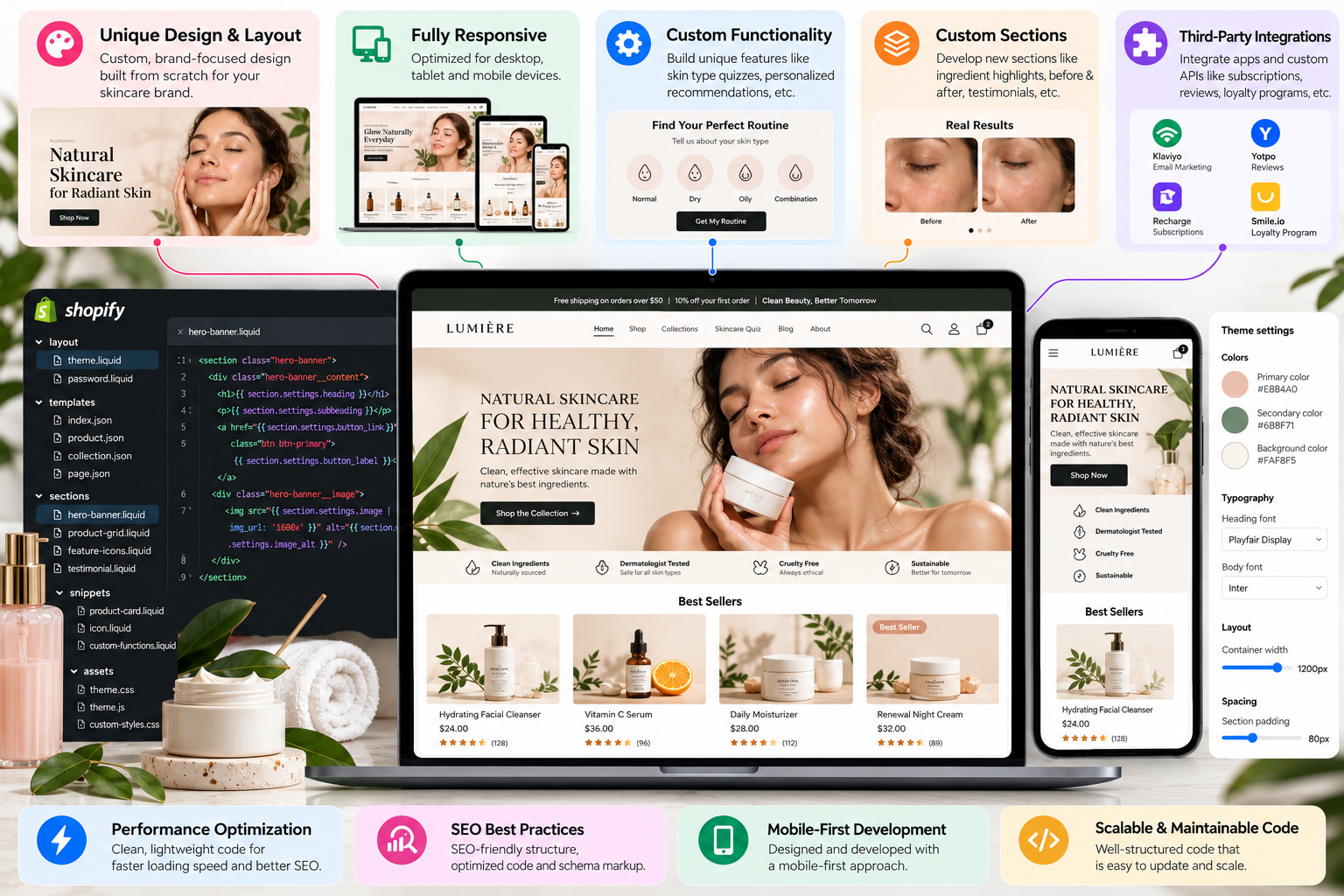
Custom Shopify theme development creates a theme that matches your brand identity and requirements, working with you from the first design idea to the final launch. It suits stores that want a distinctive look and features a ready-made theme cannot offer. Custom Shopify themes typically include:
- Bespoke design: layouts, branding and visual details made for your store.
- Responsive builds: themes that perform on phones, tablets, laptops and desktops.
- PSD to Shopify conversion: pixel-perfect development from your design files. Today this usually means Figma or Sketch files as well as PSDs.
- Performance work: minimised code, compressed images and optimised scripts for faster loading.
The custom build process in technical terms
A professional custom theme project usually moves through these stages:
- Discovery and requirements. Brand, audience, catalogue structure, content model, integrations, markets, languages and success metrics.
- UX and design system. Wireframes, then high-fidelity designs and a design system covering tokens (colour, type scale, spacing, radius, elevation), components (buttons, forms, cards, navigation) and templates.
- Content modelling. Decide what lives in products, collections, pages, metafields and metaobjects. A clean content model is what lets merchants manage the store without developers.
- Architecture decisions. Choose a base: a Shopify reference theme such as Dawn as a starting skeleton, a team’s own internal starter theme, or a fully blank structure. Decide on the CSS approach (CSS custom properties, utility classes or a component methodology), the JavaScript approach (vanilla JavaScript with web components, or a lightweight framework) and the build tooling.
- Development. Build layouts, templates, sections, blocks and snippets. Implement cart, search, filtering, product media, variant selection, localisation and accessibility features.
- Integration. Connect apps through theme app extensions and app blocks, and wire up analytics, consent, reviews, subscriptions and loyalty tools.
- QA. Cross-browser, cross-device, accessibility, performance, theme-editor behaviour and checkout flow.
- Launch and handover. Publish the theme, train the merchant team and provide documentation.
A modern developer workflow
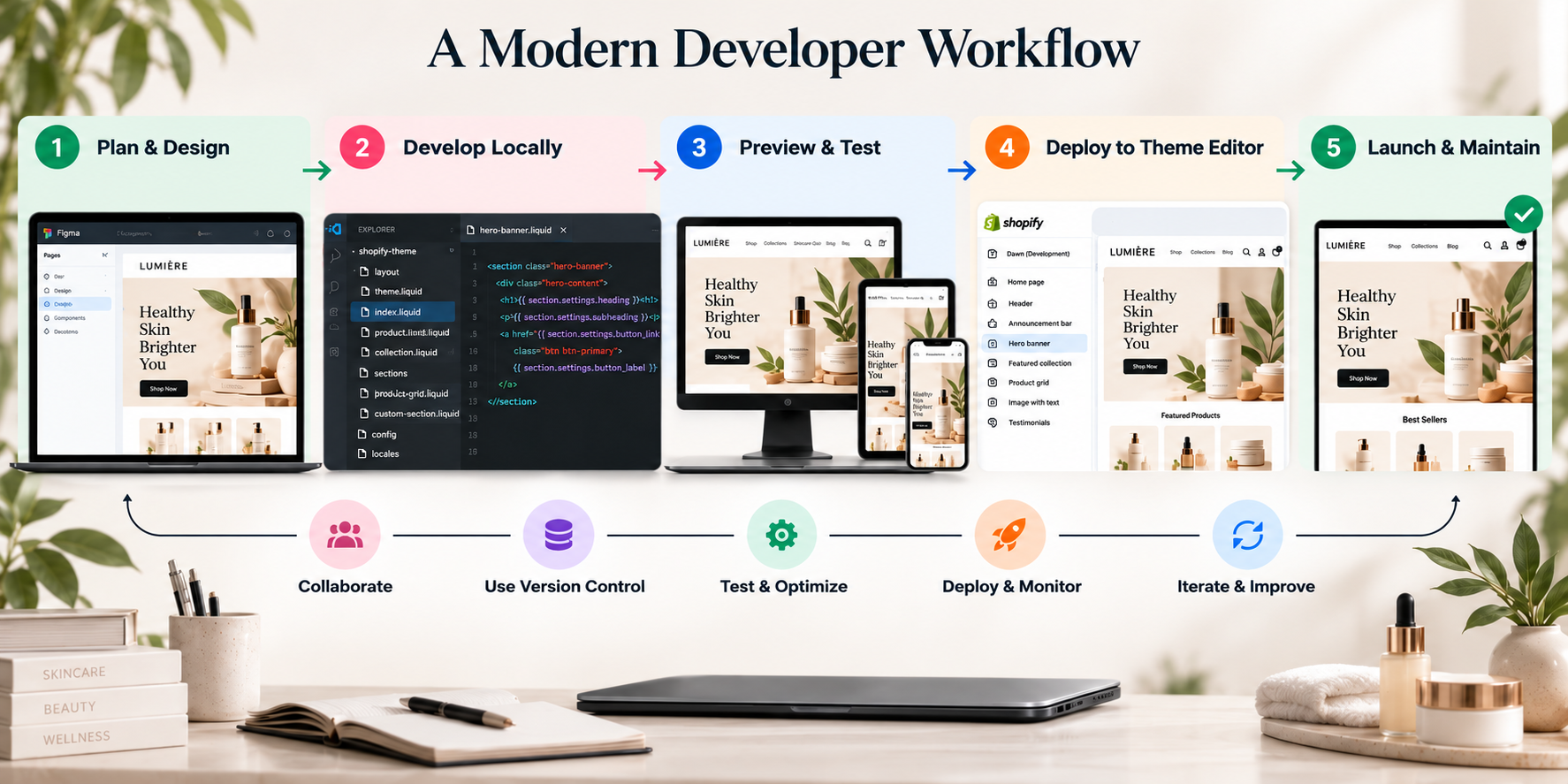
Strong Shopify theme developers use professional tooling, not just the browser code editor:
- Shopify CLI (shopify theme dev, shopify theme push, shopify theme pull, shopify theme check) for local development with live preview and hot reload.
- Git version control with branches and pull requests, often connected to Shopify’s GitHub integration so merging to a branch updates a theme.
- Theme Check (Shopify’s Liquid linter) to catch errors, deprecated tags and performance issues.
- Lighthouse CI or similar to enforce performance budgets on every change.
- Preview and development themes so merchants review work safely without touching the live theme.
- Automated formatting and linting for CSS and JavaScript.
If an agency edits the live theme directly in the admin code editor with no version control, treat that as a warning sign.
What a custom theme gives you that customization cannot
- A purpose-built information architecture: product pages, collection pages and navigation designed around how your customers actually shop.
- Lean code: only the CSS and JavaScript your features need, rather than a general-purpose theme’s large feature set.
- A design system: consistent components that make future pages faster and cheaper to build.
- Unique interactions: configurators, bundle builders, quizzes, comparison tools and editorial storytelling.
- Clear ownership: your developers understand every file because they wrote it.
Custom Shopify themes also let developers plan the code around your features, which can make future changes easier to manage.
Should I Choose Shopify Theme Customization or Custom Theme Development?
Choose Shopify theme customization if you like a theme’s structure and need it adapted to your brand. Choose custom theme development if no existing theme can deliver the experience you want. As a simple rule, start with the least change that solves your problem, then invest more when growth demands it.
- Choose customization when: your catalogue is straightforward, your budget is limited and you want to launch quickly.
- Choose custom development when: you need a unique experience, complex features or a design that sets you apart.
A weighted decision framework
Score each criterion from 1 (low) to 5 (high) for your store, multiply by the weight, and add up. A high total points toward custom development.
| Criterion | Weight | What a score of 5 looks like |
| Brand differentiation need | 20% | Design is a core competitive advantage |
| Catalogue and product complexity | 15% | Configurable products, bundles, kits, B2B pricing |
| Feature uniqueness | 15% | Required features do not exist in any theme or app |
| Performance sensitivity | 10% | Mobile paid traffic with thin margins; every 100 ms matters |
| Scale and revenue | 15% | Multi-million revenue, Plus, multiple markets |
| Internal capacity | 10% | You have developers or an agency retainer to maintain it |
| Budget flexibility | 10% | Investment is justified by expected revenue lift |
| Timeline flexibility | 5% | No hard launch deadline |
Totals below about 2.5 usually favour customization, between 2.5 and 3.5 suggest deep customization or a hybrid approach, and above 3.5 make a custom build worth serious consideration. Treat these thresholds as guidance, not law.
Questions to ask yourself
- Can I describe my ideal product page and find a theme that is at least 80 percent there?
- Are my requirements mostly visual (customization) or structural (custom)?
- Will I need to change this theme heavily every quarter?
- How much of my revenue comes from mobile, and how sensitive is it to speed?
- Do I have a plan and budget for maintenance after launch?
| Route | Reported range (USD) | Source |
| Theme customization | About $2,000 to $10,000+ | Outerbox Design, 2026 |
| Custom theme development | $10,000 to $40,000+ | Ecosire, 2026 |
| Custom theme development (larger builds) | $15,000 to $60,000+ | First Pier, 2026 |
How Much Does Custom Shopify Theme Development Cost?
Shopify theme customization cost and custom Shopify theme development cost vary by agency and scope. Published 2026 estimates, shown below, are market ranges and not Viha Digital Commerce quotes.
Ranges differ because agencies quote different amounts of design, development and testing. Compare scope before price.
What drives custom theme development cost
- Design depth: number of unique templates (home, collection, product, cart, search, blog, article, account, landing pages) and the level of illustration, motion and art direction.
- Number of custom sections and blocks: each reusable module needs design, development, schema, settings and QA.
- Feature complexity: product configurators, bundle builders, subscription flows, store locators, quizzes and B2B ordering.
- Content modelling: metafield and metaobject definitions, plus migration of existing content.
- Integrations: reviews, loyalty, search, subscriptions, ERP-driven data and analytics.
- Localisation: number of languages, right-to-left support and market-specific layouts.
- Accessibility target: building to WCAG 2.1 or 2.2 AA is more work than ignoring it, and cheaper than retrofitting it.
- Performance targets: hitting strict Core Web Vitals budgets requires careful engineering and testing.
- Team and region: hourly rates vary by agency location, seniority and specialisation.
- Timeline: compressed schedules often cost more.
An illustrative effort model
Here is an example of how a mid-sized custom theme might be estimated. The figures are for demonstration only and are not a quote.
| Workstream | Estimated hours |
| Discovery, UX and wireframes | 40 to 60 |
| Visual design and design system | 60 to 100 |
| Theme architecture and setup | 24 to 40 |
| Templates and sections development | 120 to 220 |
| Custom features (cart, filters, configurators) | 60 to 160 |
| App integrations | 20 to 50 |
| Accessibility and performance work | 30 to 60 |
| QA and bug fixing | 40 to 80 |
| Project management and launch | 30 to 50 |
| Total | 424 to 820 |
At blended agency rates of $40 to $100 per hour, that range spans roughly $17,000 to $82,000, which is consistent with published ranges at the lower and upper ends. Rate matters less than efficiency and accuracy of the hours estimate.
Custom Shopify theme development cost versus value
The right question is not what the theme costs but what it earns. If a $30,000 custom build lifts conversion rate from 1.8 percent to 2.2 percent on a store with 200,000 monthly sessions and a $70 average order value, revenue rises by about $56,000 per month (200,000 sessions × 0.4 percentage points × $70). Real results vary, and theme changes rarely deliver this by themselves, but the arithmetic shows why high-traffic stores can justify custom work while a store with 5,000 monthly sessions often cannot.
Shopify Theme Customization Cost
Shopify theme customization cost stays lower because the base theme already supplies the core structure, while a custom theme pays for design, build and testing from the ground up. Published 2026 estimates put customization at about $2,000 to $10,000+.
What fits in a customization budget
| Budget band | Typical scope |
| Low (around $2,000 to $4,000) | Branding, colour and typography, homepage section changes, a few Liquid edits, app setup |
| Mid ($4,000 to $8,000) | Product page redesign, custom sections, collection filtering tweaks, cart drawer changes, metafield-driven content |
| Upper ($8,000 to $10,000+) | Multiple custom templates and sections, deeper feature work, performance clean-up, integration with several apps |
These are planning bands, not fixed prices.
The purchase price of the base theme
Premium themes from the Shopify Theme Store are typically a one-time licence fee of a few hundred dollars, which is small compared with development cost, and free themes such as Shopify’s own are available. A better theme base can reduce customization hours, so evaluate themes on structure, performance and section flexibility, not just appearance.
Tips to keep customization cost down
- Choose a base theme that already includes most of the layout patterns you need.
- Use the theme editor and built-in settings before commissioning code.
- Prioritise changes by revenue impact: product page, cart and collection pages first.
- Provide finished copy, images and brand assets up front.
- Phase non-essential features after launch.
Timelines
The timeline follows the same pattern as cost. For an average project, customization takes a few weeks to a few months, and fully custom work takes longer depending on design complexity.
| Route | Typical duration | Main schedule drivers |
| Light customization | 2 to 4 weeks | Number of changes, content readiness |
| Deep customization | 4 to 10 weeks | Custom sections, integrations, feedback cycles |
| Custom theme build | 8 to 20 weeks | Design approvals, feature complexity, QA |
| Large custom or Plus build | 4 to 8 months | Multi-market scope, integrations, stakeholder alignment |
These are planning ranges, not guarantees. The most common causes of delay are late content, slow design sign-off and scope added mid-project.
When Should a Business Choose Custom Shopify Theme Development?
Custom Shopify theme development earns its cost when your needs push beyond what a theme supports. Consider it when:
- Your brand needs a distinctive experience: you want a storefront no competitor can copy.
- Your catalogue is complex: you have large ranges, configurable products or custom B2B buying journeys.
- Performance is critical: you want lean code built only for the features you use.
- Your features are unique: the experience you want does not exist in any current theme.
- You are scaling or on Shopify Plus: you need a foundation that grows with integrations and markets.
Custom Shopify themes also let developers plan the code around your features, which can make future changes easier to manage.
Signals that you have outgrown customization
- Your developer says every change takes longer than it should because they are working around the theme.
- You are paying for several apps to patch gaps a purpose-built theme would handle natively.
- Your Lighthouse and Core Web Vitals scores are held back by code you cannot remove without breaking the theme.
- Theme updates from the vendor can no longer be applied without hours of manual merging.
- You are launching new markets, brands or B2B experiences that need different templates, not just different content.
- Your brand team repeatedly asks for layouts the theme editor cannot produce.
Typical custom-theme use cases
| Use case | Why a theme rarely covers it |
| Product configurators and made-to-order products | Needs live option logic, price calculation and visual feedback |
| Bundle and kit builders | Needs multi-step selection, inventory awareness and cart line item properties |
| Editorial-led brands and storytelling | Needs flexible art-directed layouts, not standard grids |
| B2B and wholesale experiences | Needs quick order forms, quote requests, company-specific catalogues and gated content |
| Marketplaces and multi-vendor patterns | Needs custom collection logic and vendor templates |
| Multi-brand or multi-region groups | Needs a shared design system with brand-specific tokens |
| High-traffic paid acquisition stores | Needs landing page systems that load fast and test quickly |
Is Custom Shopify Theme Development Worth It for Small Businesses?
For most small businesses, a strong theme with targeted customization is the better first step. One 2026 guide notes that stores under $1M a year are usually best served by a paid theme plus customization, and that full custom builds at small scale are often money spent on vanity. A fully custom theme becomes worthwhile when revenue, catalogue size or brand ambition outgrows the theme. Start lean, prove the business, and invest in custom work when the numbers justify it.
A break-even test for small stores
Use this quick calculation before commissioning a custom theme:
- Estimate the extra annual profit the theme could realistically add (traffic × conversion lift × average order value × gross margin).
- Add the custom build cost and the yearly maintenance cost.
- Compare over 24 to 36 months.
For example, a store with 15,000 monthly sessions, a 2 percent conversion rate, a $60 order value and a 50 percent gross margin earns about $9,000 in monthly gross profit. A 10 percent relative conversion lift (from 2.0 to 2.2 percent) adds about $900 per month, or $10,800 per year. A $25,000 custom build would take more than two years just to pay back, before maintenance. The same store spending $4,000 on targeted customization of its product page and cart could pay back within five months at the same lift. That is why small stores usually win by customizing first.
What small businesses should spend on first
- Pick a high-quality theme with fast, accessible and flexible sections.
- Customize the product page, cart and collection layouts for conversion.
- Fix mobile usability and page speed.
- Set up metafields for specifications and trust content so the theme editor does the heavy lifting.
- Add custom Liquid only where it clearly supports revenue.
- Revisit a custom build when you pass a meaningful revenue or complexity threshold.
Technical Architecture: What You Are Really Buying
In both routes you are buying code that runs in a shopper’s browser and on Shopify’s servers. Understanding the architecture helps you judge quotes and quality.
Online Store 2.0 building blocks
- JSON templates let merchants add, remove and reorder sections on any page type without code. Shopify has limits on sections per template and blocks per section, so verify current limits in its documentation when designing complex pages.
- Sections are the main unit of reuse. Each includes Liquid markup, optional CSS and JavaScript, and a schema describing settings.
- Blocks are repeatable items inside a section (for example slides, tabs or feature rows). Newer Shopify-built themes also use theme blocks, which can be shared across sections and nested, giving merchants more layout flexibility.
- App blocks and theme app extensions let apps add functionality to a theme without developers pasting code into theme files. A custom theme should be designed to support them so app installs and removals stay clean.
- Metafields and metaobjects store structured data (specifications, FAQs, size charts, store locations, authors) that sections read and display.
- Dynamic sources connect section settings to product, collection or metaobject data in the theme editor.
An example section schema
Below is a simplified example of a custom “feature highlights” section. The schema block defines what merchants can edit in the theme editor.
<section class="feature-highlights" id="fh-{{ section.id }}">
  <h2>{{ section.settings.heading }}</h2>
  <ul>
    {% for block in section.blocks %}
      <li {{ block.shopify_attributes }}>
        <strong>{{ block.settings.title }}</strong>
        <p>{{ block.settings.text }}</p>
      </li>
    {% endfor %}
  </ul>
</section>

{% schema %}
{
  "name": "Feature highlights",
  "settings": [
    { "type": "text", "id": "heading", "label": "Heading", "default": "Why customers choose us" }
  ],
  "blocks": [
    {
      "type": "feature",
      "name": "Feature",
      "settings": [
        { "type": "text", "id": "title", "label": "Title" },
        { "type": "textarea", "id": "text", "label": "Text" }
      ]
    }
  ],
  "presets": [{ "name": "Feature highlights" }]
}
{% endschema %}
Notice the block.shopify_attributes output, which lets the theme editor highlight and reorder blocks. Skipping it is a common sign of rushed theme work.
Data flow on a Shopify storefront
Understanding what happens when a page loads clarifies where cost and speed come from:
- The browser requests a URL such as /products/example.
- Shopify’s servers render the page by combining the theme’s layout, the JSON template, the sections and Liquid objects (product data, metafields, cart state, localisation).
- HTML is returned with references to CSS, JavaScript and images served from Shopify’s CDN.
- The browser renders the page. JavaScript then adds interactivity: variant switching, cart updates, predictive search and app features.
- Dynamic actions call Shopify APIs: the Ajax Cart API (such as /cart/add.js and /cart/change.js), the Section Rendering API for partial HTML updates, predictive search endpoints or the Storefront API.
- Checkout is handled separately on Shopify’s checkout, which is customized with checkout extensibility rather than the theme.
Checkout is not part of the theme
This surprises many merchants. Theme customization and custom theme development affect the storefront up to the cart. Checkout branding and logic use checkout settings, UI extensions and Shopify Functions. If your goal is to change the checkout experience, a new theme will not do it. Budget for it separately.
Performance, Accessibility and App Compatibility
Theme quality is judged by speed, usability and stability as much as appearance.
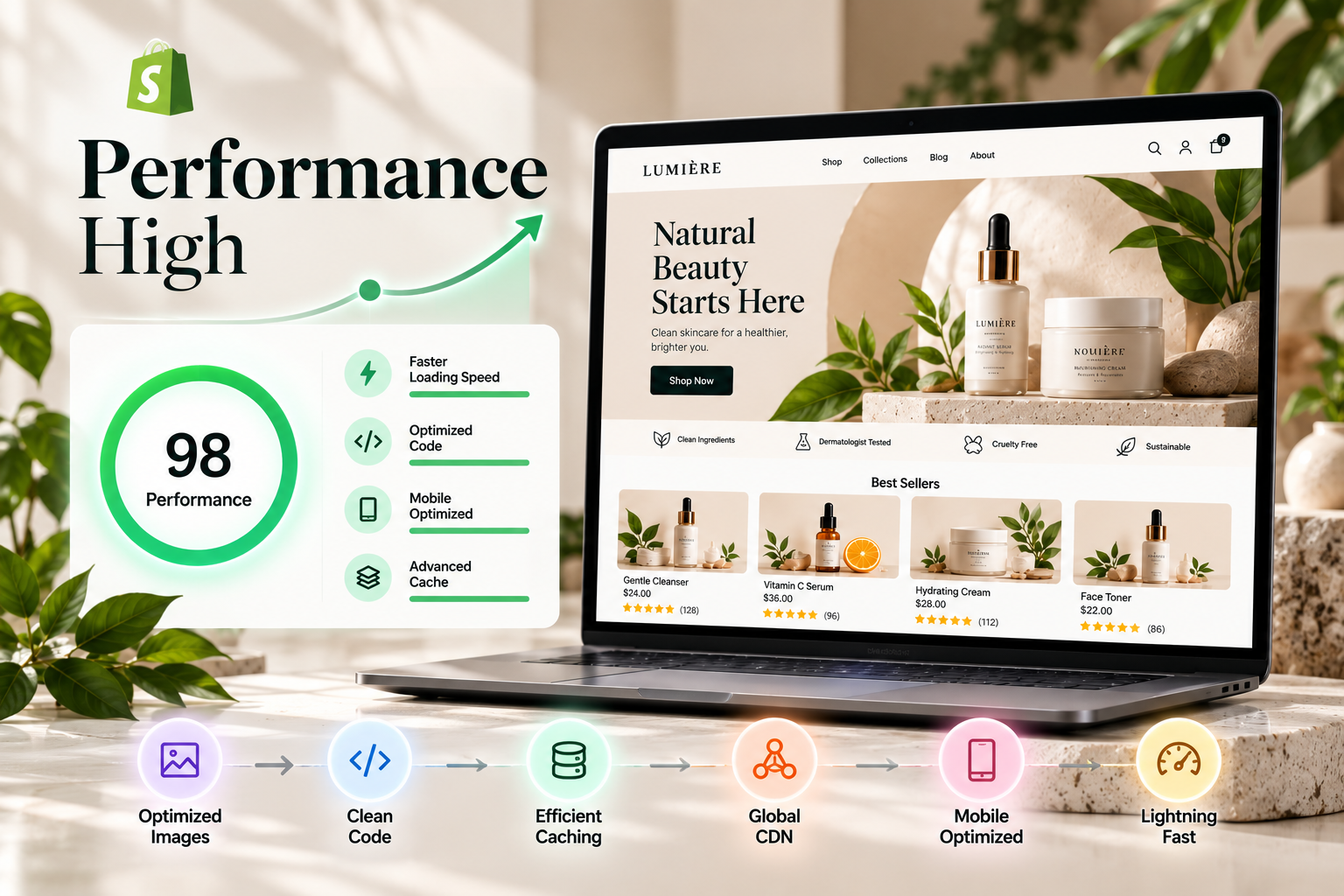
Performance
Core Web Vitals, reported through the Chrome User Experience Report and Google Search Console, are the practical benchmark: Largest Contentful Paint (LCP) under 2.5 seconds, Interaction to Next Paint (INP) under 200 milliseconds and Cumulative Layout Shift (CLS) under 0.1 on mobile. Good theme work includes:
- Image strategy: use Liquid’s image_url and image_tag filters with responsive srcset and sizes, lazy-load below-the-fold images, and give the LCP image fetchpriority=”high” and no lazy loading.
- Explicit dimensions on images and embeds to prevent layout shift.
- JavaScript discipline: ship less JavaScript, defer non-critical scripts, avoid large libraries when native browser features suffice, and split code by page type.
- CSS discipline: inline critical CSS where it helps, avoid unused CSS, and use CSS variables for design tokens.
- Font loading: limit font families and weights, use font-display: swap, and preload the key font file.
- Third-party script control: load analytics, chat and review widgets after interaction or idle time where possible.
- Server rendering cost: avoid expensive Liquid loops and unnecessary repeated lookups.
A custom theme can reach a tighter performance budget than a general-purpose theme because it contains only what you use. A customized theme can also perform well if the base theme is lean and the customizations are disciplined. Poorly built custom work can be slower than a good off-the-shelf theme, so ask any agency for performance targets and evidence from previous projects.
Accessibility
Build to WCAG 2.1 or 2.2 level AA: semantic HTML landmarks, keyboard-operable menus and drawers, visible focus states, sufficient colour contrast, labelled form fields, meaningful alt text, accessible carousels and modals with focus management, and support for reduced motion preferences. Accessibility is also a legal risk reducer in many markets and improves usability for everyone.
App compatibility
Every theme must coexist with apps. Check that your approach supports app blocks, avoids hard-coded selectors that apps rely on, and keeps {{ content_for_header }} intact. Test review widgets, subscription tools, bundles, search and loyalty apps in the theme before launch. Fewer apps usually means faster pages, so a custom build can replace some app functionality with native code, but only where the maintenance trade-off is sensible.
Localisation and Markets
If you sell in multiple languages or currencies through Shopify Markets, the theme must use translation keys ({{ ‘key’ | t }}), locale files and currency-aware price rendering. It should also handle longer strings, right-to-left layouts where relevant and market-specific content blocks.
SEO fundamentals in the theme
The theme controls title tags, meta descriptions, heading hierarchy, canonical tags, structured data (such as Product, BreadcrumbList and Organization JSON-LD), image alt text and internal linking. A rebuild or major customization is a chance to improve these, and a risk if they are lost. Agree an SEO checklist as part of the scope, especially if you are changing templates on a store that already ranks.
Maintenance, Upgrades and Total Cost of Ownership
The build is the smaller part of the lifetime cost. Plan for maintenance from day one.
Maintenance realities by route
| Factor | Customized theme | Custom theme |
| Vendor updates | May be available, but must be merged manually if code has been changed | None, because you own the code |
| Bug fixes | Vendor fixes base bugs, agency fixes custom bugs | Your agency or team fixes everything |
| New Shopify features | Vendor may adopt them over time | You or your agency must implement them |
| Documentation | Vendor docs plus agency notes | Agency documentation is essential |
| Developer dependency | Moderate | Higher, unless the theme is well-structured and editor-friendly |
| Risk of technical debt | Layered overrides accumulate | Depends on build quality and discipline |
How to protect yourself
- Require version control access and a documented deployment process.
- Ask for a README and component documentation describing sections, settings, metafields and any custom JavaScript.
- Agree on a maintenance retainer or an hourly support arrangement with response times.
- Schedule a quarterly health check covering speed, accessibility, app bloat, broken features and Shopify platform changes.
- Keep merchant-editable content in the theme editor and metafields, not hard-coded, so routine changes do not require developers.
- Avoid proprietary lock-in: the code should be yours, in your repository.
Three-year cost view
| Cost item | Customization route | Custom build route |
| Initial build | $2,000 to $10,000+ | $10,000 to $40,000+ |
| Base theme licence | A few hundred dollars | None |
| Annual maintenance and improvements | Often 10 to 20 percent of build cost | Often 15 to 25 percent of build cost |
| Likely redesign or re-platforming of theme | Sooner, if the base theme becomes limiting | Later, if architecture is sound |
These maintenance percentages are planning assumptions, not published figures. Replace them with your agency’s actual terms.
Hybrid and Headless Options
The hybrid route
Many stores land on a hybrid: a well-chosen base theme with a handful of genuinely custom sections and templates. This keeps most of the cost and speed advantage of customization while delivering the unique experiences that matter. It is the route we most often recommend for growing stores. A hybrid approach can also be an on-ramp to a full custom build: build the design system and custom sections first, then replace the rest of the base theme over time.
Headless commerce
A headless storefront uses Shopify as the commerce engine and a separate front end (for example Shopify’s Hydrogen framework hosted on Oxygen, or Next.js and other frameworks) connected through the Storefront API. It offers maximum front-end freedom and can support highly tailored experiences, but it adds engineering effort, hosting and monitoring, and it means you manage things the theme system handles for you: routing, caching, SEO tags, sitemaps, previewing, app compatibility and merchant editing. Most merchants do not need headless. Consider it only when you have a specific requirement a Liquid theme cannot meet and a team able to maintain it.
A quick comparison
| Route | Cost | Speed to launch | Flexibility | Maintenance effort |
| Theme settings only | Lowest | Fastest | Lowest | Lowest |
| Customization | Low to mid | Fast | Medium | Low to medium |
| Custom theme | Mid to high | Medium | High | Medium |
| Headless | Highest | Slowest | Highest | Highest |
How to Choose a Shopify Theme Development Agency
Choosing the right Shopify development agency matters as much as choosing the route. When you meet Shopify theme developers, check four things:
- Liquid expertise: ask for examples of custom Liquid work, not just visual design.
- Process and testing: look for testing across devices and browsers before launch.
- Clear timelines: expect a plan based on your design complexity and customization level.
- Ongoing support: confirm who maintains the theme after go-live.
A deeper evaluation checklist
- Portfolio relevance: do they have live stores of similar size, catalogue and complexity?
- Technical sample: can they walk you through a section schema, a metafield-driven component Shopify Theme Customizer – Sections & Settings Shopify Theme Customizer – Sections & Settings or a performance fix on a real project?
- Tooling: do they use Shopify CLI, Git, Theme Check and review processes?
- Performance evidence: can they show before-and-after Core Web Vitals?
- Accessibility practice: do they test with keyboard and screen readers?
- Theme editor mindset: do they build features merchants can edit without code?
- Scope clarity: is the quote itemised by template, section and feature?
- Ownership: do you receive the code, documentation and repository access?
- Support model: what are response times, and what does maintenance cover?
- References: can you speak to a current client?
Red flags
- A fixed price with no discovery or design review.
- Editing the live theme directly with no staging or version control.
- No mention of performance, accessibility or QA.
- Heavy reliance on page-builder apps that add script weight.
- Reluctance to share code ownership or documentation.
- Promises that a new theme will automatically raise conversion.
Questions to ask in the first call
- What would you keep from my current theme, and what would you change?
- Which of my requirements can be met with a configuration or an app instead of code?
- What are the top three risks you see in my project?
- How will merchants edit what you build?
- How will you measure whether the new theme works?
Shopify Theme Development Services From Viha Digital Commerce
Our Shopify theme developers can build a theme from scratch or modify the one you already have. Every project follows four steps:
- Discover and plan: we learn your brand, goals, audience and theme requirements.
- Design and develop: we turn the approved direction into layouts, sections and functionality using Liquid customization.
- Test and optimise: we test across devices and browsers and refine performance.
- Launch and support: we deploy the theme and provide ongoing support and maintenance.
Our Shopify custom theme development services cover design, Liquid development, testing and launch support, and our Shopify theme customization services cover updates to your current theme.
Whether you need Shopify custom theme development services or lighter changes, we help you choose the route that fits your store. Hire Shopify theme developers and talk to Viha Digital Commerce about your project. We will review your store, goals and current theme, then recommend the route, scope and timeline that fit.
Frequently Asked Questions
How much does Shopify theme customization cost?
Published 2026 estimates put Shopify theme customization at roughly $2,000 to $10,000+, depending on how many templates, sections and features are changed.
When should a business choose custom Shopify theme development?
When it needs a distinctive brand experience, has a complex catalogue or B2B journeys, requires lean high-performance code, needs features no theme provides, or is scaling on Shopify Plus.
Is custom Shopify theme development worth it for small businesses?
Usually not at first. A paid theme with targeted customization generally delivers better return for stores under about $1M in annual revenue. A custom build becomes worthwhile when revenue, catalogue size or brand ambition outgrows what a theme can do.
What is included in Shopify theme development services?
Typically discovery and planning, design, Liquid development, responsive builds, app and integration setup, testing across devices and browsers, performance optimisation, launch and ongoing support. Confirm accessibility, SEO checks and documentation are in the scope.
How long does custom Shopify theme development take?
Light customization can take two to four weeks and deeper customization four to ten weeks. Custom theme builds commonly take eight to twenty weeks, and large Plus builds can take several months.
Will a new theme improve my conversion rate?
It can, but results are not guaranteed. Gains come from better UX, faster pages and clearer product content, not from the theme alone. Measure before and after, and test changes.
Does a custom theme change my checkout?
No. Checkout is customized through Shopify’s checkout settings, extensions and Functions rather than the storefront theme.
Can I switch from a customized theme to a custom theme later?
Yes. Many stores customize first, then move to a custom build as they grow. Keep content in metafields and the theme editor, and keep documentation, so the move is easier.
What should I look for in a Shopify theme development agency?
Strong Liquid expertise, a testing process, clear timelines, a support plan, relevant portfolio work, modern tooling such as Shopify CLI and Git, and willingness to give you ownership of the code.
Conclusion
Shopify theme customization and custom theme development solve different problems. Customization adapts a proven base theme to your brand quickly and affordably, with published 2026 estimates of about $2,000 to $10,000+. Custom development builds an experience from scratch, with published estimates of $10,000 to $40,000+ and higher for larger builds. The right choice depends on your revenue, catalogue complexity, performance needs, internal capacity and how much differentiation your brand requires.
For most small and growing stores, a strong base theme plus targeted customization is the best first step. For brands whose experience, catalogue or scale has outgrown a theme, custom development is a sound investment when it is scoped carefully, built with modern tooling and supported after launch.
Not sure which route fits your store? Viha Digital Commerce can review your current theme, goals and catalogue, and recommend the right scope, timeline and budget. Talk to our Shopify theme developers today.








 All-in-One Solution
 Customizable Services
 Assortment of Payment Options
 Optimized Sales Processes
 Omnichannel Maintenance & Support
 Custom Shopping Cart
 Advanced Security & Support
 API Payment & Logistic Integrations
 Social Media Integration
 Professional Communication
 Skilled Developers
 Timing is Everything
 Secure Agreements
 Support Tilt
 Quality Top Up Most
 White Development Pathway
 Competitive Price Point